After 10 years of being in business, we are finally discontinuing browser support for Internet Explorer. Microsoft already ended support for Internet Explorer back in 2016. Security standards for browsers have improved over the years, and without current updates, the Internet Explorer browser is sub-par when it comes to enterprise-level security.
As an online software provider, the security and privacy of your data is super important. QuickSchools does not share your data with third party vendors without your expressed consent. To that effect, we have certified ourselves with the EU-U.S. and Swiss-U.S. Privacy Shield Frameworks administered by the U.S. Department of Commerce’s International Trade Administration (ITA). Details below:
The latest Sprint E17 QuickSchools release are mostly minor improvements and bug fixes. Here’s a list:
Display “School Roles” by default when “School Profile” initially loads
Move Intervention App to App Store (to be announced later this week)
Show Subject Abbreviation in Class Discussions (See below)
Labelling support for “Discipline” and Lesson Plan “Summary”
Move Delete function to bottom of Actions dropdown for Teachers and Students
Transcript Configuration for “4 Quarters rolled-up into 2 Semesters” bug fix
Transcript Option to “Hide current year/semester in progress” bug fix
Bug fixes to Messaging and Private Messaging (from previous Sprint)
Fixes to new Submit to Report Cards Function introduced in previous Sprint
Fixes to Axiom Integration Files for SFTP
Subject Abbreviation in Class Discussions
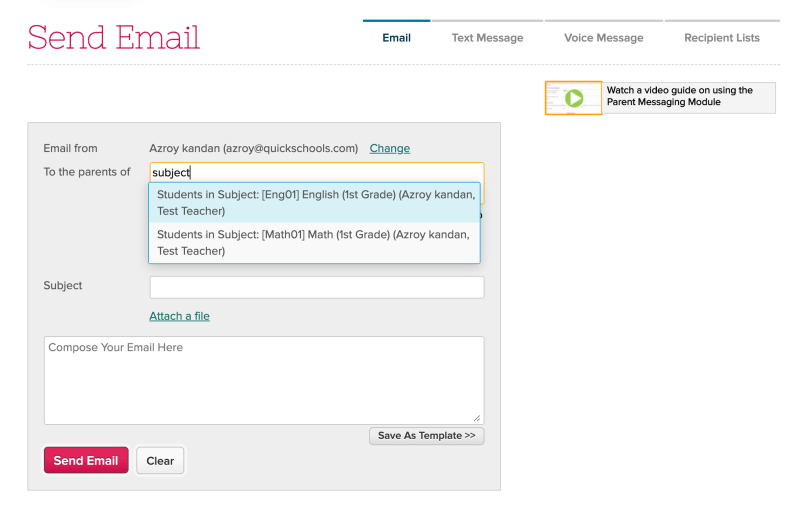
In line with previous improvements to show the Subject Abbreviation in Subject lists for Messaging, we’ve introduced the same change for the Class Discussion module:
Subject List includes Subject Abbreviation from Class Discussions
This is particularly important for teachers who teach multiple sections of the same subject, where the only way to differentiate 2 sections is by the subject abbreviation.
Display Student Nickname when selecting Students from dropdown
Sending by subject now shows Subject Set Code (or Abbreviation)
Private Messaging Improvements
Display Student Nickname when selecting Students from dropdown
Axiom Integration App Improvements
Extracts will be zipped before transfer via SFTP
Gradebook Improvements
New Submit to Report Cards Function (Beta)
Mobile App Framework Improvement
Additional support for Gradebook API Calls
Fix Log-In Error for Teacher
Miscellaneous Bug Fixes / Improvements
Typo in Google Classrooms module
Default Codeset for Interventions
Rename “Allocate” to “Apply” when referencing splitting of payment between siblings
Bug downloading attachments from Lesson Plans tab of Student record
Messaging Improvements
We’ve made some minor improvements to the Messaging module in this New Release: Sprint E16 (previously Parent Messaging) for larger schools that have multiple sections for a single course. When selecting a subject/course from the dropdown, we now display the Subject Abbreviation, so you can easily differentiate between sections with the same subject name:
Subject Listing in Parent Messaging now includes the Subject Abbreviation / Code
Also, for schools that rely on the student’s nickname, the Student dropdown now includes the Nickname:
Happy Labor Day to all our schools in North America. Due to the holiday, our scheduled release was delayed by a day.
Here’s a list of the latest improvements in QuickSchools, released earlier today:
Google Classroom Framework Improvements
Axiom Integration App Improvements
Allow Extract to run without SFTP credentials
SFTP supports specific directory
General UI Improvements
New Academic Interventions App (Coming Soon)
Gradebook Improvements (See below)
Rename “Default Column” to “Admin Column” in Gradebook
Bug fixes for Locked Formula in Gradebook
Error saving Gradebook Template (due to new Locked Formula)
Error copying Gradebook Grades (due to new Locked Formula)
Mobile App Framework Improvement
API support for getting parent data
API support for user profile data
API support for student profile picture
Bug fixes on logging in
Miscellaneous Bug Fixes / Improvements
Allow multiple Attachments in Lesson Plans (See below)
Error exporting subjects to Schoology
Update Dropdown UI when editing subjects/courses for Student
Report Creator fix for Student Profile picture
API fix for Attendance Snapshot App
Option to Recalculate Fields in Transcripts
Gradebook Improvements
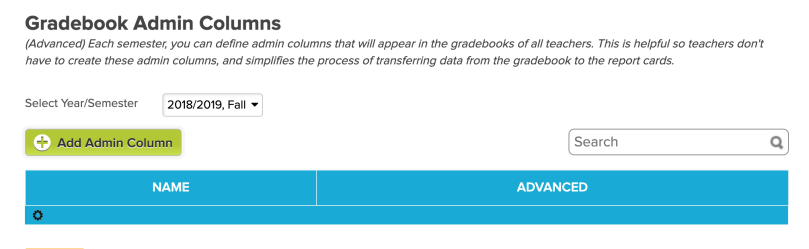
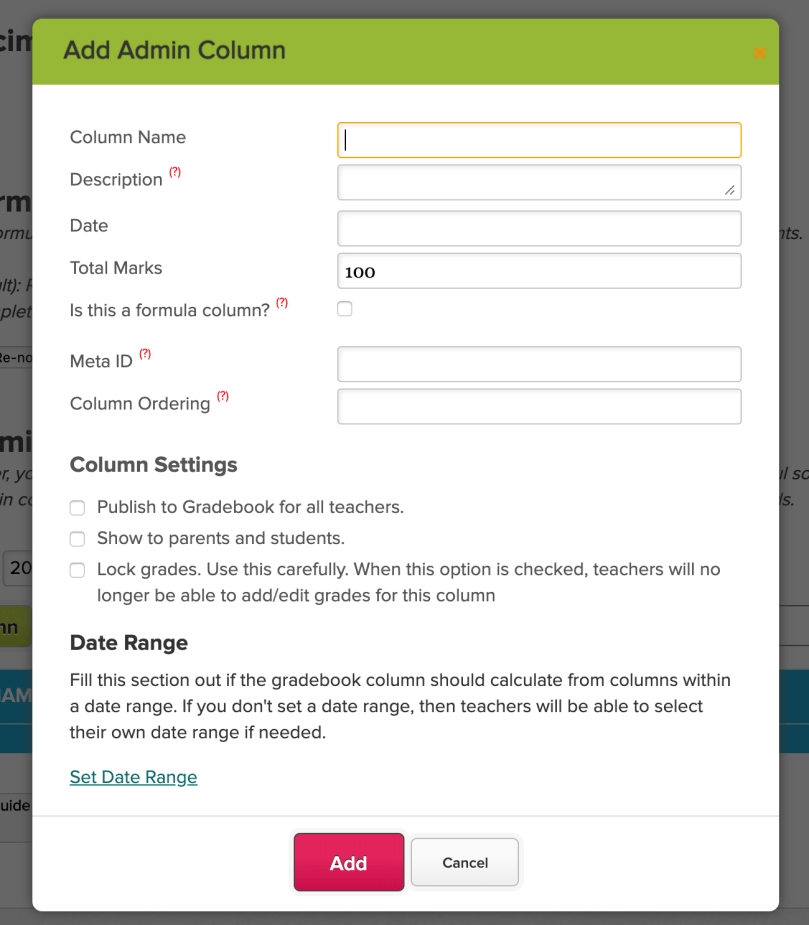
Last year, we introduced the ability to create columns in the Gradebook as an administrator, in order to facilitate the transfer of grades from the Gradebook to the Report Cards. At the time, we called these orange columns “Default Columns”. Due to the administrative nature of these columns, we’ve renamed them to “Admin Columns”:
This section can be found under the “Grading Setup” menu:
Adding a Gradebook Admin Column from Grading Setup
We’ve also added some fixes to the “Lock Column” function that was introduced in the previous Sprint E14. So if you have the ability for “Who can enter grades for all the teachers” (when configuring access for “Gradebook / Report Cards”), you can now lock the Final Grade Column of any gradebook:
Quick announcement! We have released the new Advanced Discipline app in our QuickSchools App Store. This new app gives you the ability to track more details in your discipline reports, a few of the things you can do in the app are:
Here’s a list of the latest improvements in QuickSchools:
Mobile App Framework Improvement
Support to add/edit and delete Gradebook columns
Master Scheduler Bug Fixes / Improvements
Fix New departments loading in real-time
Fix for Step 4, Sections no longer scheduled on Breaks during “Load”
Fix for Course Constraints
Clean-Up Distribute Courses from E12
Miscellaneous Bug Fixes / Improvements
New “Date of Birth” field in Admissions module (see below)
Report Creator fix to filter by Application Status (for Admissions module)
Bug when searching for student names with apostrophe
Default Gender is now “N/A”
Warn against changes to reports in Report Creator linked to Emails (see below)
Bug sending emails to deleted teachers
Bug fixes to upcoming Advanced Discipline App
Upcoming Interventions module now supports attachments
New Date of Birth field in Admissions
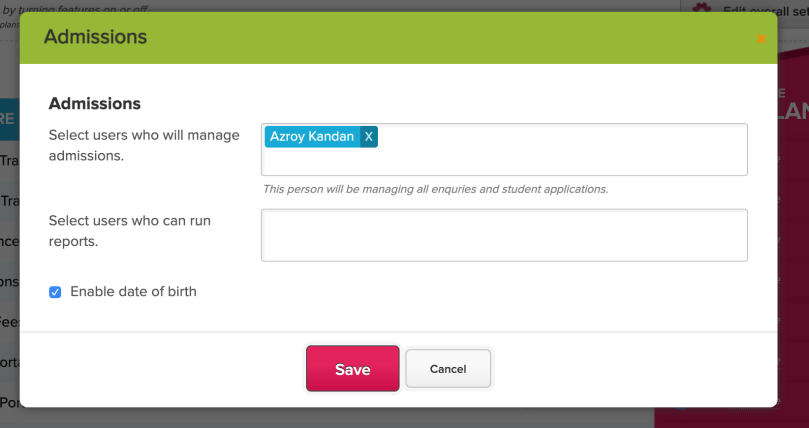
By default, the Inquiry module within the Admissions feature only displays an “Age” field. However, this field gets stale for inquiries that persist longer than a year. And so we’ve introduced a new Date of Birth field which will auto-calculate the age for you.
To turn it on, go to “Settings” > “Turn Features On / Off” and configure the Admissions module:
Enable the new “Date of Birth” field for Admissions Inquiries
Once enabled, you’ll see the new “Student Birth Date” field, and the “Student Age” field will be greyed out (and auto-calculated):