Our Live Chat Service will be offline starting 4 pm US Eastern Time (EST) on Tuesday Dec 24 in observance of Christmas. We’ll be back online on Thursday at 8 am EST. Please leave us a message, and we’ll get back to you as soon as we can:
Likewise, our Live Chat Service will also be offline starting 4 pm US Eastern Time (EST) on Tuesday Dec 31 in observance of New Years. We’ll be back online on Thursday January 2 at 8 am EST.
The next Sprint E23 will be the last sprint of 2019, and will run an extra week with a scheduled deployment on Dec 30, 2019. But for now, QuickSchools is happy to announce our latest Sprint E22 release.
Here’s a list of the latest improvements of Sprint E22:
Enable Enrollment Date by Default
Field is available when adding a new student record
Field is also available in Report Creator
Transcript Improvements (See below)
Improvement to Hiding Grades from Semester In Progress
Sorting Subjects Alphabetically
Email Notification for “Recalculate Fields”
Canvas and Schoology Improvements
Ability to Search Students when mapping
Ability to Search Courses when mapping
Miscellaneous bug fixes
Gradebook fix related to Term Grades deployed in E21
Report Card PDF bug fix for Hebrew
Semester Activation Improvements (BETA)
Performance Improvement when taking attendance for larger schools.
Fee Tracking fix when applying Standard Charge for first time
Library fix for teachers checking out books
Parent Login bug fix
Email Messaging History bug fix
App Store Billing bug fix
Remarks when deactivating students bug fix
Transcript Improvements
At the request of many schools, our Transcripts module has been updated to include the following new improvements:
Improvement to Hiding Grades from Semester In Progress
This feature has been available for quite some time now. We’ve enhanced the way the “Hide current years/semester in progress” feature behaves, in order to more predictably control the behaviour of generated Transcripts, especially as new academic terms are added and activated. This setting appears as a checkbox under “Transcripts Configuration”:
Transcripts Configuration
Sorting subjects alphabetically
Also under “Transcripts Configuration”, we’ve created a new setting to “Sort sort courses alphabetically“. As the name suggests, with this setting enabled, all courses in the Transcripts module will be automatically sorted based on the name of the course.
Here’s a list of the latest improvements in QuickSchools:
Gradebook PDF support for Summary by Weight Factor (See Below)
Custom Template for Gradebook PDF
Custom Template for Gradebook Progress Report PDF
New Final Grades option for Gradebook Formula (See Below)
Attendance Improvements
Attendance PDF now supports specific academic terms (See Below)
Bug fix when taking attendance for large schools
Improve Attendance Pie Chart
Google Classroom
Draft Grades in Google Classroom is synchronized as blank/empty grade
Updated Data Dictionary for Report Creator now includes support for:
Graphing for Lesson Plans
Graphing for Number of Gradebook Columns
Clean-Up Attendance-related Fields
Filtering for Gradebook Public Comments
Filtering for Fee Tracking Transaction Date
Miscellaneous Bug Fixes / Improvements
Gradebook PDF displays multiple teachers for shared subjects
Emailing from Report Creator no longer in Beta (See Below)
Restrict administrator from deactivating own record
Library tab on Student record
Library bug fix for inactive students
Improvements to WYSIWYG Editor for Email Messaging (Beta)
Improve Delete function for Admissions
Remove deprecated Merge Student function
Canvas Integration connection bug fix
Scheduler bug fix for deleted periods
Enrollment bug fix for Group Schools
Login Bug Fix
Gradebook PDF support for Summary by Weight Factor
We’ve had several schools request that the generated Gradebook PDF categorize all the assessments into groups, based on the Weight Factors in the Final Grade formula. This new improvement aims to address that need. However, since the majority of our schools are fine using our existing Gradebook PDFs, this new feature is only available by request.
How it works
First off, let’s get on the same page on how Weight Factors are set up in the Final Grade formula in a Gradebook. Here’s a sample Final Grade formula:
Example Gradebook Final Grade formula
Notice that there are 2 weight factors worth 60% and 40% respectively. Each weight factor can contain ONE OR MORE Gradebook categories. We now have custom templates that display assignments based on Weight Factor (examples below).
Gradebook PDF supports Summary by Weight Factor
Here’s a sample of the Gradebook PDF available on the Student record (when you go to the “Gradebook” tab). This PDF displays all subjects for a particular student:
Sprint E20 was delayed due to the extensive testing required for improvements to our core modules, in particular Attendance and Standards-Based Gradebook modules. We hope you enjoy these new improvements.
So here’s a list of the latest improvements in QuickSchools:
Standands-Based Gradebook Improvements (See below)
Tool Tip when you hover over a grade for a students performance in a standard.
Improve the way standards are added/imported to the Gradebook
Ability to select specific standards within a Standard Set
Organize the way Standards are displayed for Parents
New Attendance Calendar (See below)
Configure School Days and Holidays
Subject Attendance Improvements (See below)
Indicator for Taken Attendance
Optional Submit Attendance
Roster respects students Enrollment Date
Updated Data Dictionary for Report Creator now includes support for:
Number of Columns in Gradebook
Gradebook Comments
Homework
Miscellaneous Bug Fixes / Improvements
Student Importer now supports reactivating existing student records (See below).
Course Importer (For Master Scheduler and New Transcripts)
Preview Email Fix for WYSIWYG Editor
Bug fix for Submit Grades
Bug fix for Auto-Fill on Locked Columns
Option to show running GPA on Student Portal (BETA)
Fee Tracking bug fixes for Payment Allocation
Standards-Based Gradebook Improvements
On the Standards-Based Gradebook, you can now mouse over the grade for a standard, and it will display the calculation for that grade:
Mouse over a cell to see the calculation for students performance for a certain standard
You can still of course click on a cell to see the full detail behind the calculation:
View all Assessments for a Standard, along with calculation for the selected student
We’ve also simplified the way teachers can add standards to the gradebook. Here what you see when clicking on “Add Standard”:
Add standards from a Standard Set, or create your own standard
When adding standards from a Standard Set, you can now select specific standards from within the set:
In QuickSchools we have two different options when it comes to Lesson Plans tracking.
The newer version is our Subject-Based Lesson Plans app which allows you to create lesson plans that are directly linked to subjects. Our normal Lesson Plans under the Athena plan allows you to create Lesson Plan Sets, which can be applied to multiple subjects across different semesters.
To learn more about the differences to find out which is best for you, check out the table below:
Lesson Plan (Athena Plan)
Subject-Based Lesson Plans (App)
You have to create a Lesson Plan Set first, and then apply it to a subject. You can re-apply the same lesson plan set to multiple subjects across different academic terms.
You simply select a subject, and the Lesson Plan Set is already created. When you select a different subject, you get a different Lesson Plan Set.
When you move to a new academic term/year, you can re-use the same Lesson Plan Set, and apply it to the new subject.
When you move to a new academic term/year, the old Lesson Plans are automatically archived, and you get a new (empty) Lesson Plan Set for the new term (similar to getting a new Gradebook for every term).
Lesson Plan Sets are always private, and are not shared with parents / students (EXCEPT when you post homework assignments to the Homework module)
Lesson Plans can be shared with parents / students (just like Gradebook and Homework can be shared with parents and students)
Here’s a list of the latest improvements in QuickSchools for the New Release: Sprint E19:
Google Classroom Framework Improvements
Ability to auto-map students and teachers
General bug fixes
Gradebook Improvements
Relabel configuration elements
Bug fix when admin access is removed from teachers
Bug fix for Submit Grades
Bug fix for alternating colors
Mobile API Support for Homework and Attendance Notifications
Miscellaneous Bug Fixes / Improvements
Option to show running GPA in Parent Portal (Beta)
Bug Fixes and Improvements for WYSIWYG Editor (Beta)
Bug fix on Posting Homework to Subject
Center the Period Name in Simplified Scheduling
Show Subject Abbreviation in Dropdown for Subject-Based Report Cards
Remove Save Button for Online Forms Tab for Student
Fix Status for Parent Portal Invite
Fix support for Pre-Enrolled Students in Messaging module
Fix to enable paid messaging when credit is purchased for new accounts
This Sprint has mainly been focusing on bug fixes and minor improvements. The WYSIWYG Editor in the E-Mail Messaging module has been improved greatly since the last Sprint. And the Google Classroom app is also developing nicely. In the upcoming Sprint E20, we are working on several more substantial improvements related to the Attendance module. Stay tuned for those.
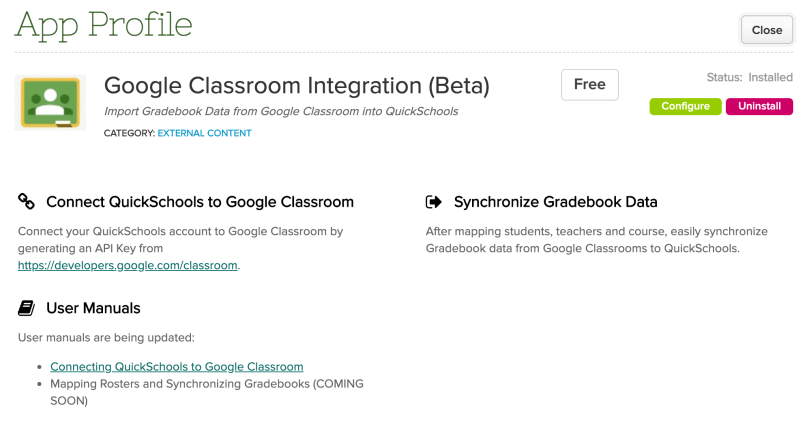
After several months of work, we now have a working (LMS) integration app with Google Classroom. This is currently still an early Beta version, but the app is able to pull data from Google Classroom to your QuickSchools Gradebook.
Google Classroom Integration (Beta) App
Some things to note about this app (as it currently works):
The app cannot EXPORT the roster. App assumes that you have already created student, teachers and courses in Google Classroom.
However, once students, teachers and courses and mapped, when Synchronizing the Gradebook, the roster will be pulled into QuickSchools. This means that if a student gets enrolled into a course, you can invite the student in Google Classroom, and the student will be automatically enrolled into the mapped subject in QuickSchools when the Gradebooks are synchronized.
Currently, the app does not support mapping of Mark Categories from Google Classroom. The API is not yet available, but when it does, we will be mapping and pulling this data as well.
The app assumes a SINGLE Google Classroom account for the entire school. This means that teachers cannot use their own Google Account to map data. But with a single school-wide Google Classroom account, you can still map individual courses to specific teachers.
Here’s a list of the latest improvements in QuickSchools:
Google Classroom Framework Improvements (Beta)
Messaging
WYSIWYG Editor for Email Messaging (Beta) – See Below
Exclude inactive students from dropdown
Gradebook Improvements
Option to Drop Lowest Grade – See Below
Copy Locked Column when activating new academic term
Gradebook Importer now handles duplicate Final Grade columns
Fee Tracking
Auto-Allocate by Date
Mass Auto-Allocate
Lesson Plans by Subject
Can post Homework Assignments via the “By Month” screen
Report Creator support for Lesson Plan fields
Simplified Scheduling – See Below
Option to rename Periods
New menu to display schedules by Grade Level
Display Subject Code / Abbreviation in Schedule tab
Miscellaneous Bug Fixes / Improvements
Typo in Axiom Integration File Name
Sort students alphabetically in Private Messaging
Properly delete related admissions record when student is permanently deleted
Move custom fields to the left in Discipline Module
Clean up labelling support for Discipline module
Bug fix for Alternate Homeroom Teachers, where teacher is both Homeroom Teacher and Alternate Homeroom Teacher
WYSIWYG Editor for Email Messaging (BETA)
This is a highly requested feature, so we thought we’d release an early BETA version, for those interested to use it right away. There are still a few kinks in the system, and we’ll be solidifying this module in the next Sprint:
Email Messaging with WYSIWYG Editor (Beta)
If you’d like to try out this new WYSIWYG Editor, please make a request to our support personnel, and we’ll turn it on for you. We’re looking for feedback to improve it. This feature will eventually be enabled for all schools, once it’s deemed stable for general use. So stay tuned!
Gradebook Option to Drop Lowest Grade
We have a new feature that will allow teachers to automatically exclude the lowest grade for any Gradebook Category. To allow teachers to use this feature, the School Admin will need to turn it on by configuring the “Gradebook / Report Cards” module, under “Setting” > “Turn Features On / Off”:
Set Setting to enable Drop Lowest Score in Gradebook
Once enabled, teachers will see a new section to allow the lowest grade for any selected Gradebook Category to be automatically excluded. The lowest grade for each category will appear in grey: