
New Release – Mar 23, 2020

Thanks for bearing with us, with the 2 planned outages this month. We’ve been working on improving server performance, as more and more schools start relying on QuickSchools for Online Learning. Here are the latest improvements:

Major Improvements

  • Fix File Upload Issues
  • Improve Server Availability
  • New Score Calculation option for SBG (See Below)
  • Expanded API support for iOS and Android Apps

General Bug Fixes / Improvements

  • QuickBooks Integration support for Canada
  • Notification to Admin when Parent updates their Contact Info
  • Improve warning message when running Summary Reports
  • Enable Print-In-Order for All Schools
  • Configure number of report cards that can be printed in order
  • Fix SBG Report Card integration when Standard Groups are deleted
  • Fix Auto-Allocation for multiple students in Family Billing
  • Fix module dependency when installing Master Scheduler
  • Fix Course Request support for Student Portal on Edge Browser
  • Fix Report Creator when reporting on students with deleted parents
  • Fix Report Creator when reporting on applications linked to deleted semesters
  • Fix Parent Relationship displayed in student record
  • Fix student re-enrollment when Leave Date is missing
  • Fix error when importing inactive students
  • Fix Student Enrollment error on Shared Online Form Packets
  • Fix Advanced Discipline PDF support for deprecated/removed Code Sets

New Score Calculation option in SBG

We’ve added a new Score Calculation option (i.e. Grading Scale for SBG) to the Standards-Based Gradebook (SBG) that respects that total number of points assigned to each assessment, similar to how the numeric Gradebook calculates formulas and the final grade based on total points in each assignment. The new Score Calculation is called “Weighted average by category and assessment“:

New "Weighted average by category and assessment" Score Calculation 
for Standards-Based Gradebook
New “Weighted average by category and assessment” Score Calculation
for Standards-Based Gradebook

As with other Score Calculations, the settings can be set school-wide under “Grading Setup” > “Standards-Based Setup”, or can be overridden in each subject:

Read More »
Planned Outage – Mar 21, 2020

We have another planned outage this Saturday, on March 21, 2020. We will be updating our hardware infrastructure to improve general performance and availability. This update requires that some of our servers be taken offline.

The outage will begin at midnight US Eastern time (or 9 pm US Pacific Time on Friday March 20), and will last up to 9 hours. If we’re able to complete the update earlier, the QuickSchools service will be brought back online immediately.

If you have any questions or concerns, please contact our support staff via email or chat.

Have a safe March Break!

Planned Outage – Mar 14, 2020

We have a planned outage this Saturday, on March 14, 2020. We will be updating our hardware infrastructure to improve general performance and availability. This update requires that some of our servers be taken offline.

The outage will begin at midnight US Eastern time (or 9 pm US Pacific Time on Friday March 13), and will last up to 9 hours. If we’re able to complete the update earlier, the QuickSchools service will be brought back online immediately.

If you have any questions or concerns, please contact our support staff via email or chat.

Have a safe March Break!

Chinese Language Support

Quickschools has rolled out support for the Chinese language, as we see the number of users who know Chinese continue to grow on our system.

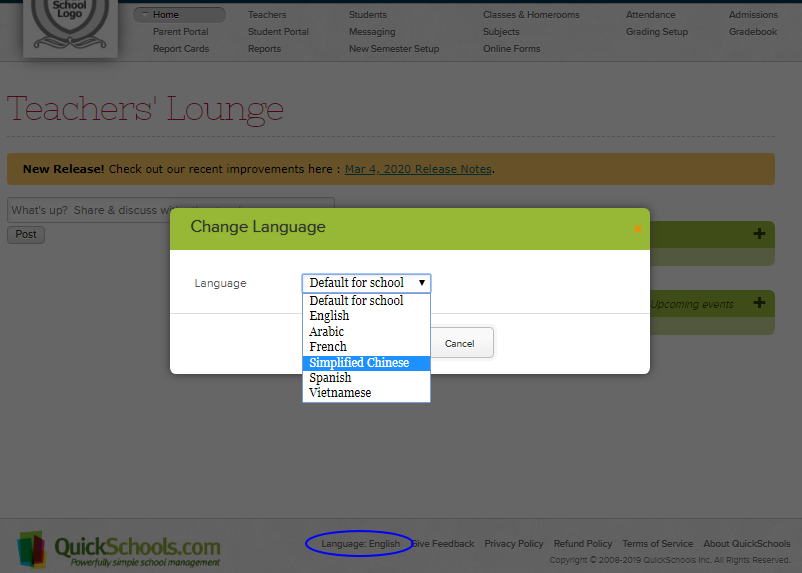
To change your user interface to Chinese: please log in to Quickschools, click Language at the bottom of the page, then select Simplified Chinese in the drop-down:

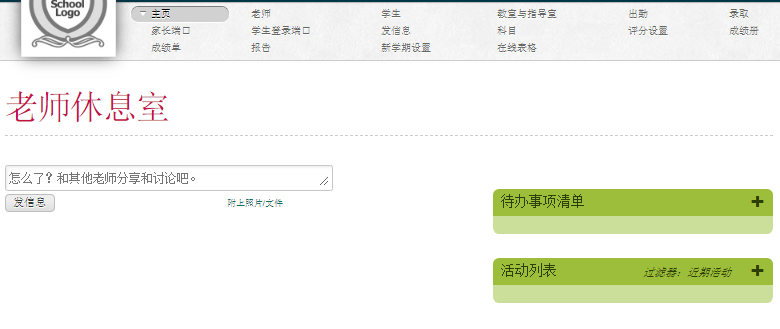
The user interface will then be translated to Chinese:

Let us know your experience! We’d be glad to hear your feedback. 

What language do you want us to support next? Please let us know!

New Release – Mar 4, 2020

As mentioned in our previous release, our primary engineering focus is to address bugs and improve the general experience using QuickSchools. So here are the latest improvements:

Major Improvements

  • Limited release to restore “Print (In Order)” for Report Cards (See below)
  • Report Creator support for calculated fields in Transcripts (See below)
  • Online Payments now supports Canadian Dollar (See below)
  • Expanded API support for iOS and Android Apps

General Bug Fixes / Improvements

  • Improve how Period Names are configured in Scheduling module
  • Fix Email Alert for Fee Tracking module
  • Fix transaction date for Fee Tracking Importer
  • Fix error accessing notifications from a deleted user
  • Fix error displaying Formula Marks in Report Cards when grades are submitted from Gradebook
  • Fix error saving Student record when Sibling feature is disabled
  • Fix error sorting fees from Parent and Student Portals
  • Improve support for displaying only relevant teacher info on Parent and Student Portals
  • Report Creator support for Subject Credits
  • Super User App supports Custom Domain
  • Sign-Up Page now includes a new field for School Type
  • Miscellaneous improvements for QuickBooks Integration

Report Card Print (In Order)

The report card “Print (In Order)” function has been disabled for quite some time now. We are now rolling out this feature in a limited capacity. If you’d like to use this feature, please submit a request to our support team, and we’ll enable:

report card print
Report Card “Print (In Order” function

We’ll be doing some additional testing to make sure this feature works well, after which we’ll be releasing this feature to all schools. 

Reporting on Custom Transcripts

The Report Creator can now report of fields that have been configured on your Transcripts template. This is particularly useful for schools that have a custom template with custom calculations:

Read More »

New Release – Feb 11, 2020

As mentioned in our previous release, our primary engineering focus is to address bugs and improve the general experience using QuickSchools. So here are the latest improvements:

Major Improvements

  • Reminder to Activate Academic Term
  • Blank Screen / Clear Cache Issue
  • Customizable Auto-Logoff Feature by School
  • Expanded API support for iOS and Android Apps

General Bug Fixes / Improvements

  • Fix error logging in when multiple academic terms are activated at the same time
  • Fix Attendance Indicator for Subject Attendance
  • Fix NULL that appears in Recipient Lists
  • Fix “Check In” filter for Library App in Report Creator
  • Fix “Date” filter for Gradebook module in Report Creator
  • Fix Table Preferences for Report Cards Criteria List
  • Fix To Do list support on Firefox
  • Fix disappearing access to Attendance for Homeroom Teachers
  • Bug fix when migrating Attendance Settings with Master Scheduler enabled
  • Bug fix for checking out books across multiple sites (in Library App)
  • Bug fix when deleting custom role still linked to teachers and staff
  • Bug fix when permanently deleting students with admissions application
  • Bug fix when using Admin Columns with Term Grades
  • Disable Attendance on Holidays for Staff users
  • Expanded Transcripts support for custom calculations using credits
  • Expanded App Store support for restricting access to modules
  • Expanded Color Scheme support for links
  • Support for Course Request Importer to exclude deleted students
  • Support for printing period start/end times in Master Scheduler PDF
  • Cosmetic fix to Parent/Siblings tab on Parent and Student Portals

Please note: We recently changed the out-going number for text and voicemails. We will soon be changing this to a 5-digit short code to avoid the Error Code 30007 (Carrier Filtering). We’ll keep you guys updated on this, as improvements are made.

New Release – Jan 22, 2020

For the next several Sprints, QuickSchools will be focusing on bug fixes, performance improvements and UI enhancements.

Here’s a list of our latest release:

  • Improved System-Wide Support for Nick Name (See below)
    • Searching for Students includes Nick Name
    • Searching Report Cards includes Nick Name
    • Searching for Student Portal users includes Nick Name
    • Searching for Parent Portal users includes Student Nick Name
    • Subject Enrollment screens now include Student Nick Name
    • Display Student Nick Name is Super User App
    • Display Student Nick Name in Private Messaging
  • Master Scheduler Improvements
    • Schedule PDF now supports Room Code
    • Bug Fix when Migrating to Next Semester
    • Bug Fix when re-installing Master Scheduler
  • Miscellaneous improvements and bug fixes
    • Improved Load Times for Transcripts (See below)
    • The “Sign-In Sign-Out” app now support Bulk Sign-Out
    • The “Graduation Status Report” PDF now supports credits for currently enrolled courses.
    • Bug Fix when using Private Messaging from Student Portal for subjects with more than one teacher.
    • Bug fix for Attendance Taken check mark for Subject and Period-Based Attendance

Improved System-Wide Support for Nick Name

For English-speaking schools where the student names are not written in the conventional latin character set (i.e. names written in Chinese, Korean, Japanese or Arabic), the Nick Name field becomes an important field for teachers and staff to identify students:

Utilize the Nick Name field when Students’ Name is not in latin character set

In these cases, system generated documents (like report cards and transcripts) will display the student’s name in their native language. But teachers will use the students Nick Name to identify students. This means that users need to be able to easily find and view students by their nick names. And so we’ve added more support for the student nick name into the various screens used by teachers and staff. For example, when searching for students in the Report Cards screen, you can use the students nick name in the search box:

Read More »

New Release – Jan 3, 2019

Happy New Year, everyone!

So here’s the first QuickSchools release for 2020:

  • Group School Improvements
    • Support for Invitations to Admissions Inquiry
    • Bug Fix when uploading files to the IEP App
  • Fee Tracking Improvements
    • Improve Screens for Payment Allocation
    • Bug Fixes related to Payment Allocation for Student Billing
  • General UI Improvements
    • Improve to Semester Activation (See below)
    • Improve Email Messaging from Report Creator
    • Improve Subject Enrollment Screen from Student record
    • Add Classes from the “Classes and Homerooms” screen
  • Miscellaneous improvements and bug fixes
    • Set Homework assign Date when posting from Lesson Plans (See below)
    • Increase character limit for Text Messaging (See below)
    • Search Report Cards by Student Tags
    • Gradebook Progress Report bug fix when using non-numeric Legend
    • Save attachment to Email Messaging History
    • Master Scheduler Step 4 bug fix to properly incorporate Breaks
    • Fix Time Stamp when sending alert for Recalculate Transcripts
    • Fixed billing on App Store
    • General Improvements to Android and iOS Apps

We also took the opportunity to run some server upgrades over the Christmas break. We should see some improvements to general performance and stability. We’ll continue to improve our services, in the coming weeks.

Improved Semester Activation

When activating a new empty academic term, you now have an additional option to copy the data forward WITHOUT activating the semester. This process is done in the background. The new screen has been reconfigured as follows:

Activate New Academic Term

Posting Homework from Lesson Plans

When posting Homework assignments from the Lesson Plans module, you now have the ability to set the Assigned Date and Due Date:

Read More »