QuickSchools has traditionally been a Student Information System (SIS), not a Learning Management System (LMS). However, there has always been some overlap (i.e. Gradebook). But given the changing times, and a strong need for all schools to have an online learning capability, we’ve decided to beef up our in-house support for Online Learning. We may not be as full-featured as many of the big players out there, like Canvas, Schoology, Google Classroom, Odysseyware and Ignitia (all of which we do integrate with), but there’s a lot to be said about having a simple core set of features that works seamlessly with an SIS.
New Assignments module as part of Online Learning capability
So here we’d like to outline some of these features, that make up the Online Learning experience within QuickSchools:
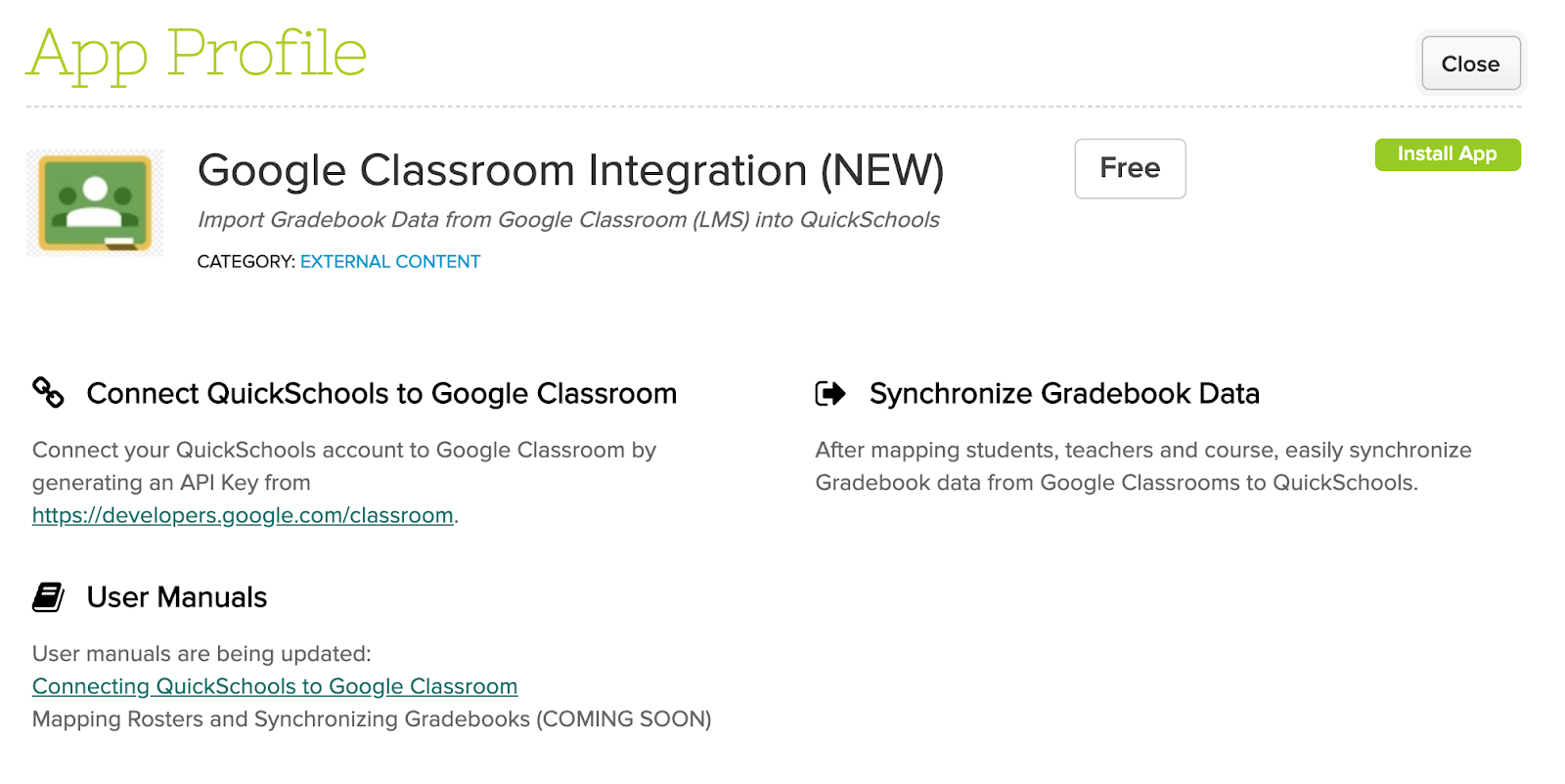
QuickSchools is delighted to announce this exciting new! The Google Classroom (LMS) Integration app has been moved out of Private Beta, and is now readily available on our App Store:
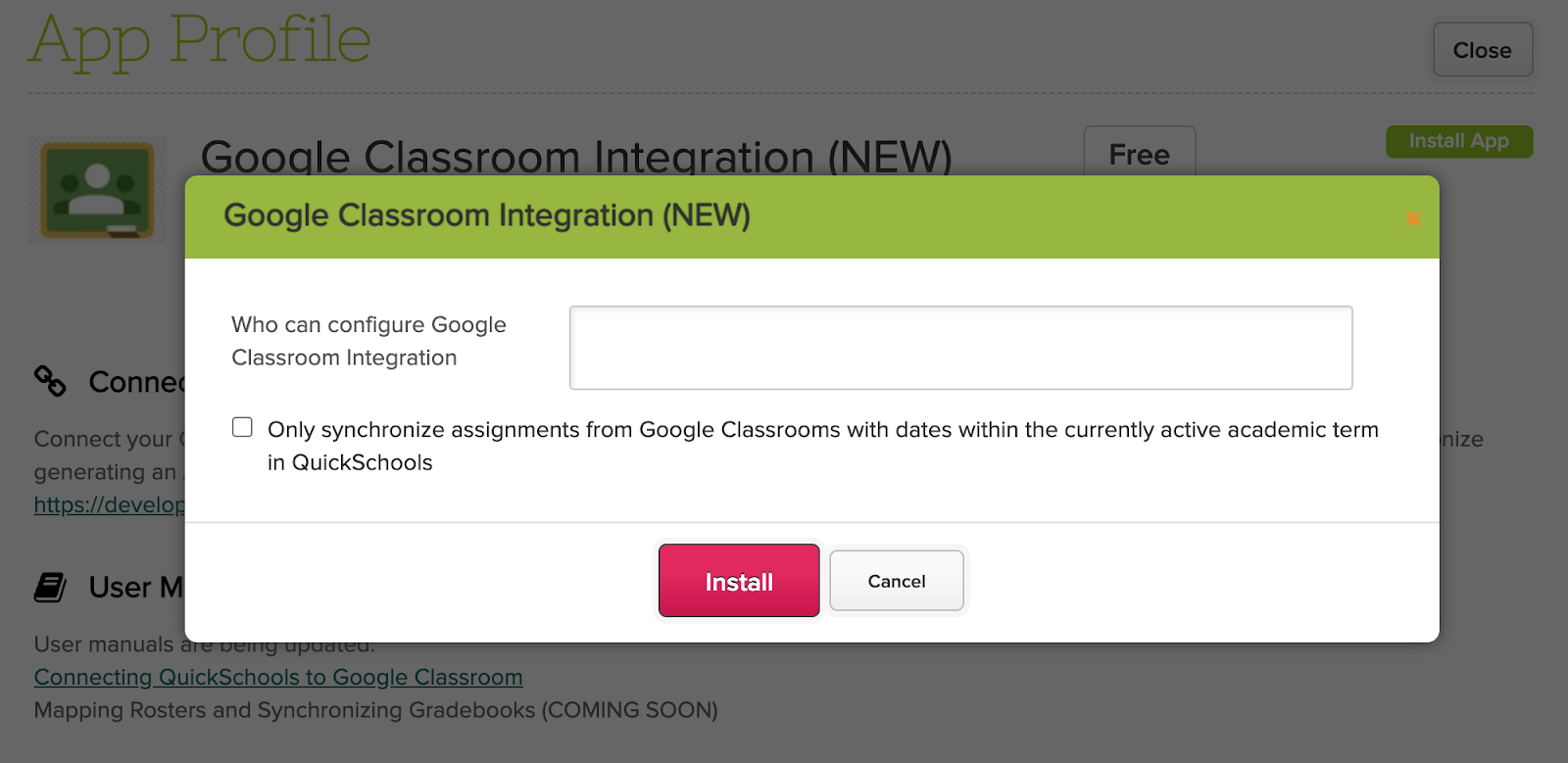
We’ve made several refinements since this app was introduced late last year. One key feature is the new option to “Only synchronize assignments from Google Classrooms with dates within the currently active academic term in QuickSchools”:
Here are some key features to note about Google Classroom, and how it relates to QuickSchools:
Both Odysseyware and Ignitia (LMS) are part of the same company, and thus use the same API framework. For schools using Ignitia, you can actually use the Odysseyware Integration App from the our App Store, to map data and transfer grades. However, it may be confusing to see references to Odysseyware in QuickSchools, if you’re actually using Ignitia.
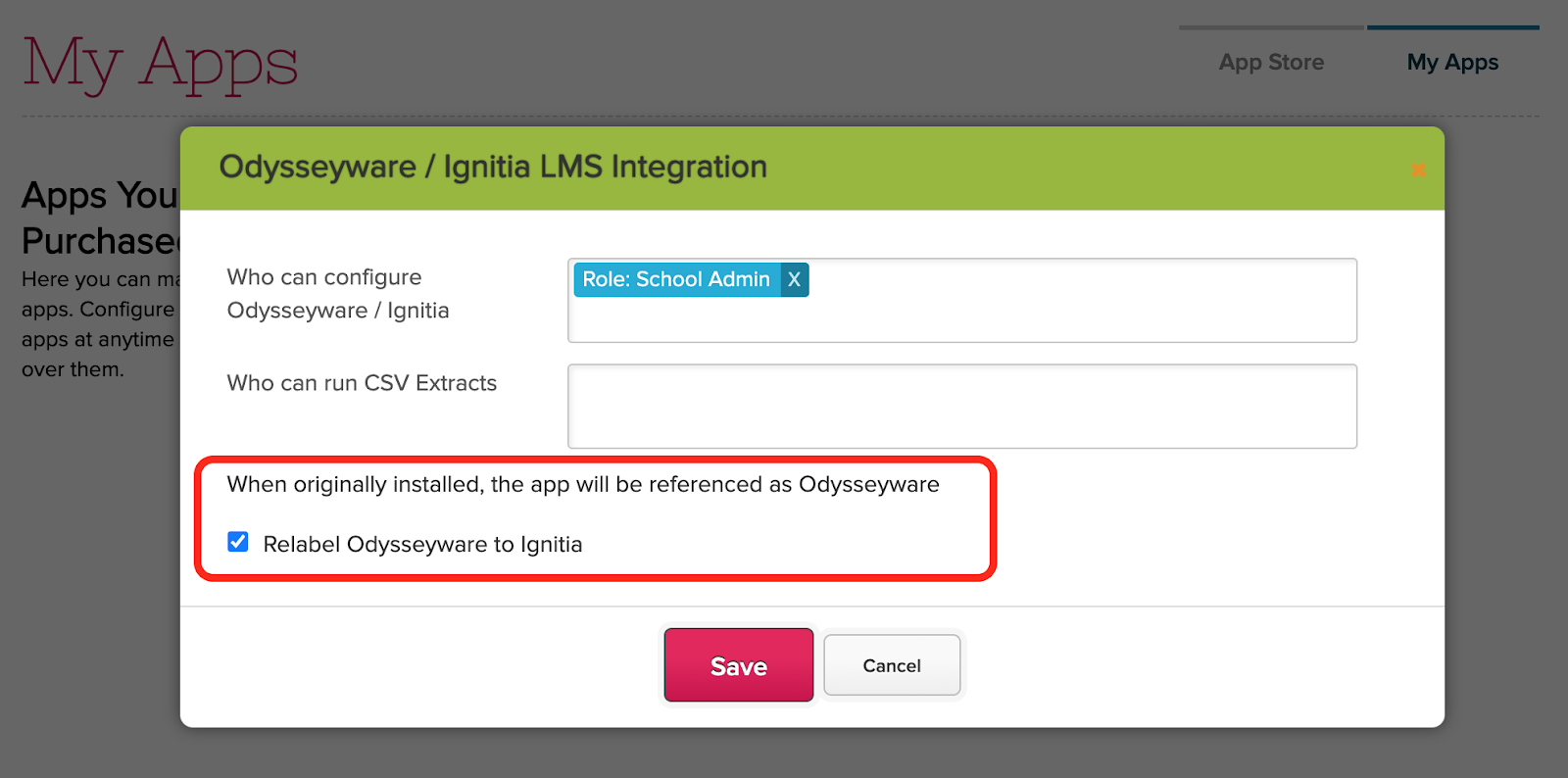
To help improve the experience, if you install the Odysseyware Integration App, you can now relabel the word “Odysseyware” to “Ignitia” when configuring access for the app:
Once configured, all the screens within your QuickSchools account will say “Ignitia” instead of “Odysseyware”:
Our focus for this most recent release has been mainly to do with our Learning Management or Online Learning capability. This includes our ability to integrate with external LMS, as well as building our own in-house support.
Expand Control for Automatic Unenrollment for Google Classroom Integration
Expand Odysseyware Integration App to include Ignitia LMS
Improve Error Handling with Canvas Integration App
LMS Features (early Beta)
Student can submit assignments online
Teachers can review student submissions
Live Stream (via integration with Zoom)
Other Bug Fixes / Improvement
New Semester Dropdown in Attendance Settings
Expand Date Filter functionality for Report Creator
Improve reporting on Transcripts via Report Creator
Expand Rich-Text support for Homework PDF
Fix Gradebook Column Date when copying formulas during semester activation
General Framework Improvements to App Store (labelling and access rights)
LMS features in Private Beta
This is now our second iteration in developing internal capabilities for Online Learning. In the last Sprint, we developed a few screens in early alpha. These screens are now in early beta, with the addition of a new Online Conferencing piece via Zoom Integration. We’ll be announcing more on these soon.
View / Join Online Meetings from Student Portal
Support for Changing Semesters
We will be improving several screens/modules to allow users to more easily make changes from previous semesters without having to activate the previous semester. Many screens like the Gradebook, Report Cards and Scheduling modules already support selecting a previous term via a semester dropdown. But some modules like the Attendance module heavily rely on the active term in order to display (and save) information.
In our last release, we gave you a sneak peak of our upcoming improvements to the QuickSchools Homework / Assignments module. We know schools need to adapt with the changing times, and so we’re beefing up our Online Learning capabilities.
One of these capabilities is for teachers to provide lessons online via Live Streaming (or Online Conference). We’ll be using Zoom to accomplish this.
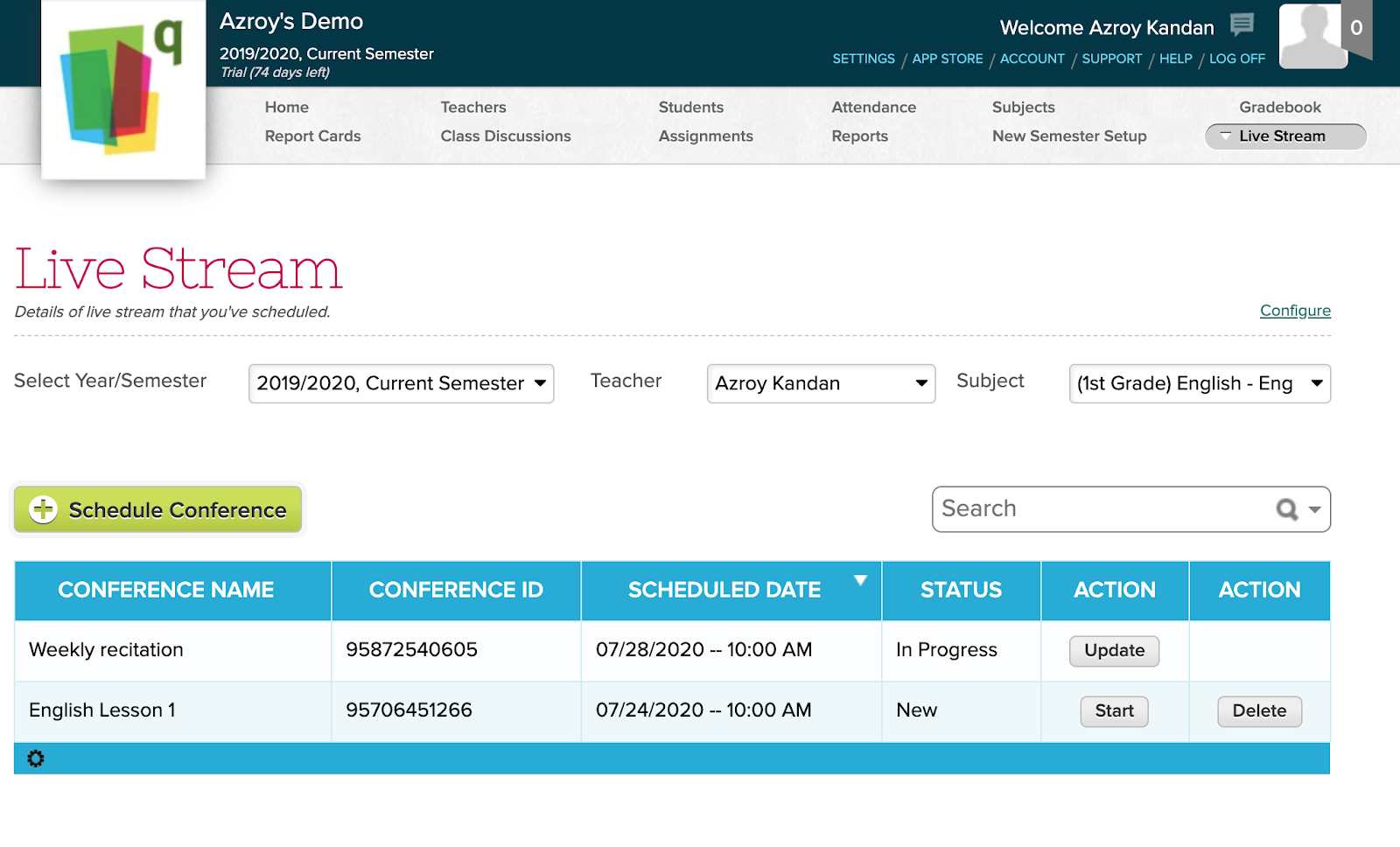
Very soon, schools will be able to link their QuickSchools account to a Zoom account, which will then allow teachers to seamlessly schedule online meetings for their classes:
Backward compatibility when switching Attendance Settings between Rotating Attendance and Daily Attendance
Google Classroom Integration Enrollment Fix when deleting assignments in Google Classroom
Bug fix for Email History with Attachments
Bug Fix to Scheduled Emails when using certain field types
Groundwork for New Assignments Module (Alpha*)
New Assignments listing for Teachers
Teachers can Add and Edit Assignments
Students can Open and Submit Assignment
Post to Assignments from Lesson Plan
Relabel “Homework” to “Assignment” for repurposed screens
A Sneak Peak for LMS
With the strong push for online learning given the current pandemic, we’re working on building a few basic LMS features, for schools that don’t necessarily need a full-fledged LMS system like Canvas, Schoology, or Google Classroom. We’re still in the early phases of development, but just to show you what’s coming soon, check out these screens
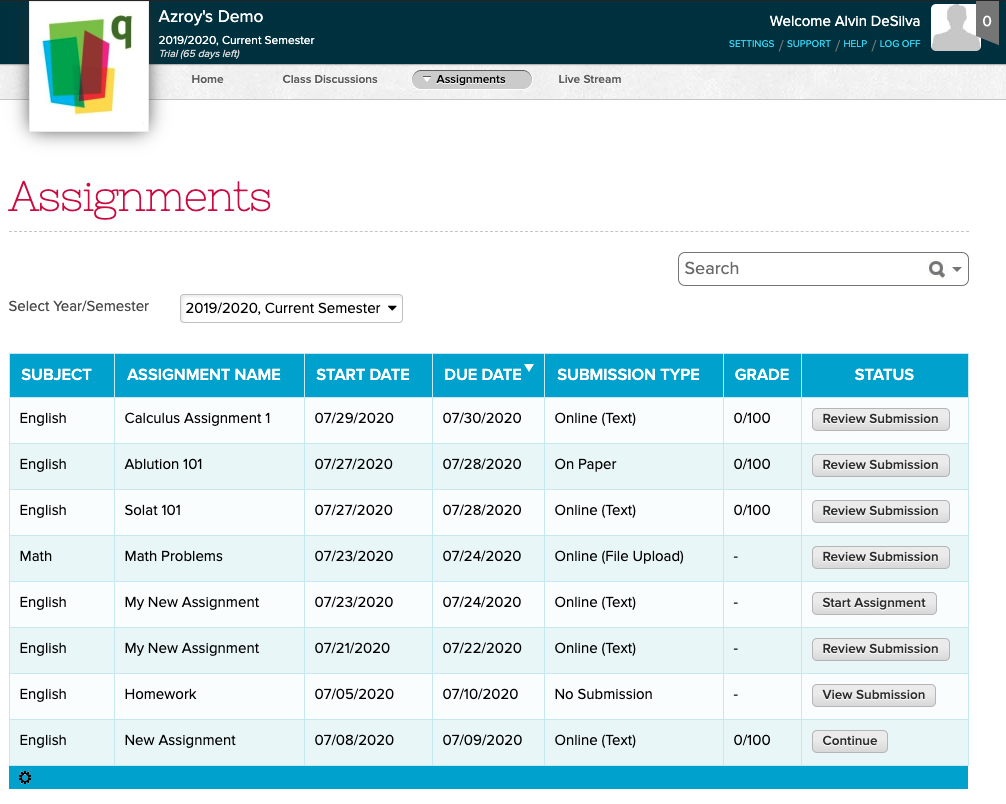
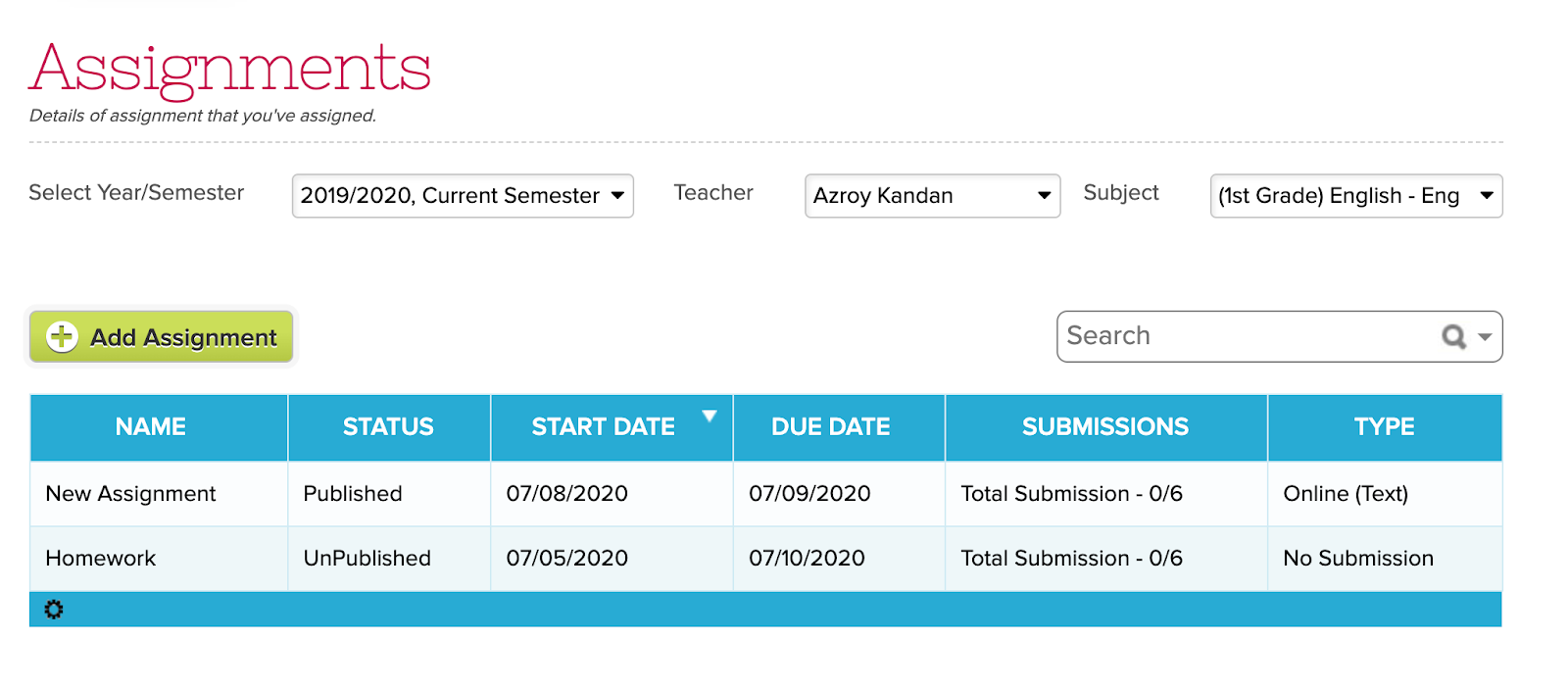
The new “Assignments” module augments the existing “Homework” module, and provides more control for teachers to engage students:
The new “Assignments” page for Students allows students to submit completed work:
Option to create Gradebook Column when adding Homework (See below)
Expanded WYSIWYG support for Report Creator
Expanded WYSIWYG support when posting Homework from Lesson Plans
Fix display of “Homework Due” notification on Student and Parent Portals
Fix text alert for Homework assignments using WYSIWYG
Enable new “Homeworks” tab in Student and Parent Portals
Framework Improvements for upcoming Assignments module
Other Improvements
Failed Credit Card payments no longer adds phone/text credit
Improve Session-Based LogOff function
Fix loading error when synchronization between browsers
Fee Tracking Import no longer in Beta
Add usage note on Custom Embed section for Admissions
General Security Improvements
Support Mapping to Canvas when users in Canvas do not have login information
Improve Gradebook Sync for Google Classroom
Create Gradebook Column from Homework module
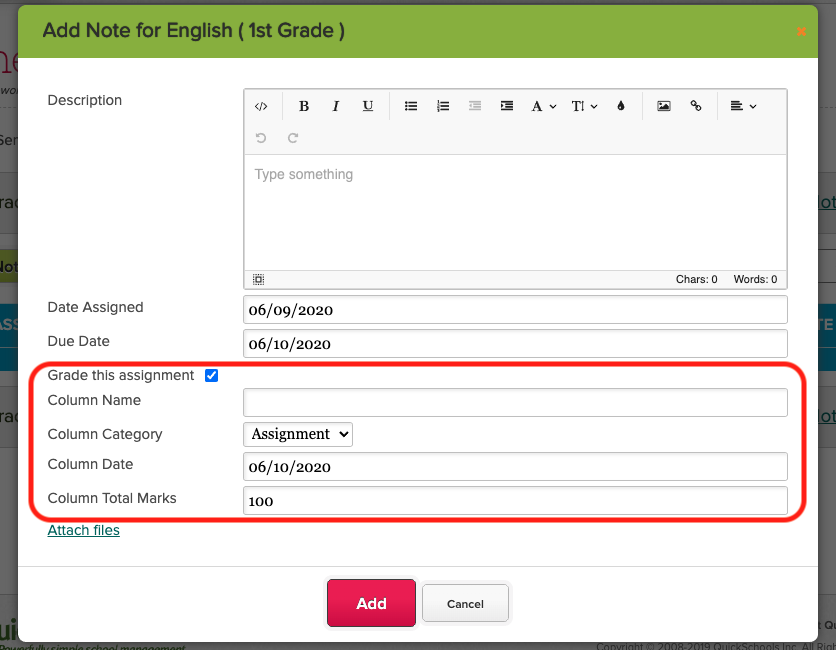
When adding / editing a Homework assignment, you know how the option to “Grade this assignment”, which will automatically create a column in the Gradebook:
We designed QuickSchools to be as simple and easy to use as possible. With on-screen video tutorials, online manuals, and live chat, schools can easily jump in and try things out all on their own. We even offer a free trial with complete access to all of our features to get started. However, if you prefer to see QuickSchools live in action, or if you have more complicated questions to ask, you can schedule an online demo with us. Demos typically last between 20-40 minutes. Here’s what our standard agenda includes:
School Details
Share basic information about your school. We’ll then tailor the live online demo to fit your requirements.
Why Quickschools?
We’ll discuss what makes Quickschools different compared to other Student Information Systems.
Live Demo
We’ll demo some of our features! The features highlighted will be specific to your needs.
Pricing Information
Our pricing information is available here, which we will briefly review.
Q&A
Here’s where we’ll take on any questions you may have.
If you are interested, you can request an online demo via chat, emailing us at support@quickschools.com, or by scheduling via the link below: