11 ways to help teachers foster creativity in the classroom

creativity in the classroom

Creativity frees the mind in a way that enables a person to absorb knowledge more efficiently. It makes the learning process more efficient and enables alternative ways of thinking. Creative individuals are able to unblock old patterns or habits of thinking and are more likely to think out of the box.

Creativity is a difficult thinking skill to acquire while being the MOST desired. Possessing creativity gives you the ability to create something new, whether a new solution to a problem, a new method or device, or a new artistic object or form. Creativity serves us greater importance than we realize. We value creativity in our technology, entertainment, music, and in most if not all industries. 

Read More »
New Release – July 12, 2022

In today’s release, we continue to make security improvements, PLUS a mix of improvements to the Orchestra Master Scheduler, Online Forms, Fee Tracking, and the Report Creator, just to name a few.

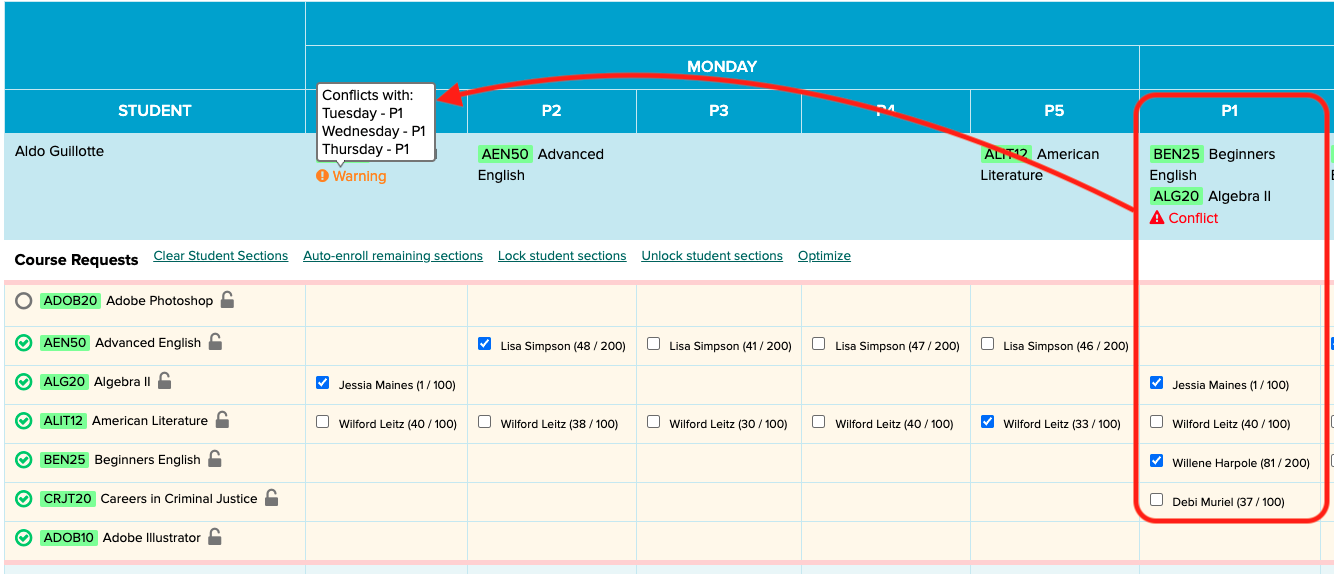
Master Scheduler now shows multi-period conflicts in Step 5

Here is a list of the latest QuickSchools improvements:

Master Scheduler Improvements

  • Improve visibility for Conflicts in Step 5 (for Weekly Schedule)
  • Option to Hide/Remove Course Requests in Step 5
  • Fix Conflicts tab in Step 4

Security Improvements

  • 2-Factor Authentication (2FA) via Email (See below)
  • Option to reduce Login Email Alerts based in IP Address
  • Other Security Improvements

General (Functional) Improvements

  • Online Forms Option to charge fees by Grade Level (See above)
  • Option to require files for upload when inviting applicant in Admissions module
  • Improve support for ACH only in Student/Parent Portal
  • View Assignments from Student Portal when clicking “Show All”
  • Improve notifications for scheduled tasks

General Bug Fixes

  • Bug fix for missing features based on roles
  • Bug fix when scheduling Live Stream with repetition
  • Bug fix School Message Board on Student Portal

Beta Improvements / Fixes

  • Option to automatically hide Transcript grades from future semesters

2-Factor Authentication

In our effort to improve security, we are building support for 2-Factor Authentication (2FA), starting with email. This feature can be turned on for the school under “Edit Overall Settings” (under “Settings” > “Turn Features On/Off”):

Read More »

Announcing Our Zapier Integration

At QuickSchools, we’re driven by our goal to empower educational institutions. We’re here to make your responsibilities as a principal, school administrator, and/or teacher easier by streamlining your work processes.

QuickSchools + Zapier

QuickSchools provides the technology solution for admissions, enrollment, fee tracking, rostering, etc. We also help you collect and manage various data related to students, parents, staff, and courses. It makes perfect sense for us to partner up with Zapier so that you can integrate Quickchools with your other technology solutions with minimal effort. Bypass all the busywork when it comes to sharing data and automating tasks. 

At present, QuickSchools integration via Zapier focuses on CRM applications such as HubSport and WizeHive. But schools should be able to use Zapier to integrate QuickSchools with a variety of applications.

Find the QuickSchools integration via Zapier in the Zapier app center

Thank You for Attending our Orchestra Master Scheduler Webinar

Thank you to all those who attended our Orchestra Master Scheduler webinar on June 23. We hope that you enjoyed your time with us and found it helpful.

We had fun showing off what Orchestra can do for our customers!

As usual, a follow-up email, along with a feedback survey, was sent to all registrants. We hope that you’ll take the time to complete and submit the survey back to us. We welcome any feedback and/or suggestions to improve future webinars. For a copy of the webinar recording, simply check off the appropriate box in the survey form.

If you’re interested in giving the Orchestra Master Scheduler a try or you have further questions, feel free to reach out to us via our Live Chat Support or email us directly at support@quickschools.com.

Our Help Center also provides valuable information, including step-by-step how-to guides and answers to FAQs.

Last but not least, we hope that you’ll join us in our next webinar  Preparing for the New School Year – scheduled on July 28. Registration will be available soon!

New Release – June 20, 2022

In today’s release, we continue to make security improvements, PLUS a mix of improvements to the Orchestra Master Scheduler, Online Forms, Fee Tracking, and the Report Creator, just to name a few.

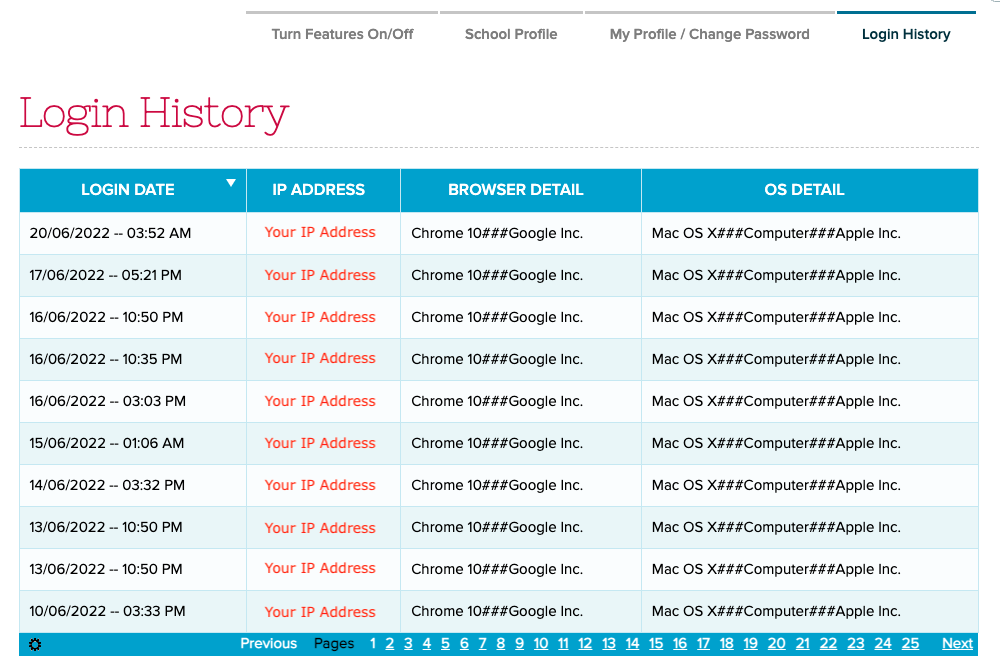
Login History
New “Login History” under “Settings”

Here is a list of the latest QuickSchools improvements:

Master Scheduler Improvements

  • Expand new “Scheduling Algorithm” in Step 4
  • Improve Debug logging in Step 4

Security Improvements

  • Login History for User (see above)
  • Include School Info in Email Notifications
  • Change sender for Email Notifications
  • Bug fix Email Notification when teacher is added/removed from a Role
  • Other General security improvements

General (Functional) Improvements

  • Limit how Form Packets can be accessed by Grade Level (see below)
  • Audit Trail History for Form Packet configuration changes (see below)
  • Option to receive email notification when a scheduled task is completed (see below)
  • Ability to schedule Summary Reports
  • Report Creator Data Definitions for Online Payment Transaction Fees and Attempted Amount on Failed Charges
  • Ability to preview Teachers’ Documents
  • Show Assessments from My WorkSpace
  • Disable Bulk Actions on Teacher for non-School Admin
  • Update API Resource for Zapier

General Bug Fixes

  • Fix Report Card when Gradebook Formulas are not used consistently across multiple academic terms
  • Bug Fix Email Notifications from Mobile

Beta Improvements / Fixes

  • Option to BCC with Mass Email Messaging
  • Option to hide “Upload Date” in Teachers’ Documents tab 
  • Student tab for Sign-In/Sign-Out history
  • Allow student to pay via ACH Only (i.e. Disable Pay via Credit Card)

Improvements to Online Forms

We’ve made a few improvements to the Online Forms module, namely:

  • Form packets can now be made specific to a grade level
  • View changes made to a Form packet

When configuring a Form Packet, you can now specify grade levels to show the entire form packet:

Read More »

Roundup: Scheduling with Orchestra

Over the years, we’ve continuously built the Orchestra Master Scheduler (our standalone scheduling software) to provide a better user experience. In this post, we’ve curated articles related to Orchestra. Without further ado, let’s take a look:

Announcing the Orchestra Master Scheduler

Setting up the Master Scheduler

Configuring the Master Scheduler

Related Articles

If you’d like to know more about our Orchestra Master Scheduler, sign up for our upcoming webinar on June 23, 2022 at 11 am PST / 2 pm EST.

This webinar is the perfect time for you to see a live demo and/or ask questions. Book a slot for yourself by logging on to your QuickSchools account, and signing up from the Teachers’ Lounge page. If you do not have a QuickSchools account and you’re curious to learn more about Orchestra, please send an email to eruani@quickschools.com to register.

We look forward to seeing you!

Is using social media in the classroom a good idea?

impact of social media in the classroom

Ever thought of using social media as an educational tool in your classroom? Maybe now is the time. It is a great tool that can enrich the learning experience and improve communication. Form a deeper connection between your school and students. For instance, students can be updated with events and happenings through the school’s social media profile. We look into ways how using social media in the classroom can be helpful in the classroom.

Read More »