Pay Online for Lunch Orders

The Lunch Ordering App will be receiving a big update this summer. QuickSchools will soon be supporting Online Payments for Lunch Orders. Parents and teachers can pay for meals online before orders are sent to the school for fulfillment.

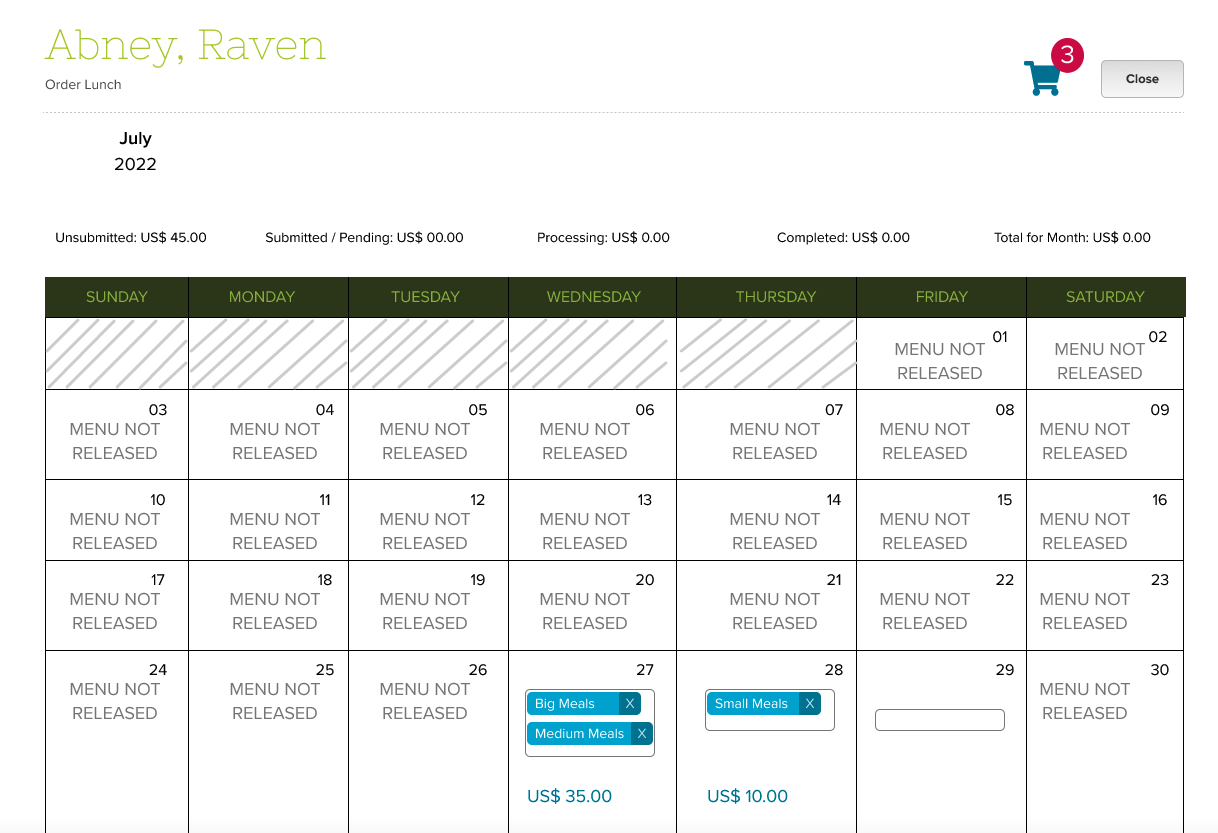
This improvement does not change the existing flow for selecting meals. Users will see a Calendar view of all meals offered. However, instead of seeing a “Submit Order” button, users will see a Shopping Cart icon at the top:

Clicking on the Shopping Cart icon will display all meals that have been added to the Shopping Cart:

Read More »

Special Event: QuickSchools’ Teacher Training Month!

We know that a lot of our teachers are busy ramping up for the new 2022-2023 school year. No worries, QuickSchools is here to lend a helping hand!

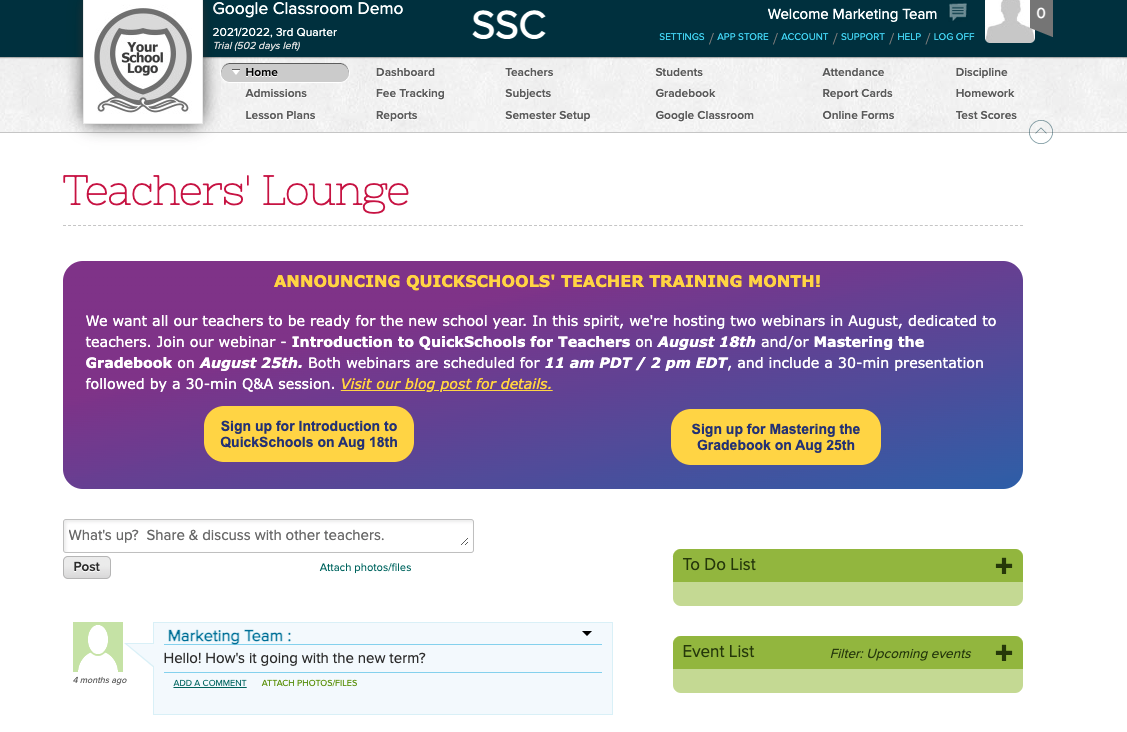
🦚 We’re proud to announce August as QuickSchools’ Teacher Training month. During this month, we’ll be hosting two live, FREE webinars especially crafted for teachers. More details below:

Introduction to QuickSchools for Teachers on August 18th

The Introduction to QuickSchools webinar will give teachers an overview of what QuickSchools has to offer. You’ll learn how to navigate through the screens and what resources are available to help you explore our software further. This webinar will be useful for teachers who are new to QuickSchools. The curriculum will include:

  • Logging into QuickSchools
  • Overview of the following teacher-related modules in our SIS: Attendance and Gradebook
  • Overview of the following LMS modules: Lesson Plan, Class Discussion, and Homework
  • Private Messaging
  • Getting Help

This webinar will only provide an overview of the italicized modules above, as we offer separate webinars that cover these modules in depth (see our 2022 webinar series).

The curriculum for this webinar is based on the paid training curriculum that we offer to newly subscribed schools. Please take advantage of this FREE training offer!

Mastering the Gradebook on August 25th

The Mastering the Gradebook webinar is suitable for all levels of users (from beginners to advanced). We’ll go through a brief 5-minute overview of basic Gradebook activities, before moving on to intermediate and advanced topics. Key discussion points include:

  • Gradebook basics: adding columns and formulas, and grading (re-normalizing and weighted grades)
  • Configuring the Gradebook settings: icons and optional tools
  • Communicating with students and parents: sharing feedback, and private vs public comments
  • Transferring grades from the Gradebook to the Report Cards
  • Alternative grading: Standards-based and Self-paced

Both webinars will be interactive. Post questions and answer polls during the 30-minute presentation session, and discuss topics further during the follow-up, 30-minute Q&A session.

In addition, both webinars are scheduled for 11 am PDT / 2 pm EDT. You can sign up for either webinar or both. Log on to your QuickSchools account and click on the sign up button(s) on the Teachers’ Lounge page.

New Release – August 1, 2022

In today’s release, we’re including framework improvements for our upcoming Lunch Order and Shopping Cart modules. The release also includes a mix of improvements to the Orchestra Master Scheduler, Admissions, Sign-In/Sign-Out, and security, just to name a few.

Step 4 Scheduler supports color-coding without "Organize by department"
Step 4 Scheduler supports color-coding without “Organize by department”

Here is a list of the latest QuickSchools improvements:

Master Scheduler Improvements

  • Color Code Step 4 when “Organize by department” is not enabled (See above

Security Improvements

  • General Security Improvements
  • Improve Privacy on Test Server

General (Functional) Improvements

  • Ability to hide Admissions Application Statuses (See below)
  • Show Custom Fields for Documents on Student record
  • Importer for Sign-In/Sign-Out App (See below)
  • Improve Report Creator support for Sign-In/Sign-Out App

General Bug Fixes

  • Improve Support for Disputed Charges in Fee Tracking with Online Payments
  • Improve Support for OneRoster (v1.1) Integration
  • Upgrade Text Messaging Framework
  • Bug Fix Alerts Framework for deleted parents
  • Bug Fix when adding new Online Test
  • Other Server Updates

Beta Improvements / Fixes

  • Lunch Ordering Support for Online Payment
  • New Shopping Cart Framework
  • Ability to Share Dashboard
  • Improvements to Bulk Charge Credit Cards via Standard Charges
  • Add support to disable Auto-Enrollment for Canvas Integration
  • Add support to automatically Un-enroll students for Canvas Integration
  • Fix District-Wide Students for Group School

Hide Application Status

In the Admissions module, when configuring the Application Statuses, you now have the option to hide certain status:

Read More »

Thank You for Attending our Webinar on Getting Ready for the New Academic Year!

A big thank you to everyone who attended our webinar on Getting Ready for the New Academic Year. We hope that you enjoyed the discussion and found the information useful.

Webinar by QuickSchools on Getting Ready for the New Academic Year

As per usual, we sent out a follow-up email (with a feedback survey) to all registrants. We would be grateful if you could complete and submit the survey back to us. Any feedback or suggestions would be appreciated, and would help us improve future webinars.

If you’re interested in trying out some of the features presented during the webinar, or have further questions or concerns, please don’t hesitate to reach out to us via our Live Chat Support or email us directly at support@quickschools.com.

Our Help Center and Blog also contains various step-by-step guides and tutorials, as well as answers to FAQs.

Last but not least, we’re happy to announce August as QuickSchools’ Teacher Training month. We will be holding two webinars — Introduction to QuickSchools for New Teachers scheduled for August 18, and Mastering the Gradebook scheduled for August 25. Registration will be opening soon. We hope to see you then!

Our top 10 teaching tips for new teachers who are just beginning their career

teaching tips for new teachers

When the new school year starts after this summer break, young educators will be entering school to begin their new journey in the education world. While having to reel the trauma from being a teacher, especially during these trying times must be hard to process, it is only normal that new teachers may experience confusion and high levels of stress. Teachers bring creativity, channel high levels of energy, and bring light to the classroom. 

We hope that these teaching tips might be of some help to all new teachers around the globe.

Read More »

Roundup: Getting Ready with QuickSchools

Summer is at its peak, but we know that schools are already gearing up to welcome the new school year and semester.

In this post, we curated the most relevant articles to help schools ramp up for 2022-2023. Our list covers articles that will help schools set up their modules, subjects and registration enrollments, as well as set up QuickSchools for students, parents, and teachers.

Semester Setup

Teachers / Staff

Students / Parents

Subjects & Subject Enrollment

Attendance

Scheduling (if applicable)

If you’d like to learn more on how to set up your QuickSchools account for the new school year, you’re welcome to sign up for our upcoming webinar scheduled on July 28, 2022 at 11 am PDT / 2 pm EDT.

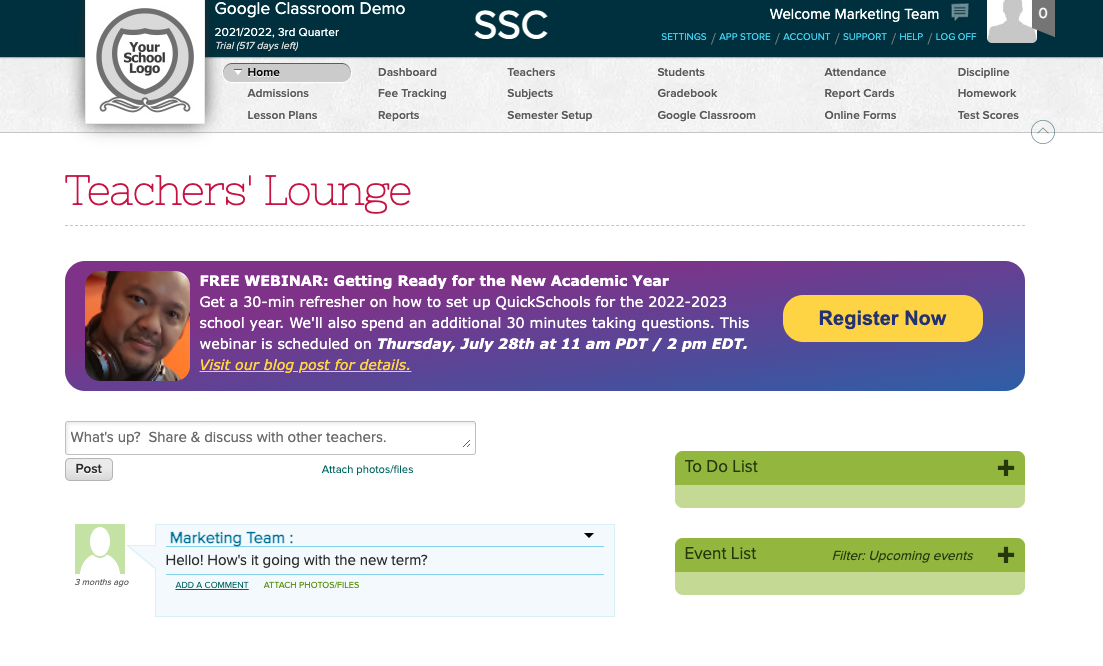
Our webinar is the perfect time for you to see a live demo and ask questions. Sign up by logging on to your QuickSchools account, and clicking on the Register Now button on the Teachers’ Lounge page.

We look forward to seeing you!

My school has been rebranded! What do I do now?

Your school is under new management, or perhaps has merged with another school, and you want to rebrand. Perhaps your school name has changed? Or, you have a new logo? Or, you have a new color scheme to promote your brand? What are the options available to you? 

Here, we discuss the various steps you can take to re-customize the experience for users accessing your QuickSchools account.

Change Basic Profile Details

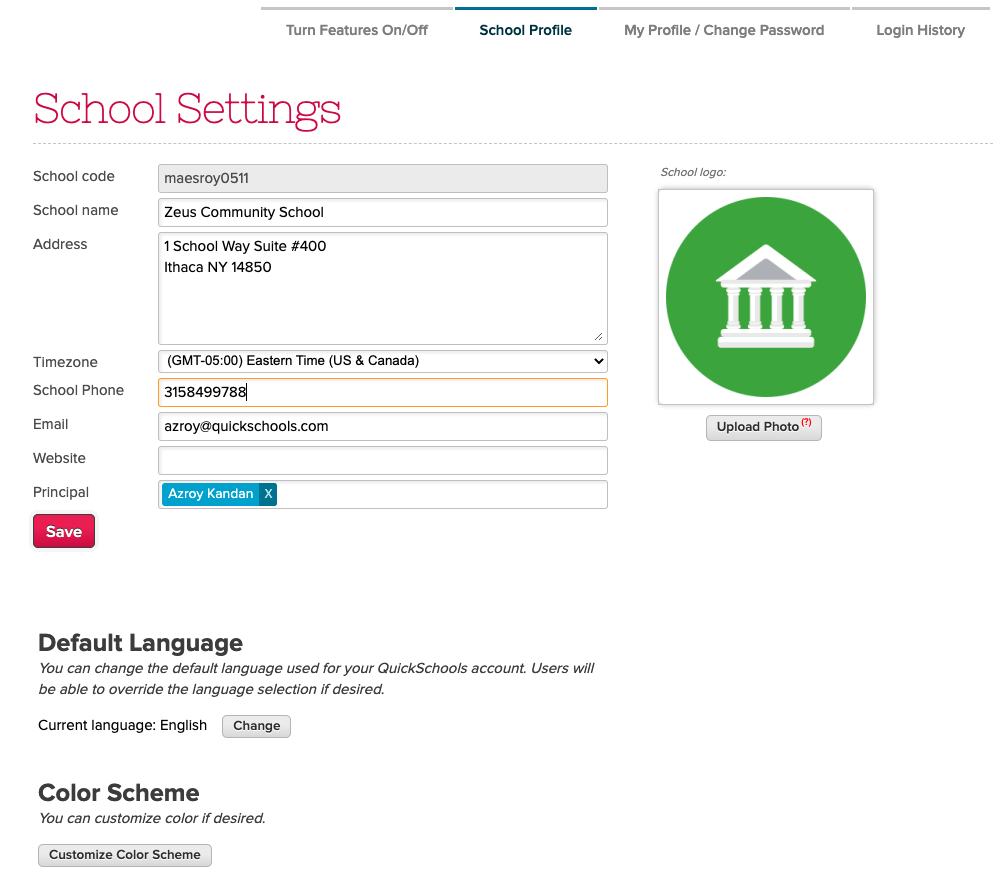
The first thing you should do as the school administrator is go to “Settings” > “School Profile”, and change the basic profile information for your school, such as your school name or uploading your new logo. This includes things like:

  • School name
  • School address
  • Contact info (Phone and Email)
  • Website
  • Color scheme
  • School logo
Update School Details under “School Profile”

The one thing you’ll note is that the School Code cannot be changed. This is because we use the School Code to partition your data into its own database. As such, this field cannot be changed once assigned to a school.

A lot of schools are okay with leaving the URL as-is because it does not incur any additional cost or effort. If changing the URL is important, there are a few options available to you:

  • Set-Up a Custom Domain
  • Create a new account
  • Migration via Group School

OPTION 1: Set-up a Custom Domain

QuickSchools offers a Custom Domain App. By using this app, you can set up your own URL for accessing your QuickSchools account. This option requires the least effort. However, the Custom Domain App incurs a monthly subscription. You will also need to register for your own custom domain and provide an SSL certificate from your provider.

Read More »

July 2022 Webinar: Getting Ready for the New Academic Year

We know that you’re ramping up for the new school year, and we’re here to help!

As part of our services, we’re offering a free, live webinar to make sure that you’ll put your best foot forward for the 2022-2023 academic year.

The Getting Ready with QuickSchools webinar will take you through the important steps of setting up your account for the upcoming school year. This webinar will be useful to principals and school administrators who are new to QuickSchools or in need of a quick, refresher course in setting up the software. We’ll go through the following workflow:

  • Clearing the test data from the test drive
  • Adding teachers and students
  • Setting up modules, user access, subjects and enrollment
  • Introducing teachers and parents to QuickSchools

This webinar is interactive. Post questions and answer polls during the 30-minute presentation session, and discuss topics further during the follow-up, 30-minute Q&A session.

The Getting Ready with QuickSchools webinar is scheduled for July 28th at 11 AM (PDT) / 2 PM (EDT). If you’re interested, you can register by logging onto your QuickSchools account. The registration link is available on the Teachers’ Lounge page.