A Message To Our Participants – Thank You!

We’d like to thank everyone who participated in our inaugural Teacher Training Month! We truly appreciate all your support, and hope you found the presentation helpful.
thank you for joining our teacher training webinar

Please take the time to submit the Feedback Form, included in our follow-up email. Your comments and suggestions will help to improve future webinars.

If you any questions, concerns, or are interested in learning more about the features discussed during our webinars, feel free to reach out to us via our Live Chat Support or email us at support@quickschools.com. Various tutorials and step-by-step guides are also available in our Help Center and Blog.

Last but not least, our next webinar – Customizing Effective Report Cards – is scheduled for September 22. This webinar is geared towards school administrators and principals. Keep an eye out for the registration announcement on Teachers’ Lounge.
New Release – August 22, 2022

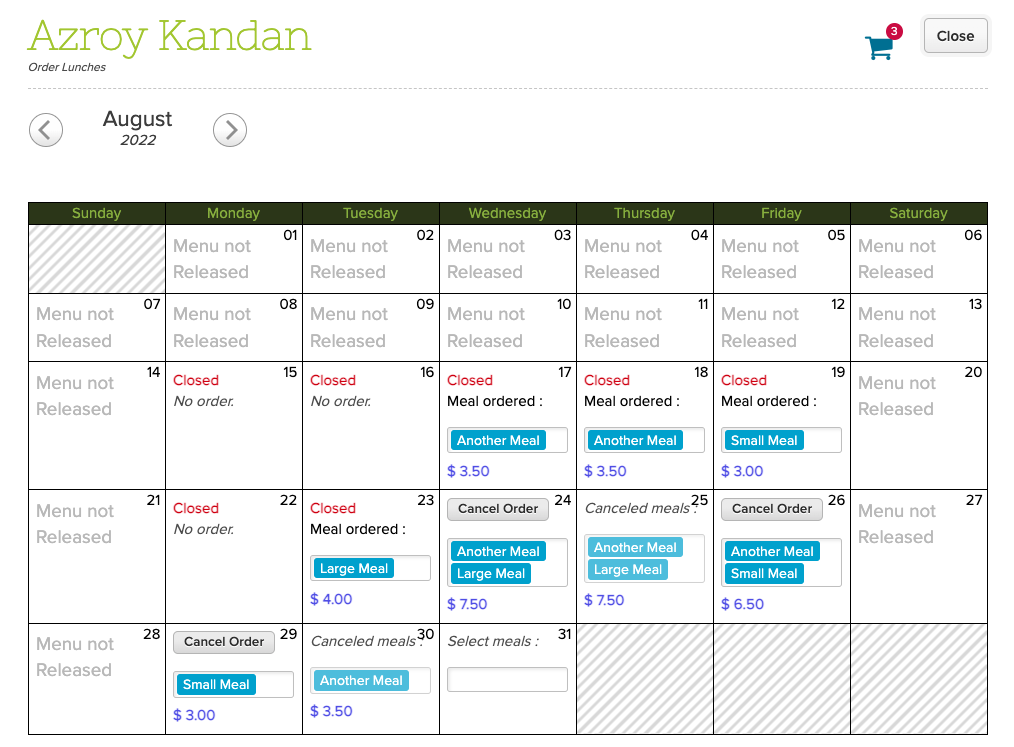
Today’s release showcases our new-and-improved Lunch Ordering app which now supports Online Payments, as well as Lunch for Teachers. This release also includes several improvements to the Orchestra Master Scheduler, Discipline, Report Cards, Lesson Plans and Admissions modules.

lunch orders for teachers with quickschools
Lunch Ordering for Teachers

Here is a list of the latest QuickSchools improvements:

Master Scheduler Improvements

  • Show main buttons when scrolling in Step 4 
  • New External Section ID importer for Step 4 (beta)
  • Track when course requests are assigned to sections in Step 5
  • Improve Summary Reports
  • Bug fix Section Limits by Department,
  • Bug fix Override Target Students
  • Bug fix Course Requests Import Date in History screen
  • Bug fix related to Auto-Set Next Grade
  • Bug fix Bulk Email Section Schedule

Lunch Ordering App

  • Support Online Payments (Shopping Cart)
  • Lunch Orders for Teachers (See above)
  • Order Cancellation generates Credit for Future Orders
  • Updated Lunch Fulfillment screen for Admin

General (Functional) Improvements

  • Ability to view Discipline PDF from Student portal
  • Show configured custom fields for Discipline module on Student record (See below)
  • Bulk Enroll Students from the Admissions module (See below)
  • Support ability to relabel “Enrollment Date” in Admissions module
  • Show Report Card Session Name from Subject-Specific Criteria screen
  • Ability to preview uploaded attachments in Lesson Plans module
  • Support optional Homework in Lesson Plans
  • Reverse Sort semester dropdown in Standards-Based Gradebook

General Bug Fixes

  • Improve Bulk Fill for Subject-Based Report Cards
  • General Security Improvements

Beta Improvements / Fixes

  • Support Sharing Dashboard with Users
  • Option to clear manually entered grades in Report Cards from Subject-Based screen
  • Import Sign-In/Sign-Out records from Student History screen

Custom Fields for Discipline

Custom Fields that have been configured to be viewable are now displayed as a column on the Discipline tab of the student record:

Read More »

Google Meet or Google Classroom: Which is better for teachers?

google meet or google classroom is better for teachers

There’s a big debate among educators: Which is better for teachers, Google Meet or Google Classroom? Both tools rank as top choices for online teaching, but each serves a different purpose. In this article, we’ll explore whether one stands out as the better choice for teachers, and how each tool supports virtual classrooms in unique ways.

When it comes to online learning, Google has stepped up to help. Teachers have been able to use Google tools to make sure that the education for their students wasn’t disruptive. This was especially useful during the COVID-19 outbreak and lockdowns imposed. Google Meet and Google Classroom were helping classes to continue online. With online learning now growing even with no more lockdowns, these tools will still be beneficial in the education industry. The question is, however, what are the differences between Google Meet and Google Classroom? Both resources are different from each other and they both have their own pros and cons. 

Read More »

Roundup: QuickSchools for Teachers

blogs for teachers with quickschools

August is always an exciting month for QuickSchools. This is the month that we welcome a lot of new schools into our community. This means that we’ll be welcoming a lot of teachers new to QuickSchools as well. We love to see growth!

If you’re a teacher who is new to QuickSchools – you’re definitely in luck! Our mission is to get you classroom-ready. We want you to develop the skills and knowledge to fully utilize our software. For this purpose, we curated the most relevant articles to help you get up to speed:

Read More »

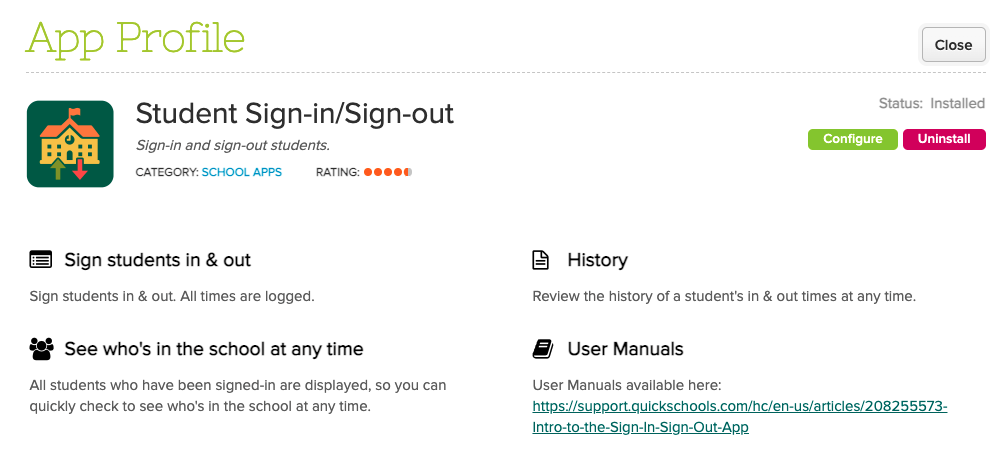
Sign-In / Sign-Out App (2022)

The QuickSchools Sign-In/Sign-Out App has undergone quite a few improvements over the years. Schools are using this app to:

  • Track the exact date and time when students sign-in and sign-out of school
  • Allow students to sign themselves in
  • Allow parents to sign in their children
  • Track the total time a student is in the school (usually for billing or compliance purposes)

You can find this app on our app store:

Sign-In/Sign-Out App on the QuickSchools App Store

We’d like to take this opportunity to discuss some recent improvements since our last review was from 2020, as well as a few potential improvements moving forward:

To find out more about existing features, please check out our previous post here:

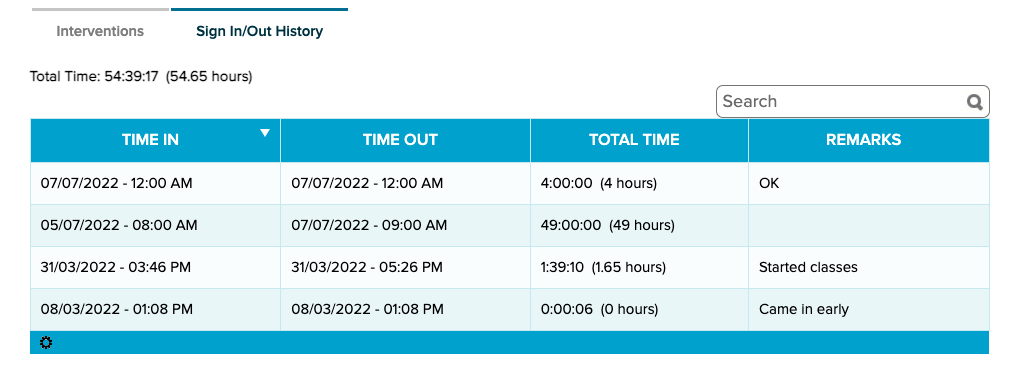
History Tab on the Student record

Teachers and staff can now view the sign-in/sign-out history for a student directly from the student tab. This makes it easier for users to review all data pertaining to a student in one location. 

View Sign-In/Out History from the Student record

NOTE: This is a welcome improvement because most apps require you to view information about the app from the app itself (and not from the student record).

Summary from Student Portal

This new feature is designed primarily for adult education. It allows students to track the amount of time they’ve completed at school, as a prerequisite for completing their course:

Read More »

Mini Release – August 8, 2022

We deployed a few minor improvements today, primarily for the Orchestra Master Scheduler and Security.

minor improvements to Orchestra Master Scheduler
Configure starting periods for courses in Step 1 “Configure Courses”

Here is a list of the latest QuickSchools improvements:

Minor Improvements for Master Scheduler

  • Ability to configure starting periods for courses
  • Record date/time when course request is assigned to a section
  • Bug Fix Step 1 when teacher is deleted
  • Bug Fix Step 2 when clicking on Teachers
  • Improve Reporting for Master Scheduler

Teacher Caseloads in Orchestra

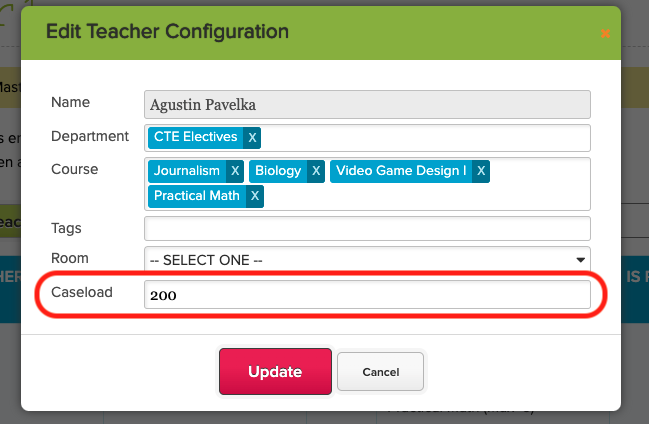
In the Orchestra (Master Scheduler for QuickSchools), you can set up a Caseload limit for teachers in Step 1, under “Configure Teachers”:

Set Teacher Caseload when you “Configure Teachers” in Step 1

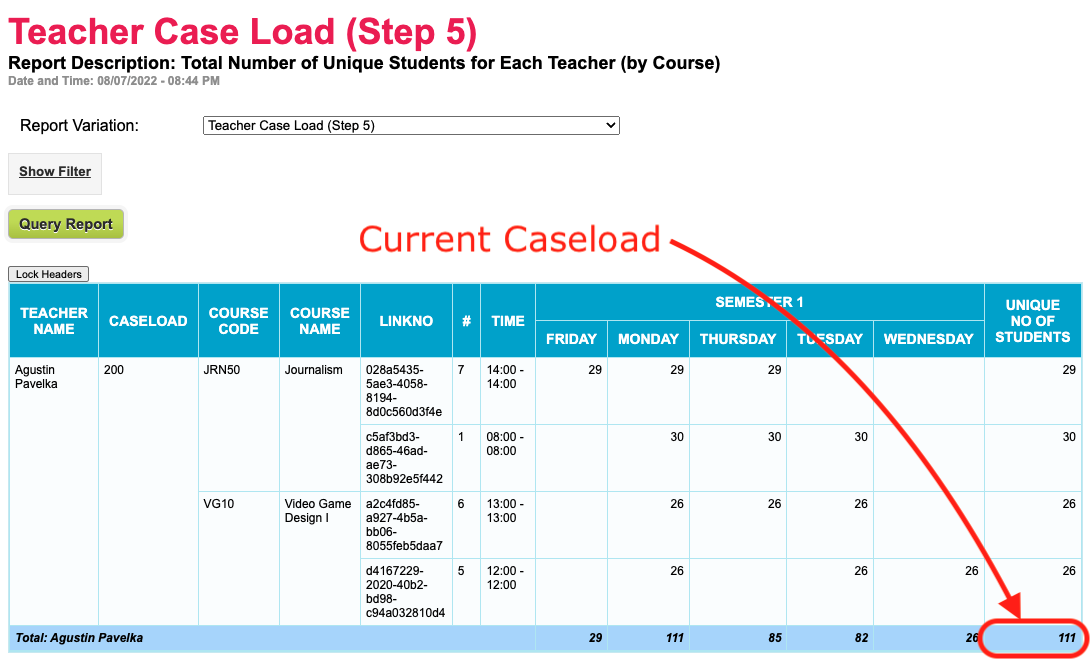
The system calculates the current caseload for the teacher by adding the total number of students for all sections, and then compares it against the Caseload limit. Here’s an example from the “Teacher Case Load (Step 5)Summary Report that shows how the Caseload is calculated and compared against the Caseload limit:

Use the “Teacher Case Load (Step 5)” Summary Report to view current Caseload and Caseload limits.

For convenience, you can also see the current caseload for a teacher in Step 5, when mousing over a an available section for a student’s course requests:

Read More »