New Release – Sept 20, 2021

Here is a list of the latest QuickSchools improvements:
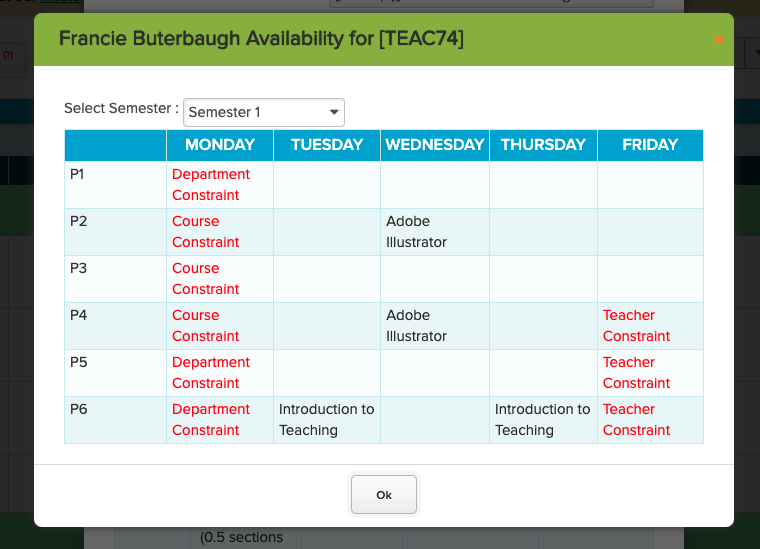
View Teacher Availability for a Specific Course when reviewing Sections in Step 4

Master Scheduler Improvements

  • Support Caseload Limit in Step 1: “Configure Teachers” (See below)
  • Bug Fix Weekly Schedule when “Days” is left blank in Step 1: “Configure Courses”
  • Ability to adjust target from Step 2: “Course Requests by Course”
  • Bug Fix calculation of Number of Sections in Step 2: “Course Requests by Course”
  • Show Teacher Availability in Step 4: “Schedule”
  • Display total when showing Breakdown by Department in Step 5: “Load Students”
  • Cosmetic improvements to Step 5: “Load Students”
  • Bulk Send Section PDF in Step 6
  • General refinements to the Weekly Schedule feature
  • Bug fix remove course requests when students are deleted in bulk

General Improvements

  • Ability to customize general PDF templates (Private Beta)
  • Ability to customize general email templates (Private Beta)
  • Improve Semester Activation function to include the following options (See below):
    • Do not copy subject
    • Copy subject without teachers
    • Copy subject without student enrollments
  • Migrate Subject Custom Fields when activating a new semester (See below)
  • Support Custom Fields when importing Subjects
  • Support Read-Only access to general Report Cards for non-administrators
  • Support multiple active Report Cards when submitting grades from Gradebook
  • Support separate First and Last name for Submitter in Online Forms (See below)
  • General Improvements and API Support for the Temperature App
  • Bug Fix Class Discussions dropdown filter for Semester
  • Bug Fix BCC when sending Email Templates from the Admissions module
  • Bug Fix “All Not-Yet-Taken” setting for Attendance Notification Dashboard (Private Beta)
  • Minor Bug Fix for Daily Period Zero Attendance
  • Server Security Updates

Some highlights below:

Read More »
New Release – Aug 30, 2021

Since our last release on August 9, we made several improvements to our Orchestra Master Scheduler. And now that the new Weekly Schedule feature is more robust, we’re back BIG-TIME to our regular 3-week Sprints. This release includes groundwork for our upcoming Learning Management System (LMS).

Check out the complete list of our latest QuickSchools improvements:

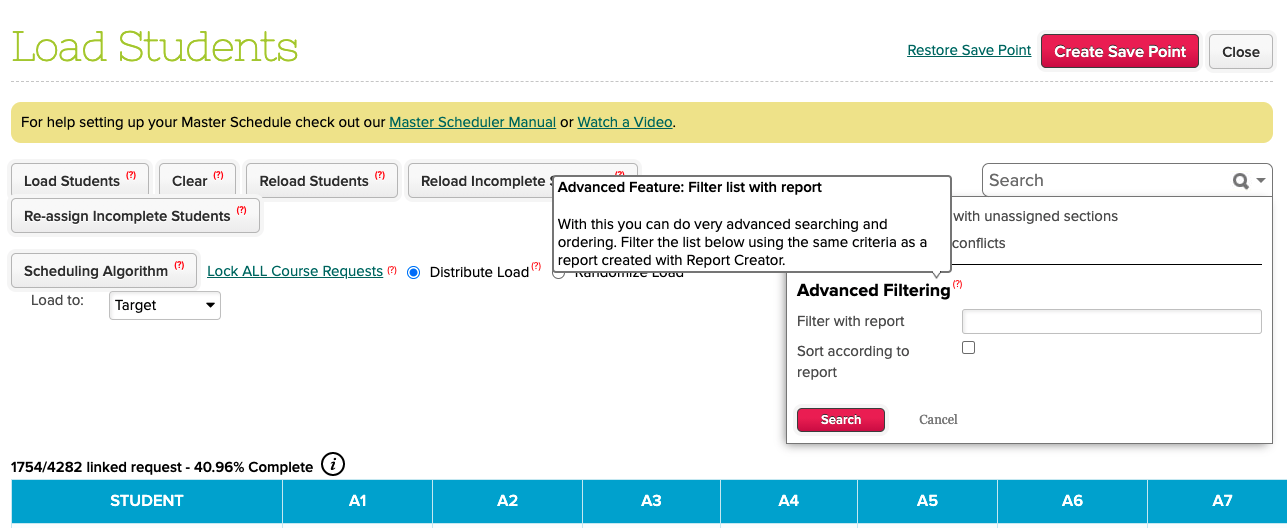
New Advanced Filtering by Report on Master Scheduler Step 5: Load

Master Scheduler Improvements

  • Remove Next Grade when SIS is not used
  • Support optional teachers when importing STEP 1 course-teacher configurations
  • Step 2 ability to Reset calculated number of sections
  • New External IDs for Sections in STEP 4
  • Step 5 Advanced Filtering (via Report Creator)
  • Step 5 Percentage breakdown by Department
  • Remove STEP 5 Section Enrollments when Course Request is removed/deleted
  • Temporarily Remove STEP 5 “Re-assign Incomplete Students” for Weekly Schedule
  • Update Sections in student record when Course Requests are updated
  • Add support for Weekly Schedule in Summary Reports
  • Bug fix when calculating STEP 2 number of sections for courses with zero limits
  • Bug fix when removing course requests via STEP 2 Bulk Course Requests
  • Bug fix when displaying STEP 4 total students in each section
  • Bug fix calculating STEP 5 percentage when students are deleted
  • Bug fix Advanced Search in Step 5 for “students with unassigned sections”
  • Bug fix Advanced Search in Step 5 for “students with conflicts” when enrollment period is linked to multiple semesters
  • Bug fix when rendering Section Enrollment PDF when Bell Schedule is updated
  • Bug fix when editing section assignments from Student record for Weekly Schedule

General Improvements

  • Alpha features for Online Tests (LMS)
  • Alpha features for My WorkSpace (LMS)
  • Extend Temperature App to Parent Portal
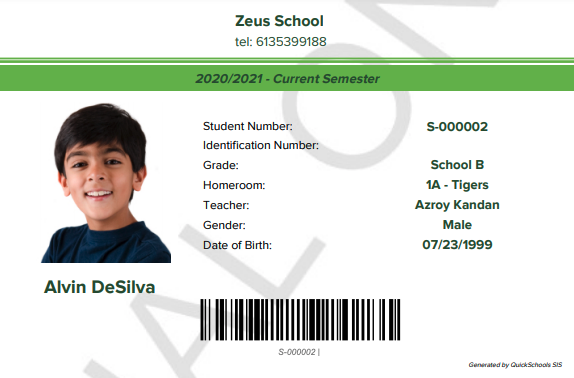
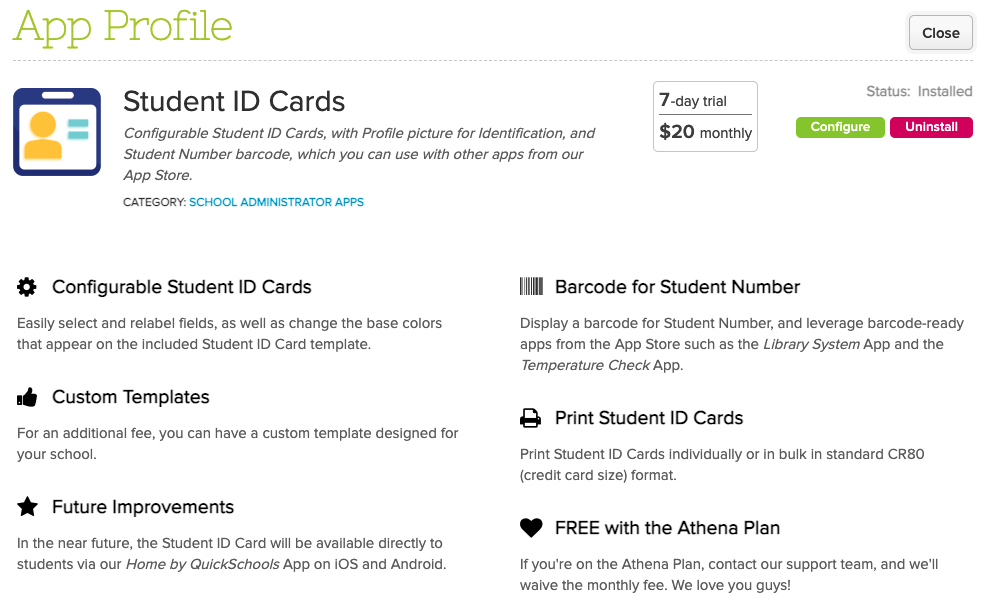
  • Support CR80 (credit card) size in PDF Templates (for Student ID Card)
  • Customizable Calculation for Period Zero (Daily) Attendance
  • Improve Subject dropdown in Lesson Plans module
  • New framework widgets for Time and TimeZone
  • Streamline OK button widget
  • Improve performance when downloading large Summary Reports via Excel
  • Improve concurrent access to Summary Reports with large data
  • Bug fix when students are permanently deleted in Group Schools

Master Scheduler Improvements

We’ve made some pretty big changes to the Master Scheduler in recent weeks. In one of our recent patches, we introduce a “Department” configuration in the “Scheduling Algorithm” in Step 5:

Read More »

New Release – Aug 9, 2021

This release is a special 2-week accelerated Sprint for the Orchestra Master Scheduler, covering the main areas:

  • Weekly Schedules (with varying Section Frequency)
  • Tracking Schedule Changes (after Finalization)
  • Managing Bulk Changes to Student Enrollments

Here is a complete list of the latest QuickSchools improvements:

Master Scheduler Improvements

  • New Max Sections for Teacher-Course Configuration (Private Beta)
  • Course-Teacher Importer supports Max Sections (Private Beta)
  • New shortcut for Weekly Bell Schedule (Private Beta)
  • New Days and Frequency Settings for Courses (for Weekly Schedules)
  • New Support for Multi-Day Sections in Step 4 and Step 5 (for Weekly Schedules)
  • Run Step 4 based on Department Filter
  • Update Step 4 Course Details with Frequency, Days and Max Sections for Teachers
  • PDF Schedule for Teachers based on Next Enrollment Period
  • Option to Copy Latest Schedule to QuickSchools
  • Support Tracking Schedule Data for Export
  • Summary Report Support for Copied/Exported Schedule Data
  • Report Creator Support for Copied/Exported Schedule Data
  • Report Creator Support for Students with Conflicts
  • Improvements and Bug Fixes when Configuring Teachers
  • General Improvements to Semester Setup for Orchestra Master Scheduler 

General Improvements

  • Bulk Student Importer supports Reactivating Students (Beta)
  • Bulk Student Importer supports Deletion of Students (Beta)
  • Improve capacity for sending out Section PDF in bulk

Weekly Schedules (Beta)

We have a new capability that allows schools to easily create a weekly bell schedule:

When importing or adding courses, you can specify frequency and days of the week:

Read More »

QuickSchools Library App

Our recent release for QuickSchools includes two key improvements to the QuickSchools Library App:

Add Book by Scanning ISBN

When adding a new book to your catalog, there’s a new “Scan ISBN” button that allows you to quickly scan the ISBN barcode. 

Look up Book Details by Scanning the ISBN Barcode

QuickSchools will then search the Google library, and pull details for the book, which you can use to create the book record in your QuickSchools Library App:

Book Details retrieved by Scanning the ISBN Barcode

Note that books pulled from Google will also contain an image of the book.

Generate Barcode and Label

When adding a book, you now have the option to generate a Barcode by clicking on the “Generate” button:

Read More »

New Release – July 26, 2021

We’ve made several improvements to our Orchestra Master Scheduler for this release. But we’ve also included a few general improvements related to Admissions, Report Creator, the Library App, our API (and Zapier), Google Drive Integration, and much more.

Improvements to the Applications module within QuickSchools Admissions

Here are the latest improvements in QuickSchools:

Master Scheduler Improvements

  • Term-Length is now optional when importing Courses. Defaults to Semester-long
  • Limit for Departments are now optional
  • Bug fix when searching for Courses without Departments
  • Bug fixes related to performance improvements when setting Next Enrollment Period
  • Show configured Courses for Teachers in Step 1 “Configure Teachers”
  • Show Min, Max and Target Section Sizes in Step 2 “Course Requests by Course”
  • New Step 4 Filter by Department
  • Miscellaneous Improvements to Step 4 and Step 4 Pagination
  • Rename Block Sections to Teams
  • Bulk Create Lab-Lecture Teams (previously Block Sections) by Period
  • New Step 5 Advanced Filter for Student Conflicts
  • Ability to hide periods without sections in Section Assignments PDF
  • Support separate Course Code and Course Name in Section Assignments PDF
  • Miscellaneous Bug fixes to Section Assignments PDF
  • Option to use “no-reply@quickschools.com” when emailing Section Assignments PDF
  • New Teacher Invitation Emails for Orchestra Only Plan
  • Ability to enable Section Attendance within Orchestra

Improvements related to Admissions

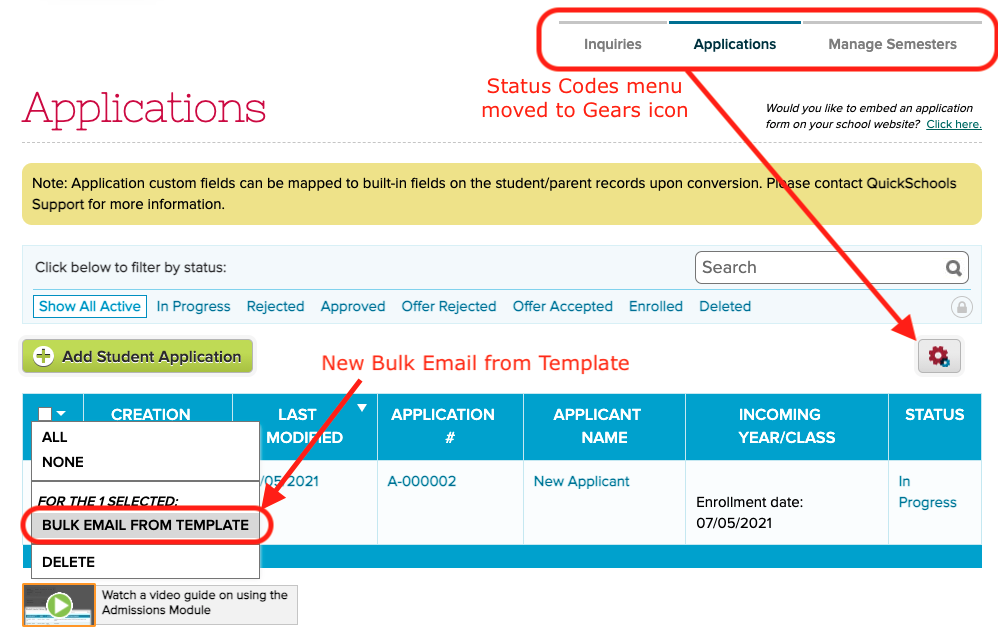
  • Bulk Email Applicants from Template
  • Improve Configuration Area for Inquiry and Application Status Codes
  • Bug Fix Enrollment when student name has apostrophe
  • Framework Improvements to support Portal for Applicants (Alpha)

Other General Improvements

Read More »

Online Payments via ACH

We recently released a new feature related to the Online Payment modules on June 6 (with improvements on July 6). Schools in the United States that subscribe to QuickSchools can now collect payments from students and payments via ACH Bank Transfer.

This feature is in BETA: If you would want this enabled for your school, please contact our Support Team.

Configuring the App

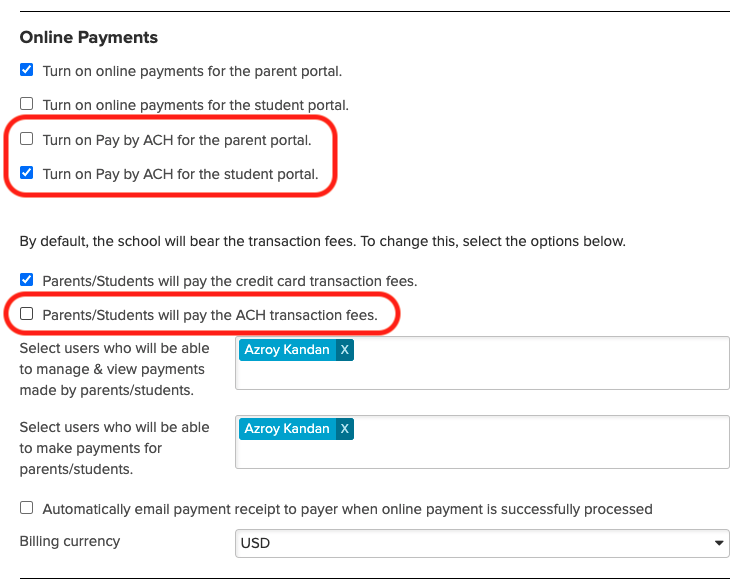
To enable this feature, go to the “Settings” page, and enable the setting under the School Fees Tracking” module:

configure the online payment in quickschools

There are separate settings for Credit Card vs. ACH Bank Transfer. And you can decide whether to absorb the transaction fee, or to charge a convenience fee to the payer.

Student Paying Online

Once you’ve connected your account to Stripe, Student make payments directly from their Student Portal:

Read More »

New Release – July 6, 2021

Several minor improvements for this release, plus a few general improvements to our Master Scheduler. Here are the latest improvements in QuickSchools:

Master Scheduler Improvements

  • Support Alternate Bell Schedule in PDF Section Assignments
  • Mass Email PDF Section Assignments
  • Improve how teachers without departments are displayed in Step 4
  • Improve general performance for large data sets
    • Option to Paginate Step 4
    • Freeze Left Pane for Step 5
    • Optimize Summary Reports
  • New Importer to link Teachers to Courses for Enrollment Period
  • Course Requests Importer supports Course Alternates
  • Improvements to Orchestra Subscription Plan
  • Cosmetic Improvements to Constraints screens
  • Expand Data Dictionary for Summary Reports

Improvements related to Beta Features

Other General Improvements

  • Simplify disconnect from Google Classroom
  • Miscellaneous API Improvements to support integration via Zapier
  • Bug fix when taking for attendance for multiple Subjects in the same period
  • Bug fix for Section Attendance Pie Chart on Student record
  • Miscellaneous bug fixes in Admissions module
  • Miscellaneous server performance improvements

Student ID Card

We’re really excited to announce our new capability to print/generate Student ID Cards. Student Cards will leverage our existing PDF templating engine, allowing ID cards to be customizable by school. 

Sample Student ID Card generated in QuickSchools (Beta)

You will have options to hide areas of the Student ID, but any further customizations would need to be done by our support staff.