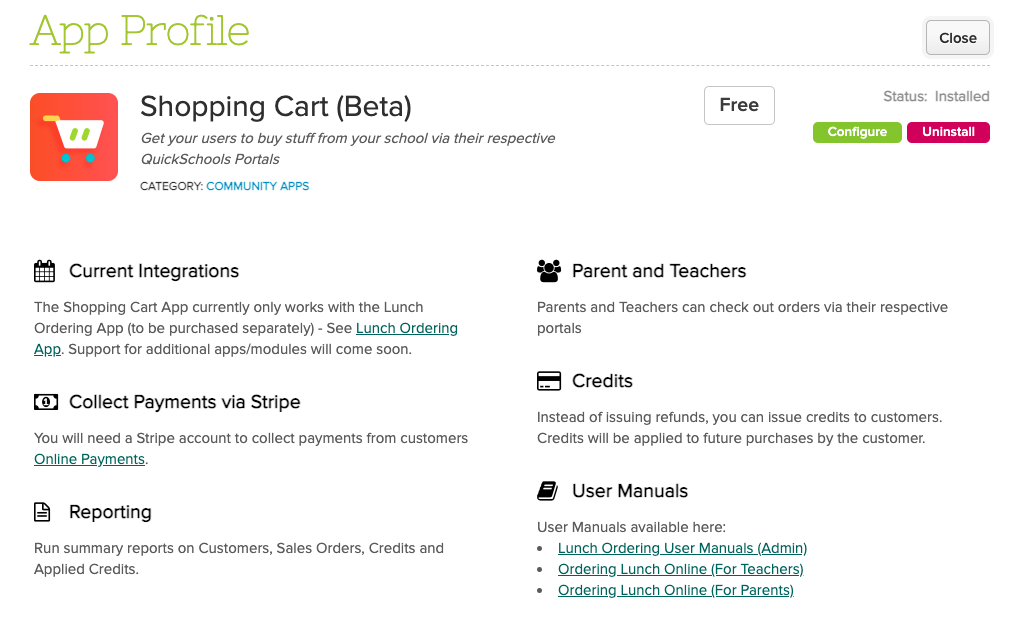
With our new updated Lunch Ordering app, QuickSchools is developing its own Shopping Cart capability, where users can add items into the Shopping Cart and make a purchase from the school.
The Shopping Cart app is currently still in beta, and only available with the Lunch Ordering App. But we do intend to support additional features in the future:
Today’s release focuses on continued improvements to our Orchestra Master Scheduler and Lunch Ordering app, plus general improvements and bug fixes to our Student Information System (SIS).
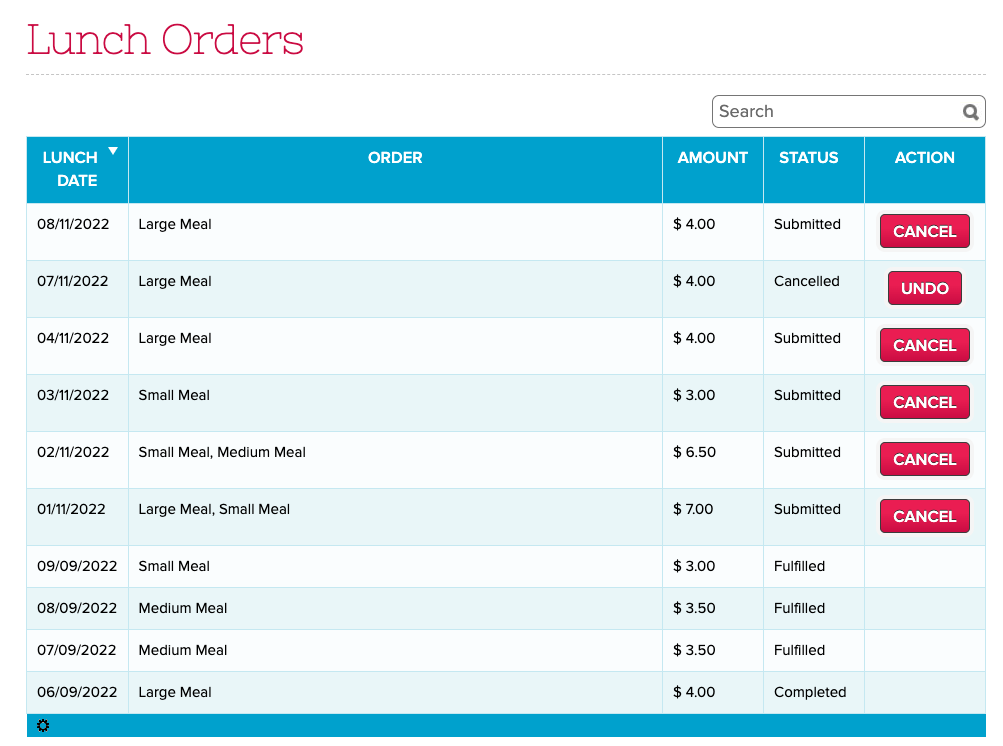
Updated “Lunch Orders” listing for Parents and Teachers
Here is a list of the latest QuickSchools improvements:
Master Scheduler Improvements
Search Students in Step 5 by Student Number
Option to display Student Number in Step 5
Option to show internal Section ID in Step 4 and 5
Option to show roster directly to Teachers via their portal
Bug Fix Course Requests when Course is excluded from Enrollment Period
Lunch Ordering App
Improve Lunch History screen to support sort, search and additional functions (See Above)
History for Bulk Cancel Lunch
Ability to Undo Bulk Cancel Lunch
Support for Lunch Day Labels
Bug Fix Deleted Lunch Orders when all individual meals are removed
General Bug Fixes
New “Schedule” tab for Student & Parent Portals for Simplified Schedule (See below)
Links in Notes for Simplified Schedule are now clickable (See below)
Links in Notes for Generated PDF from Simplified Schedule are also clickable (See below)
Update Note for cost of paid Text Messaging
Bug Fix Customer Dropdown for QuickBooks Integration App.
Beta Improvements / Fixes
Option to force full online payments in students / parents (i.e. remove option to pay any amount)
Improve support for Weekly Schedule in “Courses & Sections”
Bug fix Gradebook when missing Add Date in “Courses & Sections”
Miscellaneous Improvements to the SFTP Importer (Beta)
Support Custom Emails for Scheduled Emails
Bug fix revoking access to Teachers for Group Schools
Remove “View Enrollment History” for Group Schools
Expand data dictionary for Summary Reports
General Security Updates
Schedule for Student and Parent Portals
If your school is using the Simplified Schedule, both the Student and Parent Portals now have a dedicated “Schedule” tab that quickly shows you the class schedule:
Today’s release showcases our new-and-improved Lunch Ordering app which now supports Online Payments, as well as Lunch for Teachers. This release also includes several improvements to the Orchestra Master Scheduler, Discipline, Report Cards, Lesson Plans and Admissions modules.
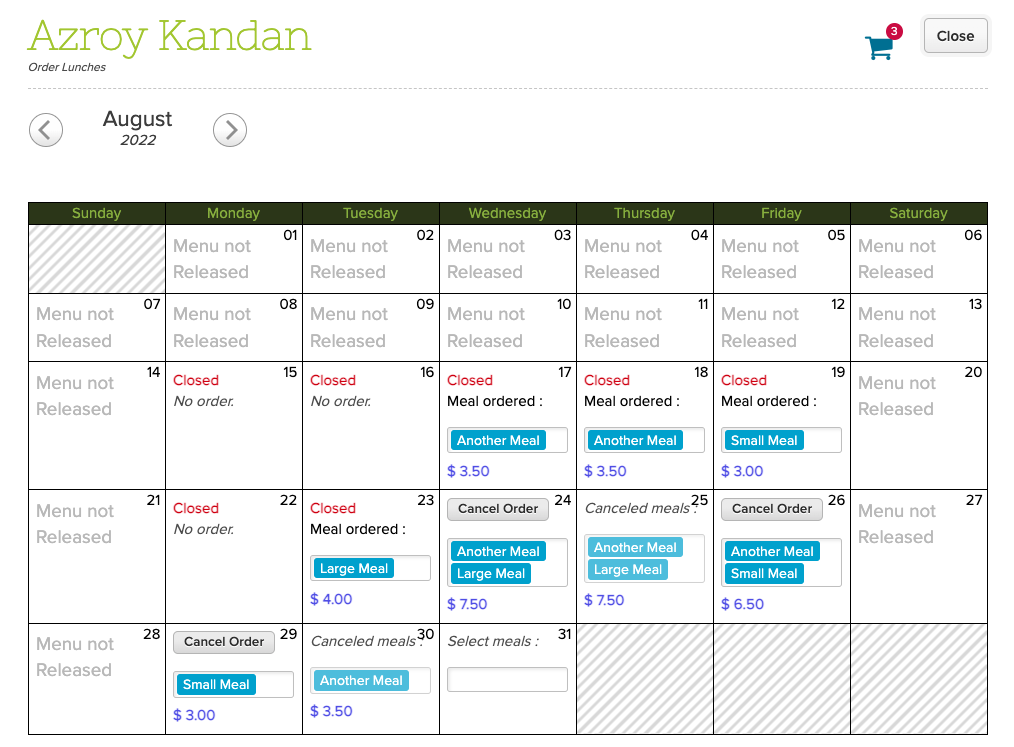
Lunch Ordering for Teachers
Here is a list of the latest QuickSchools improvements:
Master Scheduler Improvements
Show main buttons when scrolling in Step 4
New External Section ID importer for Step 4 (beta)
Track when course requests are assigned to sections in Step 5
Improve Summary Reports
Bug fix Section Limits by Department,
Bug fix Override Target Students
Bug fix Course Requests Import Date in History screen
Bug fix related to Auto-Set Next Grade
Bug fix Bulk Email Section Schedule
Lunch Ordering App
Support Online Payments (Shopping Cart)
Lunch Orders for Teachers (See above)
Order Cancellation generates Credit for Future Orders
Updated Lunch Fulfillment screen for Admin
General (Functional) Improvements
Ability to view Discipline PDF from Student portal
Show configured custom fields for Discipline module on Student record (See below)
Bulk Enroll Students from the Admissions module (See below)
Support ability to relabel “Enrollment Date” in Admissions module
Show Report Card Session Name from Subject-Specific Criteria screen
Ability to preview uploaded attachments in Lesson Plans module
Support optional Homework in Lesson Plans
Reverse Sort semester dropdown in Standards-Based Gradebook
General Bug Fixes
Improve Bulk Fill for Subject-Based Report Cards
General Security Improvements
Beta Improvements / Fixes
Support Sharing Dashboard with Users
Option to clear manually entered grades in Report Cards from Subject-Based screen
Import Sign-In/Sign-Out records from Student History screen
Custom Fields for Discipline
Custom Fields that have been configured to be viewable are now displayed as a column on the Discipline tab of the student record:
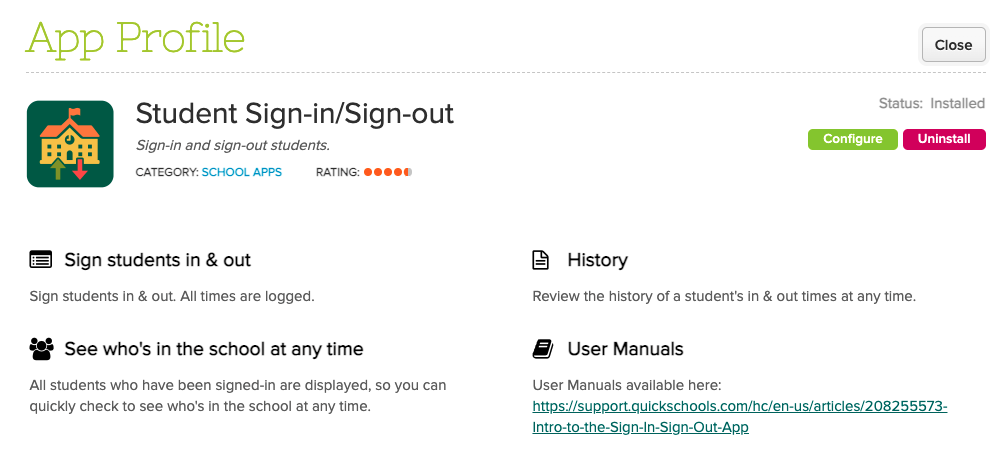
The QuickSchools Sign-In/Sign-Out App has undergone quite a few improvements over the years. Schools are using this app to:
Track the exact date and time when students sign-in and sign-out of school
Allow students to sign themselves in
Allow parents to sign in their children
Track the total time a student is in the school (usually for billing or compliance purposes)
You can find this app on our app store:
Sign-In/Sign-Out App on the QuickSchools App Store
We’d like to take this opportunity to discuss some recent improvements since our last review was from 2020, as well as a few potential improvements moving forward:
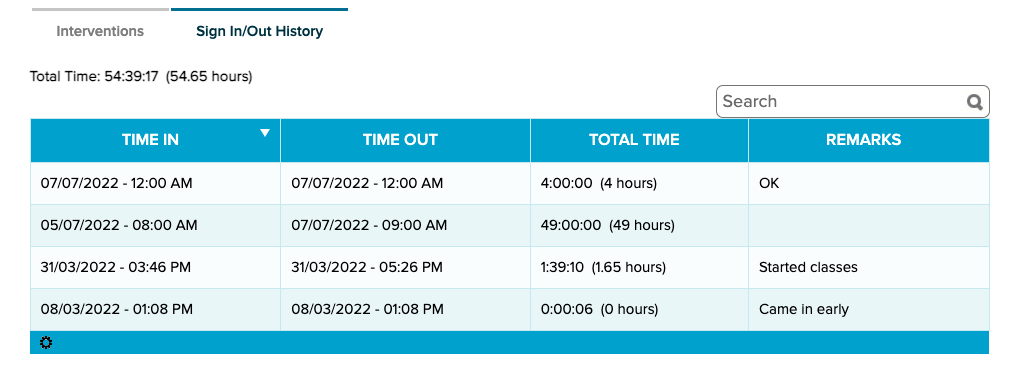
Teachers and staff can now view the sign-in/sign-out history for a student directly from the student tab. This makes it easier for users to review all data pertaining to a student in one location.
View Sign-In/Out History from the Student record
NOTE: This is a welcome improvement because most apps require you to view information about the app from the app itself (and not from the student record).
Summary from Student Portal
This new feature is designed primarily for adult education. It allows students to track the amount of time they’ve completed at school, as a prerequisite for completing their course:
In today’s release, we’re including framework improvements for our upcoming Lunch Order and Shopping Cart modules. The release also includes a mix of improvements to the Orchestra Master Scheduler, Admissions, Sign-In/Sign-Out, and security, just to name a few.
Step 4 Scheduler supports color-coding without “Organize by department”
Here is a list of the latest QuickSchools improvements:
Master Scheduler Improvements
Color Code Step 4 when “Organize by department” is not enabled (See above)
Security Improvements
General Security Improvements
Improve Privacy on Test Server
General (Functional) Improvements
Ability to hide Admissions Application Statuses (See below)
Show Custom Fields for Documents on Student record
Importer for Sign-In/Sign-Out App (See below)
Improve Report Creator support for Sign-In/Sign-Out App
General Bug Fixes
Improve Support for Disputed Charges in Fee Tracking with Online Payments
Improve Support for OneRoster (v1.1) Integration
Upgrade Text Messaging Framework
Bug Fix Alerts Framework for deleted parents
Bug Fix when adding new Online Test
Other Server Updates
Beta Improvements / Fixes
Lunch Ordering Support for Online Payment
New Shopping Cart Framework
Ability to Share Dashboard
Improvements to Bulk Charge Credit Cards via Standard Charges
Add support to disable Auto-Enrollment for Canvas Integration
Add support to automatically Un-enroll students for Canvas Integration
Fix District-Wide Students for Group School
Hide Application Status
In the Admissions module, when configuring the Application Statuses, you now have the option to hide certain status:
At QuickSchools, we’re driven by our goal to empower educational institutions. We’re here to make your responsibilities as a principal, school administrator, and/or teacher easier by streamlining your work processes.
QuickSchools + Zapier
QuickSchools provides the technology solution for admissions, enrollment, fee tracking, rostering, etc. We also help you collect and manage various data related to students, parents, staff, and courses. It makes perfect sense for us to partner up with Zapier so that you can integrate Quickchools with your other technology solutions with minimal effort. Bypass all the busywork when it comes to sharing data and automating tasks.
At present, QuickSchools integration via Zapier focuses on CRM applications such as HubSport and WizeHive. But schools should be able to use Zapier to integrate QuickSchools with a variety of applications.
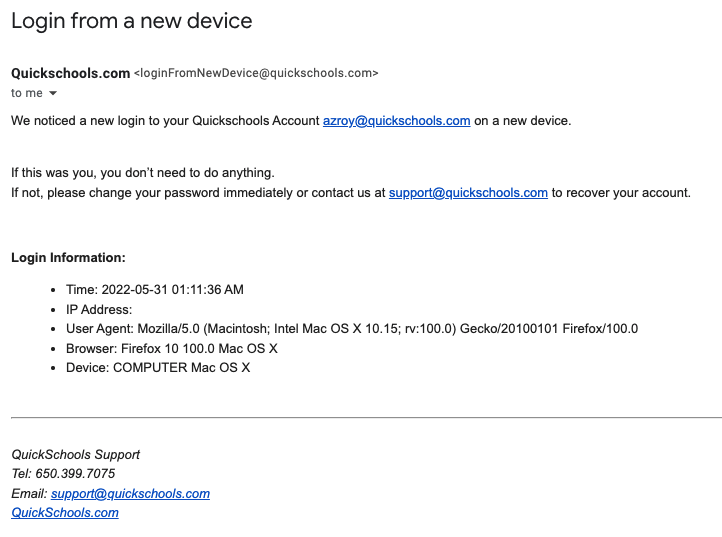
You may have received an email notification recently from QuickSchools letting you know about a new login to your account. This is a new security-related feature that was released recently. Basically, any time someone logs into your account either via a new IP address, or a new device, QuickSchools will send you an email notification.
Notification on “Login from New Device”
Recent Security Improvements
There are several other security-related features included in our recent release. In addition to new login, QuickSchools will also send out an email notification if you (1) change/reset your password, or (2) add/remove users to the School Admin role. Finally, with this new release, if you do change your password, anybody currently logged into your account will automatically be logged out.
If you notice any strange activity in your account, please change your password immediately. You should also contact your school’s administrative team, or contact QuickSchools support for assistance. We can help track down what might have happened to your account.
Security-Related Summary Reports
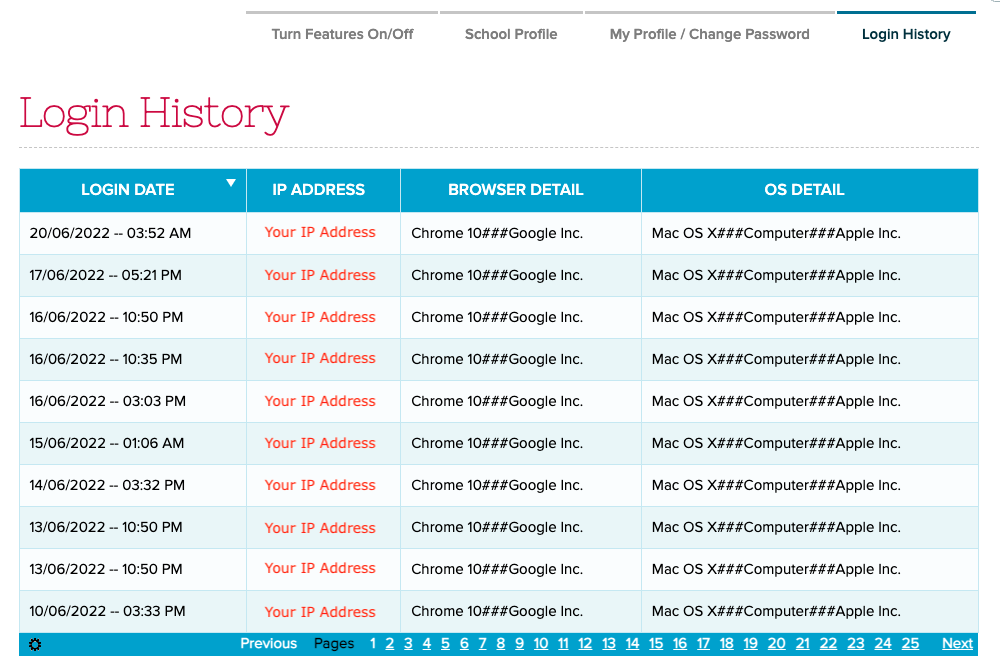
As a school administrator, you have access to Summary Reports that show user and login history. In particular, the “Portal Login History” Summary Report shows the history of all logins for any user in your school: