New Release – March 8, 2023

Yesterday, we released improvements in several areas including the Payment Plan, Lunch Ordering / Shopping Cart, Online Tests and Private Messaging:

Private Messaging now supports Searching messages by user, and Searching message contents

Here is a list of the latest QuickSchools improvements:

Payment Plan

  • Show Stripe Connection screen when not connected to Stripe
  • New Notes section for Skipped payments
  • Only show Active Payment Plans by default
  • Advanced Filtering for Payment Plans
  • New email notifications for upcoming payments and expiring credit cards
  • Support for Report Creator

Lunch Ordering / Shopping Cart

  • Parents can edit orders
  • Refactor how Subtotal and Total Cost are calculated and displayed
  • Improve re-processing of orders after cancellation
  • Additional Safeguards against duplicate orders
  • Bug Fix manual create order by admin with Mark-Up
  • Bug Fix rounding of orders with Mark-Up

Online Tests

  • Improve Teacher / Subject Selector
  • Improve screen for Adding new Online Test
  • Support Tags for Online Tests

Private Messaging (See above)

  • Search Inbox
  • Search Message Thread

General Bug Fixes / Improvements

  • Barcode Support for Sign-In / Sign-Out App (see below)
  • Improve how teachers names are imported based on name format
  • Improve file size checking when attaching files to mass emails
  • Improve description for Online Payments via Admissions and Online Forms
  • Display module information from Online Payments
  • Improve SFTP Importer to handle student name formats and duplicate courses

Barcode Support for Sign-In / Sign-Out App

If you’re using the QuickSchools Student ID Card with generated barcode, you can now use it with the Sign-In / Sign-Out App:

Read More »
Thank You for Making our February 2023 Webinar a Success!

We’d like to express our heartfelt gratitude to everyone who attended the New Features & Product Roadmap webinar on February 23rd, 2023. We hope you enjoyed attending the event as much as we enjoyed hosting it.

Do you have any thoughts or comments with regards to the webinar? We’d love to hear from you. Please complete the survey form included in the follow-up email. For those who weren’t able to attend – do not to worry! You can request a copy of the webinar recording by checking off the request for recording box in the survey. We look forward to hearing your feedback and suggestions.

If you’re interested in any of the modules or Apps previewed during the webinar, visit QuickSchools and click on the Chat button. You’ll be greeted by one of our product support specialists who can provide you with more information. Alternatively, you can email us directly at support@quickschools.com. We also provide details on our latest features and software improvements in our Release Notes.

We hope to see you in our next webinar — Orchestra Part 1: Scheduling for Beginners — scheduled for Thursday, March 23rd at 11 am PST / 2 pm EST. This webinar is geared towards School Administrators and Principals who are currently working with our master scheduler, or for those looking for one. Registration will be open by the second week of March.

New Release – Feb 13, 2023

Today’s release contains improvements in several areas including the Orchestra Master Scheduler, Payment Plan, Lunch Ordering / Shopping Cart and our QuickSchools API:

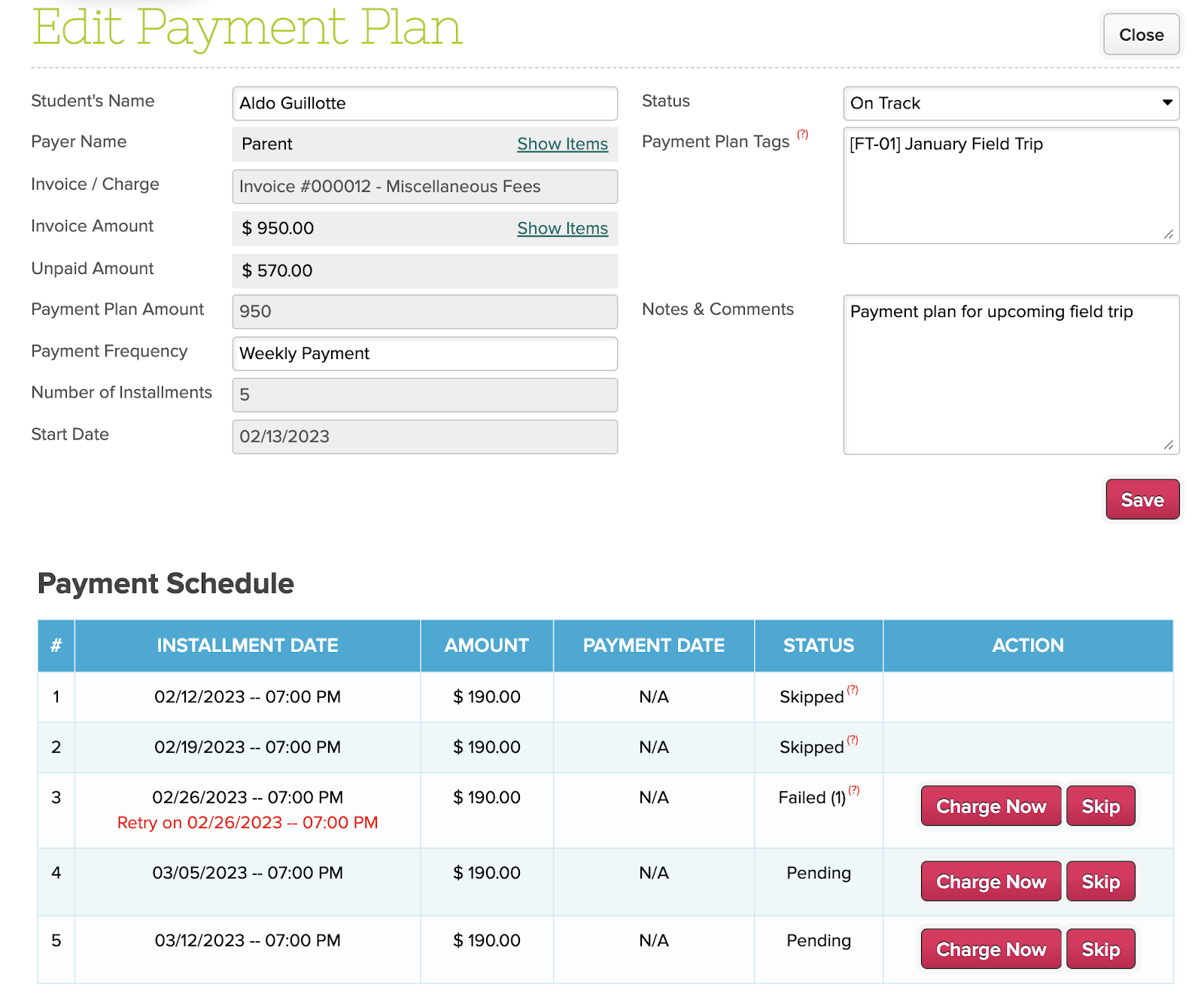
New Improved Payment Plan module

Here is a list of the latest QuickSchools improvements:

Master Scheduler Improvements

  • Improve Course Request Import via SFTP
  • Improve adding/removing of Max Sections in Step 1
  • Cosmetic bug fixes when searching for teachers in Step 4
  • Beta option to move sections with enrollment in Step 4
  • Improve Step 5 Advanced Search with the new Minimize/Maximize function
  • Exclude deleted courses from Teachers sections
  • Improve how empty sections are displayed in teacher’s Schedule PDF
  • Beta option to hide Weekly Schedule

Payment Plan

  • Option to configure the number of Retries after a failed payment
  • Option to configure the wait time to retry after a failed payment
  • Option to “Charge Now” for Admin
  • Support to back date schedule for new Payment Plans
  • Email Notification for Failed Payments, with option to CC/BSS additional email addresses

Lunch Ordering / Shopping Cart

  • Improve the Sales Order PDF to include Subtotal and Credits Used
  • Support Mark-Up when Checking Out with Credits
  • Bug Fix Manual Orders with Mark-Ups
  • Fix how meal types are handled for new academic terms

API Support

  • API Support for Engage CRM
  • API Support for Student ID Card on Mobile

We’ve been adding new features to the Payment Plan, Lunch Ordering / Shopping Cart and the Master Scheduler modules on an ongoing basis over the past several months. We’ll be updating documentation on these modules, and will provide a consolidated view of all these new improvements in the coming weeks. Keep a look out for those.

2023 Kickoff Webinar

2023 kickoff webinar for quickschools

It’s finally here! QuickSchools’ first webinar of the year is scheduled for Thursday, February 23 at 11 AM PST / 2 PM EST.

Since our last Product Roadmap webinar in May 2022, we’ve launched and improved modules that rely on our Online Payments framework with Stripe, which includes:

  • Shopping Cart (with Lunch Ordering)
  • Payment Plan
  • Admissions / Online Forms

We’ll be revisiting some of these new improvements in more detail. We’ll also be discussing our soon-to-be-released Engage CRM, which is an extension of our Admissions module, to be offered as a standalone product.

Read More »

New Release – Jan 25, 2023

We had a release last Wednesday, with improvement in several areas including the Orchestra Master Scheduler, Shopping Cart and Admissions:

Here is a list of the latest QuickSchools improvements:

Master Scheduler Improvements

  • Improve how constraints are displayed in Step 4
  • Show Teacher Assigned Course Request in Step 5
  • Support to override Room for a specific section within a Group / LinkNo.
  • Bug fix for “Subject Schedule by Teacher” Report
  • Bug fix “Bulk Transfer Students to Another Section”
  • Move option to Print 4 Per Page to Private Beta

Shopping Cart Framework

  • Support to exclude/handle expired shopping cart items (see above)
  • Improve how the Shopping Cart module is accessed by role
  • Report Creator Support for Shopping Cart
  • Bug fix for empty Sales Order

Admissions Fixes / Improvements

  • View Online Payment details from submitted Applications
  • System Fields in Embedded Application Form and now Required Fields
  • Support for Fee Tracking Invoices, when Online Payments is also enabled

General Bug Fixes / Improvements

  • Show Date/Time in Private Messaging
  • Improve support for special characters when downloading files
  • Fix Callback Number for Voice Messaging

Beta Improvements / Fixes

  • Support for Non-Binary Gender
  • Bug fix Course-Teacher Configuration import via SFTP 
  • Bug fix error when resigning teacher for Group Schools

New Release – Jan 5, 2023

Happy New Year! We had a release last Thursday, with improvements in the Orchestra Master Scheduler and Lunch Ordering. Our new Payment Plan module is officially in Private Beta:

New Payment Plan Module currently in Private Beta

Here is a list of the latest QuickSchools improvements:

Master Scheduler Improvements

  • Step 4 Search by Teacher Name
  • Improve Step 4 Course List Preferences with reloading the screen
  • Improve top menu for Step 4 and 5
  • Teacher Schedule Board support for Weekly Schedule
  • Student Schedule support for Weekly Schedule from Courses & Sections
  • Increase scroll bar height

Lunch Ordering App

  • Admin can adjust customer credits
  • Update location of “Order History” link
  • Bug fix when adding Lunch Orders for days that were previously deleted
  • Bug fix double orders in Shopping Cart

General Bug Fixes

  • Disallow deletion of Admin Columns that are using in Formulas
  • Fix Missing Grade in Transcripts Configuration
  • Improve handling of special characters in file name when exporting data
  • Improve how Class Discussions are displayed to Student when student is not enrolled into any classes

Beta Improvements / Fixes

  • New Payment Plan
  • Add Online Payment Support for GBP
  • Disallow parents from editing uploaded Student Documents
  • Improve information on notification emails from scheduled tasks
  • Bug fix error when running specific imports via SFTP 

New Release – December 12, 2022

Today’s release contains improvements in several areas including the Orchestra Master Scheduler and Lunch Ordering.

Here is a list of the latest QuickSchools improvements:

Master Scheduler Improvements

  • Display Semester dropdown in reverse chronological order when copying settings from another Enrollment Period.
  • Improve Next Course Algorithm in Step 5 to ignore constraints
  • Bulk Print Student Schedule after Step 5
  • Bulk Email Teacher Schedule after Step 5
  • Improve Bulk Print Student Schedule after Step 6
  • Option to hide main bell schedule in Schedule PDF after Step 6

Lunch Ordering App

  • Support for Admin to add new Lunch Orders (See above)
  • Streamline Lunch Order Amounts in Parent Portal when a Meal Type is deleted

General Bug Fixes

  • Improve Support for Fee Tracking with Online Payment for Online Forms
  • Trim Student Name when submitting Online Form PDF (via SVG)
  • Include decimals when synchronizing gradebook with Schoology
  • Add Admissions Inquiry Creation Date to Report Creator

Beta Improvements / Fixes

  • API Improvements for One Roster
  • Freeze Student Column when scrolling right on “Courses & Sections” > “By Student”
  • SFTP Importer (Beta) support to order of tasks
  • Bug Fix Numbering of Online Tests

New Release – November 22, 2022

Today’s release lays the groundwork for our new Payment Plan module. We expect an early beta version to be released in the next month. The remaining improvements focus on our Orchestra Master Scheduler, Lunch Ordering app, and our SFTP Importer (Beta), plus other general improvements and bug fixes.

New “Conflicts” by Department in Step 5 of the Orchestra Master Scheduler

Here is a list of the latest QuickSchools improvements:

Master Scheduler Improvements

  • Set default Next Course for Year-Long Courses in Course Catalog
  • Preview / Download student Schedule PDF from Step 5
  • Show Conflicts in “% Complete” Breakdown by Department in Step 5
  • Bug Fix when Link / Remove Section with custom Day labels in Step 4

Lunch Ordering App

  • Customers can view/print paid orders

General Bug Fixes

  • New option to Skip Invoices in QuickBooks Integration App (see below)
  • Show negative amounts properly in “Billing History”
  • Bug fix unenrolling students in Group Schools
  • Bug fix schedules tasks that “Repeat every weekday”
  • Bug fix when submitting grades from Gradebook to Report cards
  • Bug fix when displaying total score in Online Tests 
  • General Security Updates

Beta Improvements / Fixes

  • Payment Plan Framework (Early Alpha)
  • SFTP Importer (Beta) support to deactivate old students
  • SFTP Importer (Beta) support to delete old course requests
  • API Improvements to support Engage CRM
  • Bug Fix on new Sections tab for Teacher Portal
  • Add support for Notes to Parent Portal

Option to Hide Invoices for QuickBooks Integration

This is a new feature to help hide transactions that may already have been exported to QuickBooks outside of QuickSchools:

Read More »