Today’s QuickSchools release focuses on a few system / framework improvements around security, performance and maintenance, with general improvements to the Orchestra Master Scheduler and Student Information System.
Today’s QuickSchools release focuses on a few system / framework improvements around security, performance and maintenance, with general improvements to the Orchestra Master Scheduler and Student Information System.
Full list of improvements are below:
Master Scheduler Improvements
Bug Fix Display of Section Limits when limit is set to zero in Course Catalog
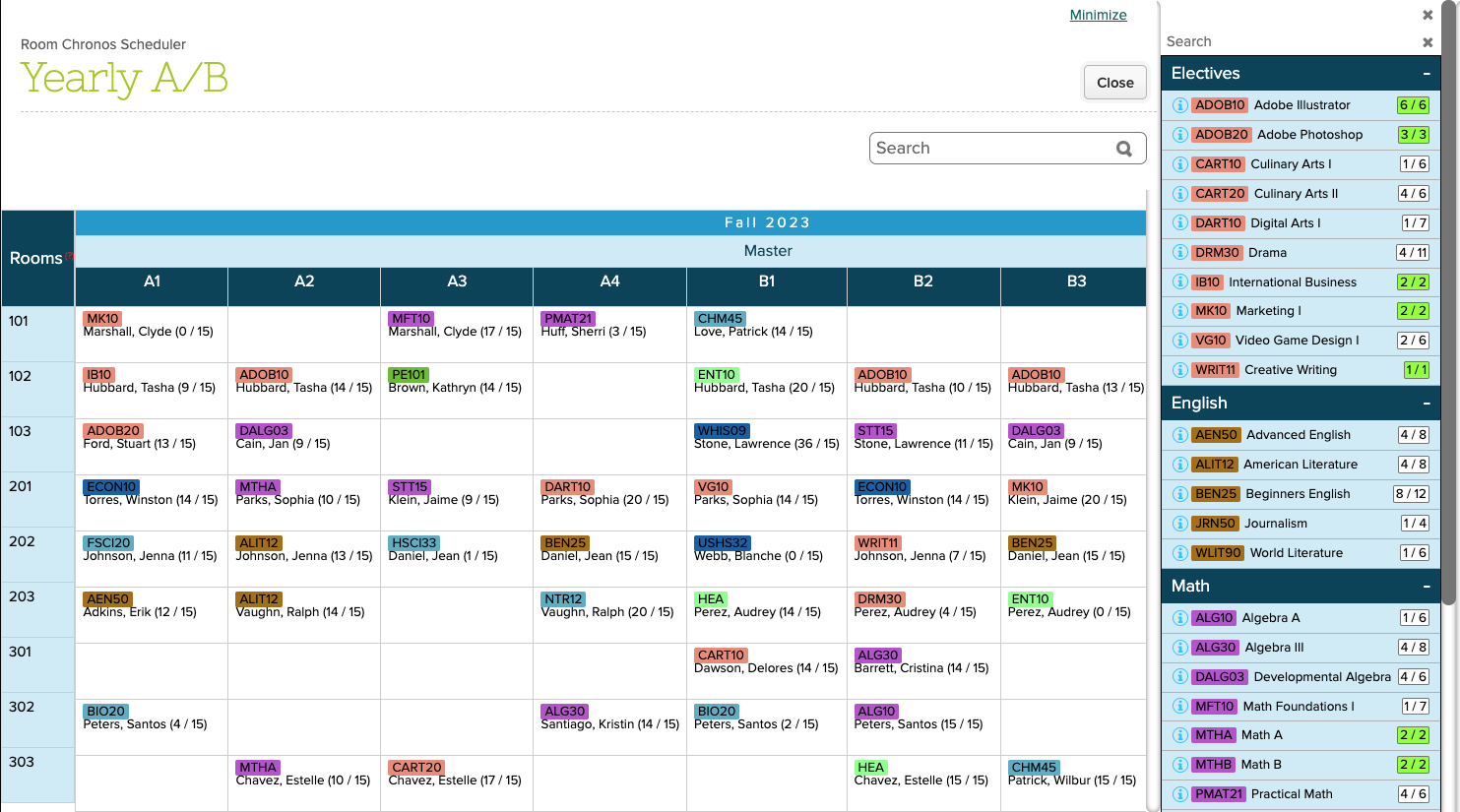
Show Rooms assignments for Courses based on Departments in Step 1
General Improvements
Auto-map Courses to Schoology when a new semester is activated
Increase timeout for archiving old Homework when a new semester is created
Increase timeout for XML BackUps
Fix display in Student Listing when Nickname is not provided
Bug fix display of configured PDF Template for Report Cards and Transcripts
Bug fix search for “Your Students” listing
Beta Improvements
New Data Monitor Framework (v1)
Refactor Migrate to Next Year (for Courses & Sections)
Framework Improvements for Anonymization (on-going)
Support “Weight Type” and “Excluded from GPA” for Course Importer
Support multiple Graduation Tracks
Improve Security for Support Agents (Google Authenticator)
Today’s QuickSchools release mostly contains bug fixes and refinements, except for one new feature – Export from Report Creator via SFTP.
Full list of improvements are below:
General Improvements
Refine email notifications from no-reply@quickschools.com
Discipline Incident PDF
Miscellaneous Bug Fixes to Master Scheduler
Other Beta Improvements
Export from Report Creator via SFTP (Beta)
Improve Framework for scheduled SFTP Imports
Hide Course Section Limits when Orchestra Master Schedule is not installed
Bug Fix Search Unified Parent for Group School
API Improvements for Engage CRM
Export from Report Creator via SFTP (Beta)
This feature is currently in private beta, and works with the Report Creator App. We will be making additional improvements to this app in the coming weeks. For right now, here’s what it does:
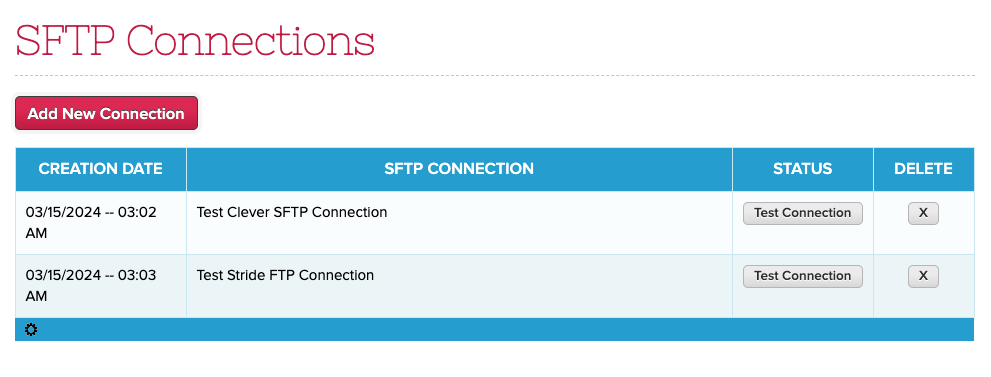
Create a SFTP Connection
There will be a new menu where you can create / edit SFTP connections:
Click on “Add New Connection” to create a new SFTP Host:
We’re back to a normal flow for engineering improvements. Today’s QuickSchools release focuses on the Gradebook, with some minor improvements to the Master Scheduler, Attendance and API.
Full list of improvements are below:
Master Scheduler
Relabel Step 4 button to “Import External IDs”
Relabel the “Lock Sections” checkbox in Step 2 to be more descriptive
Bug Fix “Bulk Course Requests” in Step 2 for locked course requests in previous Enrollment Periods
Bug Fix Advanced Search in Step 5 for Students with unassigned duplicate course requests
Gradebook Improvements
Low Grade Alert for Gradebook (see below)
Gradebook expanded option to share or copy columns between different subjects
Bug Fix Minimum Score from Admin Column
Option to submit grades from ALL gradebooks to Report Cards (Beta)
Option to bulk show/hide Gradebook in “Manage Subject Availability” (Beta)
Other Beta Improvements
API Improvements for Engage CRM and Mobile
Option to Bulk Set Attendance for Subject-Based roster
Report Creator support for Total Attendance by Period
Bug Fix Teacher Listing when a school is removed from a Group School
Low Grade Alert
We have a new Alert for the Gradebook, allowing you to notify parents of low grades. This feature currently works only for the default Grading Scale. Here’s how it works:
Enable the School-wide Alert under “School Profile”
Configure the low grades under “Grading Setup”
Notification for teachers when saving the Gradebook
Notification for Parents
Opting out of alerts for Parents
Enable the School-wide Alert
Under “Settings” > “School Profile”, there is a setting under “School-wide Alert Settings” for “Gradebook – Low Grade Alert”:
The alert is disabled by default. You can opt parents in or out by default. Parents can still opt in/out individually once the feature is enabled.
NOTE: This first version currently supports Email Alerts only. In the near future, we’ll be adding support for this alert to the “Home by QuickSchools” Mobile App
Configure the Low Grades
Under “Grading Setup”, there is a new setting called “Low Grade Alerts” where you can configure the Letter Grades and Codes that warrant an alert:
Our focus for the past few weeks has been on the New Policy for Sender Email. And so the QuickSchools release for today is limited to improvements our API for Zapier and Engage, plus some general bug fixes and improvements to our general Student Information System:
General Bug Fixes / Improvements
Bug Fix Gradebook Comments with Special Characters from Canvas
Bug Fix Private Messaging when called incorrectly from the browser
Improve experience when choosing “Other Balance” for Online Payments
Beta Improvements
API Improvements for Engage CRM and Zapier (WebHooks)
New Report Creator calculations for Section Attendance
New Zapier Integration App
We’ve been focusing on adding WebHook support to our Zapier Integration App over the past several releases. We finally introduced Instant Triggers in v2.0.0 earlier this month. With this latest release, v2.0.1 will now support district-wide webhooks. You can export more documentation on our Zapier Integration App in the coming weeks.