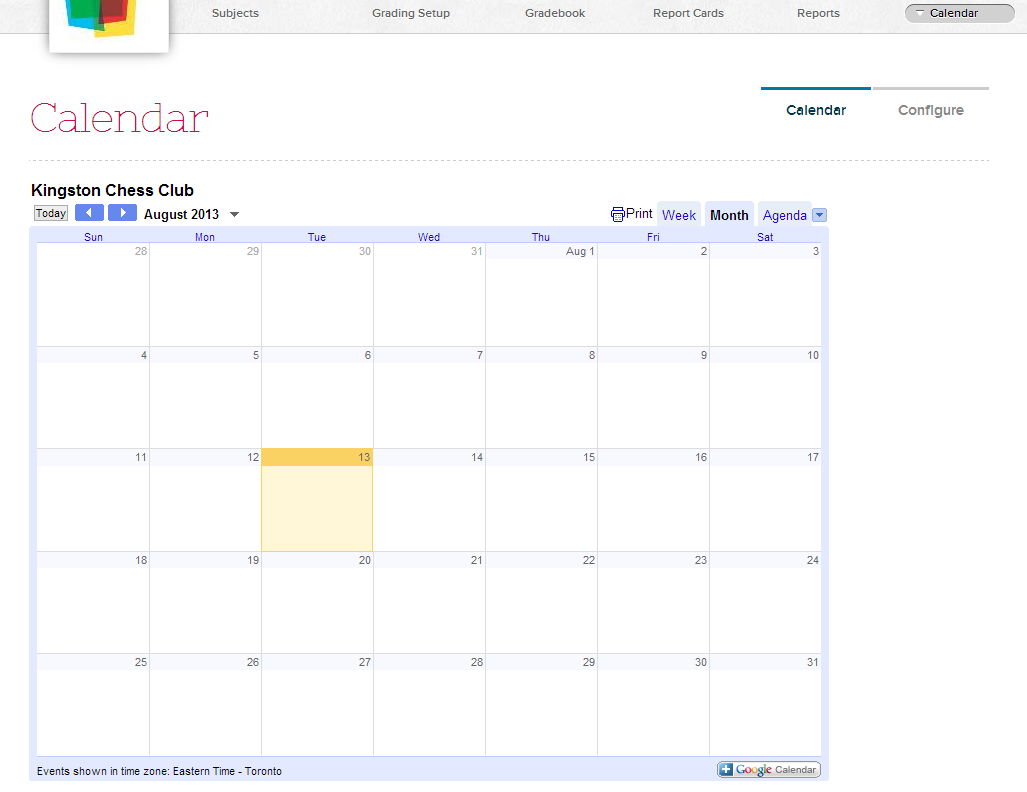
If you use Google Calendar on your website (or any other online calendar with an iFrame or JavaScript widget), you can now make it available to all your teachers, parents and students via their respective QuickSchools portals.
QuickSchools Calendar App
Share important events and dates easily and seamlessly. All you need is the code snippet to be published on your QuickSchools Account.Read More »
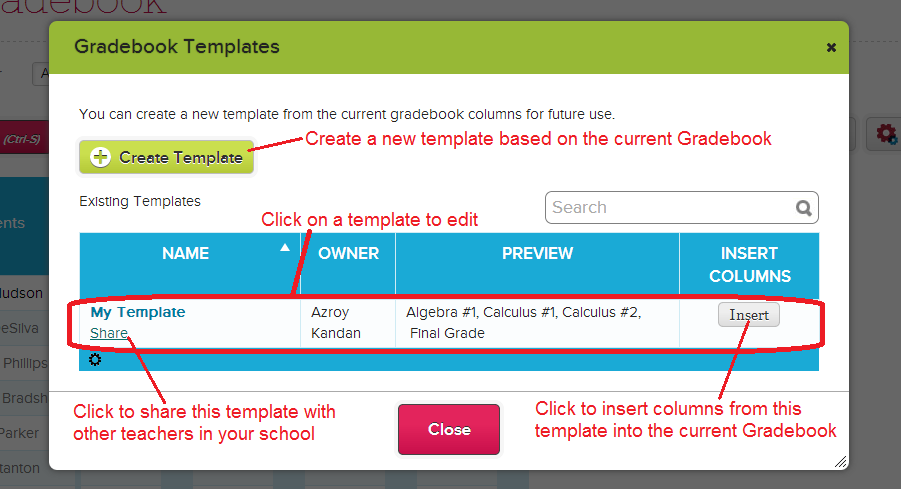
You heard it right! You can now create a template of Gradebook columns that you use often, and then very easily copy it into other subjects. Templates can be shared with other teachers as well. Here’s how it works:
Access the Gradebook templates from within your Gradebook by clicking on the Gradebook Templates icon on the right:
QuickSchools has just released a new feature for Group Schools.
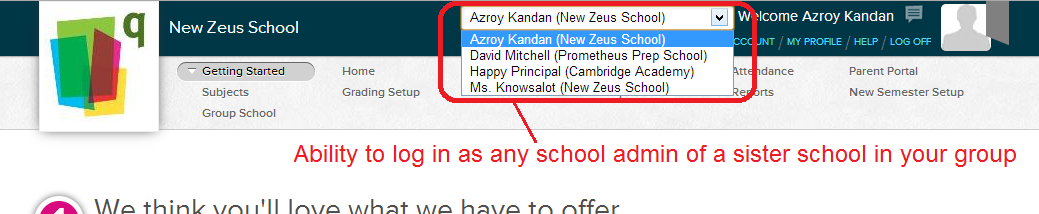
For schools that are part of a district, or a network of schools, you can now link school accounts together. Group school administrators can then log into any of the school accounts, as any of the school admins in that school account:
Logging in as Group School Admin
Group Administrators also can specify additional school administrators to be me made Group Administrators. You can also consolidate billing of all schools within the network under a single account as well:Read More »
If you’re having trouble deciding which subscription plan to start with, then we definitely recommend the Apollo Plan. It is by far our most popular plan. Here are some benefits to starting with the middle:
It’s easier to roll out: It’s typically difficult to roll-out new software to teachers. And so with less features compared to the Athena Plan, you’re able to introduce new modules in a controlled way, ensuring better adoption amongst your users. Even with all the features available on the Apollo Plan, we recommend turning them on one-at-a-time.
You can switch plans at any time: You can switch plans instantly at any time. Just go to the “Features” page, and click on the appropriate plan.
You can add-on Athena Plan features: If you just need one or two additional modules from the Athena Plan, come talk to us. We can add-on specific Athena Plan modules for a low monthly fixed price.
We try to make things as easy as possible. That’s our philosophy. And we welcome all new schools to the QuickSchools family.
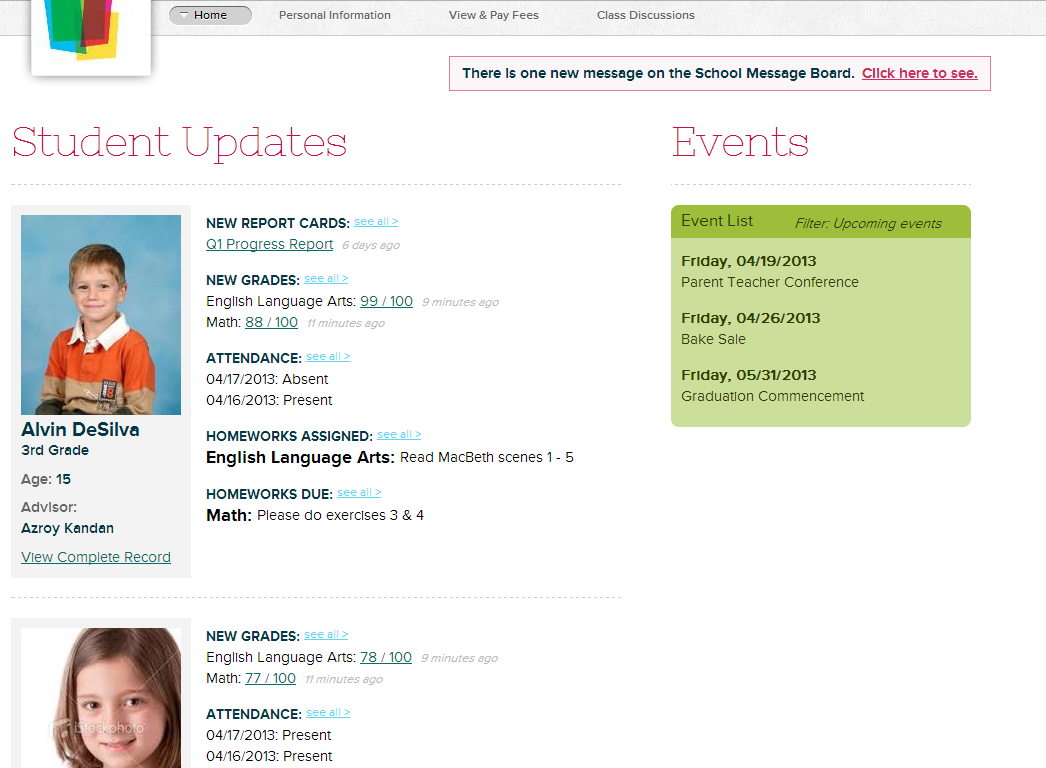
The Parent Portal has always been a great way to keep parents up-to-date with a student’s progress. Be it grades, attendance, homework, discipline, or even fees, the Parent Portal allows a parent to periodically check in on a student, to make sure the student is on track.
New QuickSchools Parent Portal Interface
But the Parent Portal can be a conduit for so much more. The Parent Portal can be used to keep parents engaged, not only to matters pertaining to the student, but also to the school in general. This is done by improving the way the school communicates with parents, and allowing them to participate and contribute.
Here are some of the tools available on QuickSchools to encourage parent engagement and participation:
The summer time is a great time to put together your schedule for the new school year. Whether you already have a schedule in mind (and you just want to put it together), or you want to build a new schedule from scratch, the QuickSchools Scheduler can help generate personalized schedules for all teachers and students, based on subjects that they are related to.
If you don’t have the Scheduling Module, you can actually add it to your Apollo Plan for a fixed monthly price. Contact us if you’re interesting in adding the Scheduling Module to your Apollo Plan.
New schedules are called “Schedule – Work in Progress”. Be sure to change the name when editing the schedule. The academic term for the schedule is displayed below the schedule name for your verification.
To begin making changes, just click on “Edit”, and you’ll see the screen below:Read More »
The summer time is when parents (and even students) start looking to enroll into school. So naturally, this would be a great time for schools to expand their reach to these prospective parents /students. With our Admissions module, you can keep track of inquiries and applications, and manage new enrollment of students. Here are some pointers. as part of our QuickSchools Summer Series:
Step 1: Enable your Online Admissions Forms
We recently released the ability for schools to post an online form for their Admissions inquiries and applications. Just get your web master or school administrator to post a short javascript code snippet onto your website, and the online form will be available to all your web visitors. You can instantly be notified whenever a form is submitted.
To find out more, check out these articles on our blog:
An Inquiry is essentially a lead, where a student or parent is interested in find out more about your school and your offering. You can keep track of all your communications with the inquirer, making it easier to secure yet another student for your school. Admissions Inquiries can easily be converted to an Admissions Application in QuickSchools, so you can start tracking more information about the student without having to re-enter data.
QuickSchools Admissions Inquiry
Step 3: Manage Student Applications
You can process new student applications via our Admissions Modules. The status of each application can also be tracked independently. Applications can be Approved or Rejected. Once Approved, the Offer to the student can also be Accepted or Rejected. Finally once Accepted, you can set the status of the Application to “Enrolled”, and this will convert the student application into a student record. Remember, you can also set up your own statuses to track things like “Wait-Listed” or “Pending Documents”.Read More »
So it’s the summer, and many schools will be closed. But even if you’re not running summer classes, there’s a lot you can do with your QuickSchools account over the summer months. Here are some suggestions to prepare for the new school year:
We’ll be posting new articles for each of these topics, as part of our Summer Series. If you want to learn more about these areas, please feel free to chat with our chat agents as well.