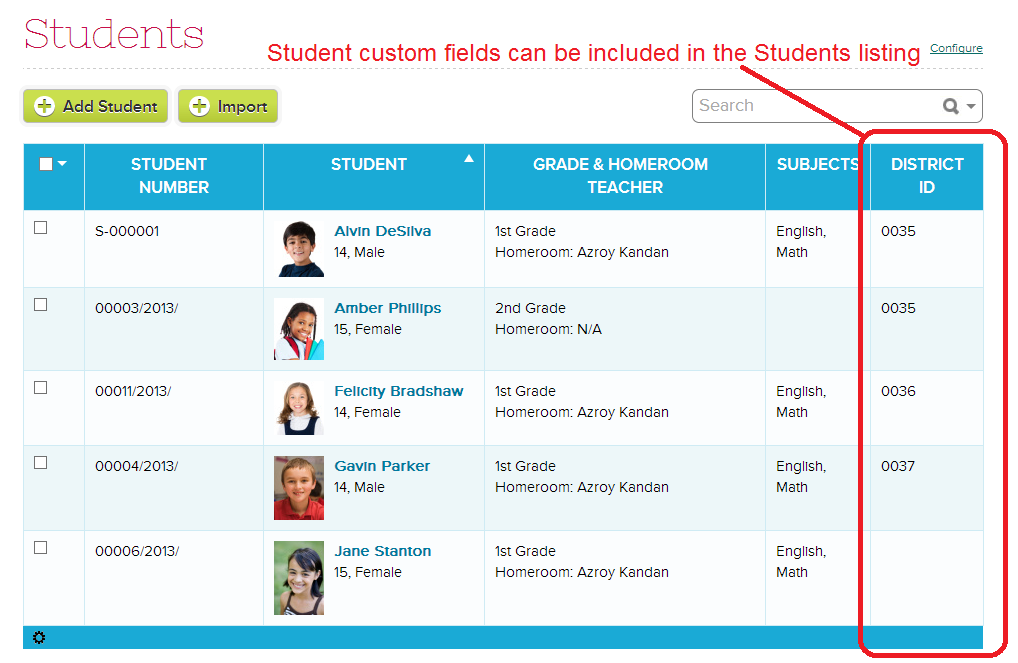
We’ve had a few requests at QuickSchools to have some of the custom fields to display on the main listing, as well as to have custom fields to be searchable. We’re happy to announce that a first version of this functionality has been released for the Students screen (other modules will follow soon). Here’s what your Students listing can look like.
If you decide to display only one of your many custom fields, the name of the custom field will appear on that table header:
Display ONE Custom Field in Students listing
If you decide to display 2 or more custom fields, in order to save space, all fields will appear under the same column. We recommend only allowing a few important / frequently used custom fields to be displayed on the main screen:Read More »
We’ve just released the ability for students to make payments online via the Student Portal. Just go to the Features page, and click on “Configure” next to the Fee Tracking module, and make sure the appropriate box is checked:
Turn on Online Payments for the QuickSchool Student Portal
Online Payments for the Student Portal works exactly like that for the Parent Portal. You can read about it here:
This new feature is perfect for Adult Education schools, like trade schools and vocational institutes. Students can now take care of payments directly from their Student Portal is needed.
As always, we welcome your thoughts and suggestions. Please leave a comment, or come chat with us online.
Last week, we began interviewing our current customers via video chat on Google Hangout. This is the first of what we hope will be a great many customer stories – “fireside chats” is what we’re calling them – that we share with you!
Greg Betti is the Principal of Stamford Elementary School, which has an enrollment of approximately 65 students grades K-8. Stamford has been using QuickSchools since September 2013.
Last summer, Principal Betti’s administration was looking to upgrade Stamford’s Gradebook and recordkeeping processes to “join the technology age.” But they were facing exorbitant costs and could not find something that their teachers could learn quickly.
“It was hard. Our teachers were nervous and we needed something in place before the school year started. We decided to try QuickSchools because it seemed like it would be easier to set up and then we could go from there.”
Principal Betti highlighted the QuickSchools help chat box and noted that he and his teachers were able to get their questions answered quickly and were up and running with the program in two weeks. He told us that QuickSchools was easy to roll out and that he has consistently been able to get high quality service. Hear from Principal Betti directly about his experience with QuickSchools:
Part of the selling point for Principal Betti was the QuickSchools Report Card feature. The Stamford school board wanted differentiated report cards for the upper grades versus the lower grades. QuickSchools worked directly with the school to design a customized report card for the upper grades. Hear from Principal Betti directly about report card customization with QuickSchools:
Principal Betti also told us about increased levels of satisfaction among teachers and parents with QuickSchools; he noted that both constituencies have achieved high levels of comfort with the product in a short period of time. Hear from Principal Betti directly about parent involvement since the implementation of QuickSchools:
Finally, Betti stated that he expects to continue growing and partnering with QuickSchools:
“We are slowly expanding our use of QuickSchools without being forced to; we’re just using it more and more. Our comfort level is not going down; it’s going up. We expand because we’re comfortable and that’s a win-win situation for our small school.”
Special thanks to Principal Betti and other participants in our fireside chat program. We look forward to sharing another story with you soon!
We’re very proud of our Report Card module. It has been a labor of love for us at QuickSchools, as we sought to blend the complexities of what schools demand in terms of assessments, with something that’s simple and easy-to-use for teachers and parents alike. And thanks to your feedback, the module has been able to evolve (and continues to evolve) into what it is today.
But still, customizing report cards can be a complicated affair, depending on the specific needs of your school. And it has been a challenge for us to try to meet the varying needs of our customers. And so, we’re dedicating an entire section on our QuickSchools Blog just to showcase the report cards that we’ve been able to customize over the years. And we hope that schools can use these examples as they work on setting up or even improving their QuickSchools Report Cards.
All report cards customization will be categorized into the “Custom Report Cards” category, which is available here:
In addition, all custom report cards will be tagged based on use-case / scenario. We’ll start with just a few examples per scenario, but the list of sample report cards will grow over time.
Report Card Examples
Here is a list of report card use-cases / scenarios:
So you’re planning to start a new school, you’re putting together the paper work, you have so many things to think about, funding, staffing, marketing, programming, maybe even accreditation. And you know at the end of the day, you’ll still need find and admit students into your program. It can be such a daunting task.
The Admissions process is one of those things that can start right away, concurrently with all the other activities of setting up a new school. You may not have teachers, or even a classroom, but you have an idea of how many students you’d like to have in the first year. And it would be nice if, when your doors finally open, you have a steady stream of students ready to enroll.
At QuickSchools, we only charge you for the active students in your account and our minimum subscription starts at just 30 kids. So guess what? For a new school you can begin your school journey on a robust enterprise program that much bigger schools use for less than fifty bucks a month!
You can build a slick Online Form on your website on day 1 of operations, and start processing both inquiries from prospective leads, as well as admissions applications. You can read about it here:
This is by far the main benefit for using QuickSchools early on in the development of your school program. But starting a subscription early in the process provides some other great benefits:Read More »
Create and organize your own Custom Fields for your inquiries and applications
Allow applicants to upload supporting documents when submitting an online form
Customize the email that is sent to the applicant when the online form is submitted
Configure recipients to be notified via email when an online form is submitted
Preview the Online Form before publishing it on your website
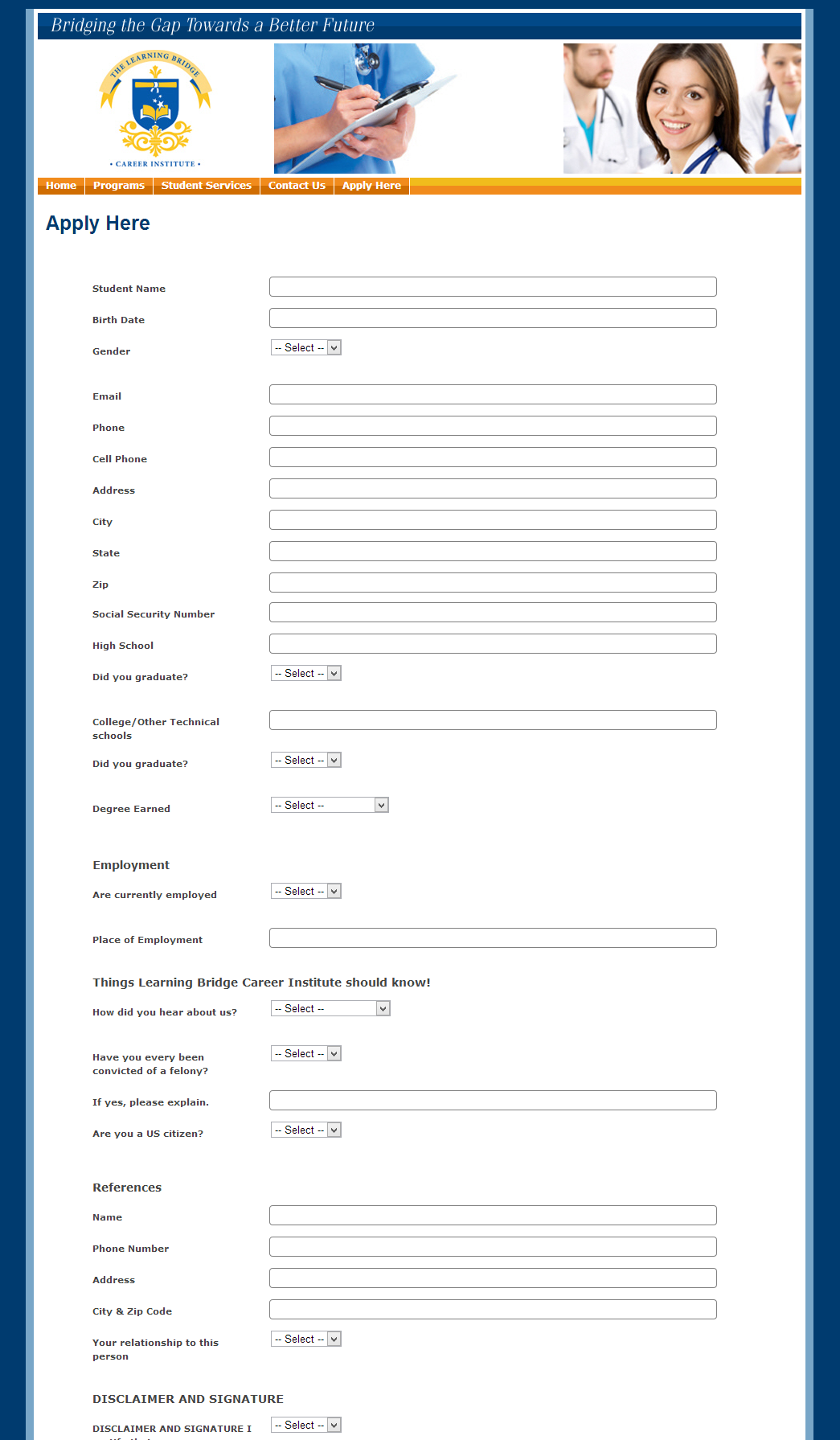
With these tools, you can completely customize your admissions form to look something like the following:
Sample Online Admissions Form
Once an inquiry or application is submitted online, a record appears in your QuickSchools account for further action. Here is a summary of what you can do with the Admissions Module (after a record is created / submitted):Read More »
We’re happy to announce that we’ve finally released the new fee tracking module. Here are some highlights:
Multiple Primary Payers
When you open a student record, you can now set multiple Primary Payers (if Family Billing is enabled):
New Fee Tracking with Multiple Primary Payers
Family Designation
When you have multiple primary payers, you can now designate how to address the payer. So for example, you could say “The DeSilva Family” or “Mr. and Mrs. DeSilva”:Read More »
The Reporting module is a great way of making offline back-ups of your data, since you can export your data from each module into an Excel file at any time. You can also view the tabular reports on screen for quick viewing. Here’s a sample report:
Sample QuickSchools Report
To access the report, you’ll need to go to the “Reports” menu. Typically, only school admins have this menu. For teachers and staff, if you don’t already have this menu, you’ll need to get access from your school admin.
Reports are grouped into modules. So for each module, there is a list of reports. The left column denotes the data being extracted, while the right column shows the various formats for the data to be displayed. In the example below, we actually have one “Disciplinary Incidents” report, but you can view it as “Disciplinary Incidents by Date”, or “Disciplinary Incidents by Reporter”, and so on: