New Release – May 21, 2025

This QuickSchools release focuses on improvements to the Online Forms App, Security as well as the new UI for the Orchestra Master Scheduler. The full list of improvements is below:

Online Forms App

  • Improve Auto-Email and Email Notification on Status Change
  • Improve Report Creator support for Submission Payments
  • Improve Payment Flow
  • Include Fee Structure when “Copy & Archive” Form Packet
  • Show Submission Payment Details in Bulk Processor
  • Bug Fix Duplicate record in Submissions list

Security Improvements

  • Improve IP Blocking
  • Minor improvements to login Captcha (Beta)
  • Bug Fix 2FA for Group School

General Improvements / Bug Fixes

  • Improve Performance for Report Creator
  • Improve the new UI for Orchestra Master Scheduler

We have some additional improvements to Group School coming soon.

New Release – May 7, 2025

It’s been a while since our last QuickSchools release. We continue to focus on security and our new UI for Orchestra Master Scheduler (from last month), along with miscellaneous improvements and bug fixes. 

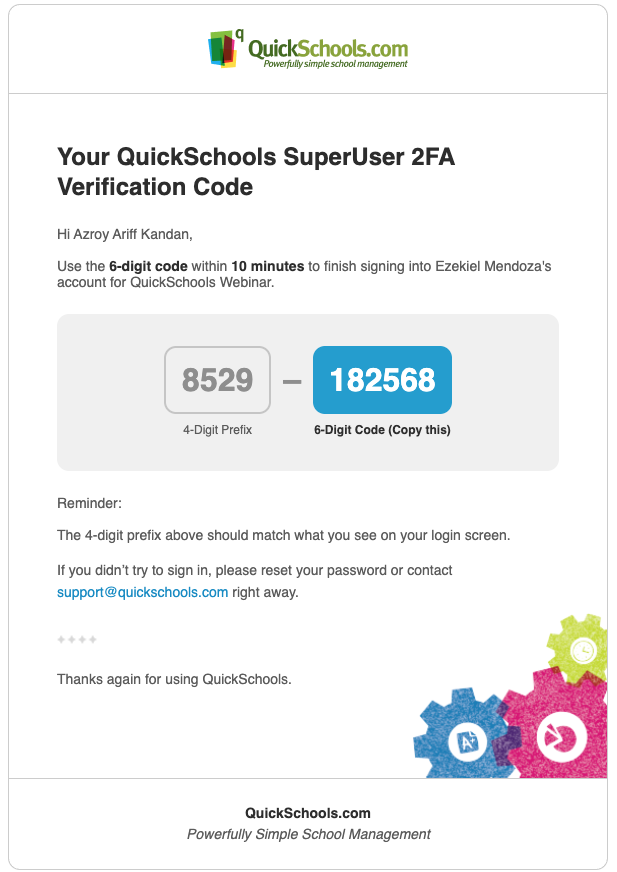
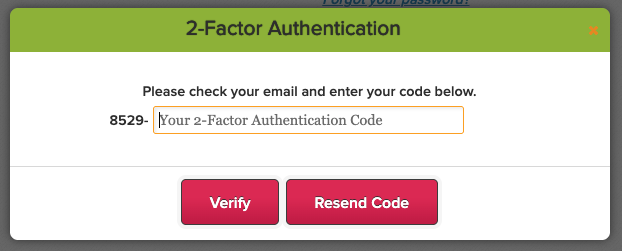
Two-Factor Authentication (2FA) Code has a new 4-digit Prefix

Full list of improvements are below:

Security Improvements

  • Ability for School Admin to disable 2FA for all Students and all Parents (See below)
  • Enhance the Change Password functionality (Expire Session, Email Notification)
  • Improve “Login from new Device” Email
  • Miscellaneous Fixes for Google Authenticator
  • Miscellaneous Improvements to 2FA (2FA Prefix – See above)
  • Verification Code for purchasing Utility Credits and Change Password (Beta)
  • Captcha on Login (Beta)

General Improvements / Bug Fixes

  • Ability to disconnect Canvas Integration
  • Improve Listing of Users from Canvas
  • Improve Schoology Auto-Enrollment of Students
  • Improve Clever SFTP App
  • Improve ability to connect/reconnect with Stripe
  • Separate Attendance Roster based on Subject Abbreviation
  • Bug Fix Auto-Fill for Online Forms
  • Bug Fix Print Student Profile
  • Bug Fix Teacher Directory for Student/Parent Portals
  • Bug Fix “Add Missing Students” for Section Attendance
  • Bug Fix removal of GPA values in Transcripts
  • Bug Fix clear Admin Column for Report Cards

Beta / System Improvements

  • Sign-In/Sign-Out App for Teachers
  • Custom Ability to edit uploaded Student Documents
  • Improve Attendance Dashboard
  • Improve Course Importer (depends on District Settings)
  • Improve Semester Activation with Courses & Sections
  • Improvements for new Master Scheduler UI
  • Improvements to Email Framework
  • Transfer Grades for Chronos Transcripts for Inactive Students 
  • Exclude “Excluded from Grading” from Graduation Status Report

Disable 2FA for Students and Parent

School Administrators now have the option to completely disable two-factor authentication (2FA) for all Students and Parents:

Read More »

New UI for Orchestra Master Scheduler

QuickSchools is proud to announce the release of a new UI for the Orchestra Master Scheduler (currently in Beta). This is just a front end change, so you can freely switch between the new UI and the original UI, in case you prefer one version over the other:

Here’s a quick run down:

Streamlined Main Page

The main page is now organized into 7 clear steps, making navigation easier. Key tools like Teacher Scheduler and Load Students are front and center, while less-used modules are neatly tucked away for quick access.

Read More »

New Release – Mar 20, 2025

This QuickSchools release focuses on security features and our new UI for Orchestra Master Scheduler, along with miscellaneous improvements and bug fixes. 

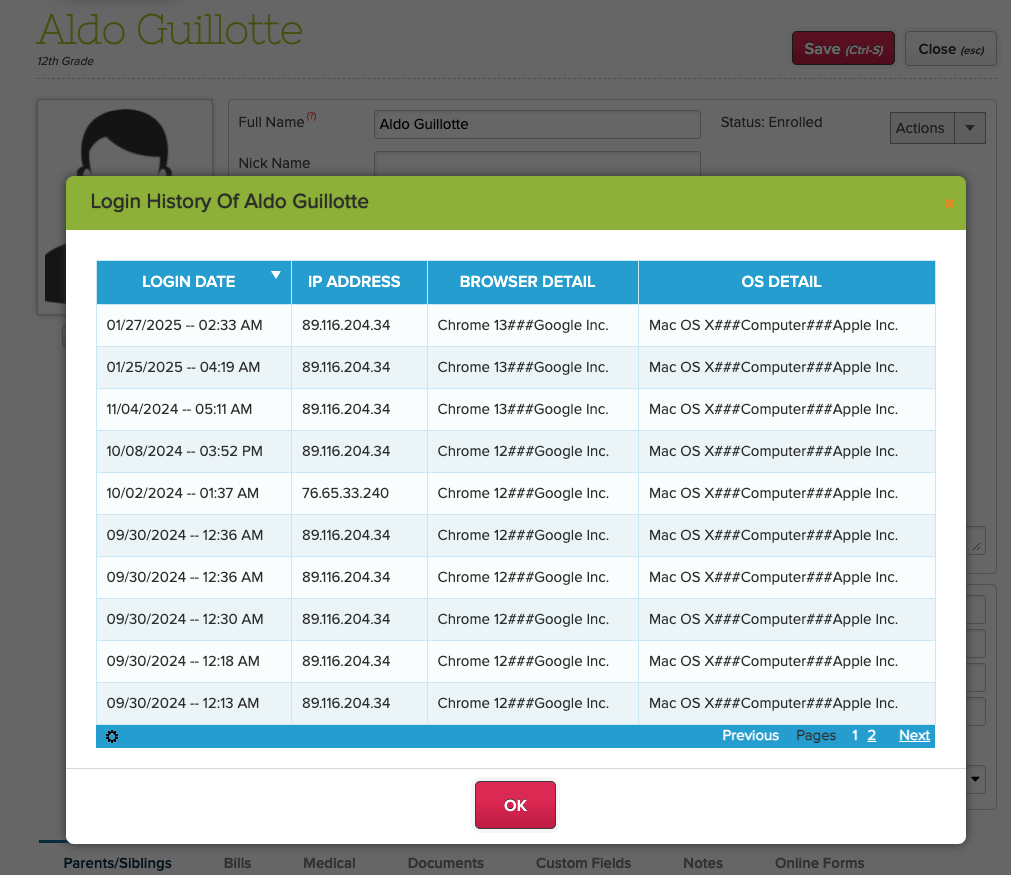
School Admin can view Login History for all users

Full list of improvements are below:

Security Improvements

  • Show Active Sessions – See below
  • Login History (for School Admin) – See below

General Improvements / Bug Fixes

  • Improve Required Custom Fields for Students
  • Improve Report Creator for Report Card data
  • Improve Student Navigator
  • Improve Mass Messaging Browser Support for Safari (version 16 and prior)
  • Bug Fix Standard Charges
  • Bug Fix Gradebook when moving columns
  • Bug Fix Gradebook PDF error due to deleted Category

Beta / System Improvements

  • New UI for Orchestra Master Scheduler (Beta) – See below
  • PDF Template App support for Lunch Roster
  • Notes Field for Data Monitor (Internal)
  • Notes Field for Group School (Internal)

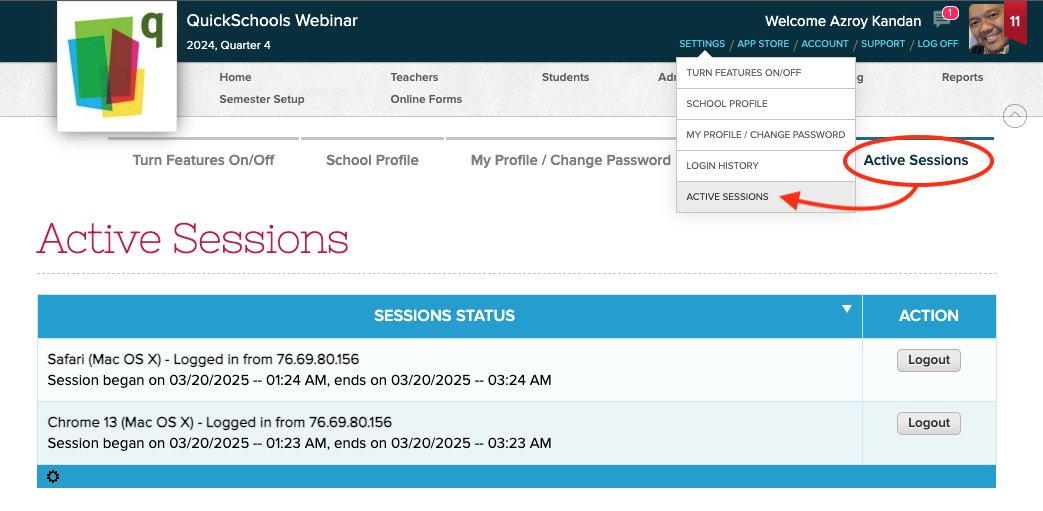
Active Sessions

User can now view all active sessions, and log out from those devices remotely:

Users can view their “Active Sessions” and log them out

Login History (for School Admin)

School Administrators can now view the Login History for teachers, students and parents. Just look for the “Login History” button/link on the corresponding record:

Read More »

Security Update – Mar 12, 2025

We’ve just released an update to our two-factor authentication (2FA) framework, standardizing the 2FA expiry to 10 days for ALL users, including School Administrators. The 2FA expiration is device-specific, meaning once you log in on a device, you won’t need to enter a new 2FA code for the next 10 days—unless you clear your cache or switch to a different device.

Thank you for your patience and support as we continue to improve our platform.

Upcoming Improvements

We have some additional security improvements that we’re excited to roll out in our next QuickSchools release. You can look forward to:

  • Users can view Active Sessions and terminate them
  • Admin Users can view Login History for Teachers, Students, and Parents.

Also coming soon:

  • Verification Code when purchasing Utility Credits
  • 2FA for Super User
  • Captcha on Login

We’re committed to improving the user experience while maintaining the highest security standards. Please continue to share your experience on QuickSchools with our Support Team, via Chat or Email.

New Release – Feb 26, 2025

This QuickSchools release focuses on security (namely two-factor authentication or 2FA) and a few bug fixes to our internal systems / framework. 

Full list of improvements are below:

General Improvements

  • Option to make Student Custom Fields as Mandatory fields
  • Deleting Homework will warn of linked Gradebook Columns
  • Bug fix display for Online Payments on Student Portal

Security Improvements

  • Email Address is required for Teachers / Staff (in order to facilitate 2FA)
  • 2FA is enabled for ALL Schools
  • 2FA is required for all School Admin users
  • 2FA is required every time School Admin logs in
  • Bug fix 2FA for case-sensitive usernames

Beta / System Improvements

  • Bulk Deactivate Teacher (Beta)
  • Option to disable auto-linkage of siblings on Student Import (Beta)
  • Improve File Upload process
  • Improve Trial Account Creation
  • General Security Improvements for 2FA
  • Temporary Bug Fix Student Navigator with Primary Payer
  • General Improvements for Server / DevOps
  • Enhance API Resources for Fee Tracking (Family Billing & Online Payments)
  • Bug fix Java Snippets for Admissions Mapper

Two-Factor Authentication (2FA) Roll-Out

Earlier this month, we announced our intent to enforce two-factor authentication (2FA) for all our schools. 

Read More »

New Release – Jan 27, 2025

This is the first QuickSchools release for the year, with a few minor improvements and bug fixes to our internal systems/framework. 

The full list of improvements is shown below:

General Improvements

  • Text Messaging now supports Email Addresses in the message.
  • Option to rename files when exporting Summary Reports via SFTP
  • New Meal Code in Lunch Ordering App
  • Improve Lunch Roster PDF
  • Improve Payment Options UI in Parent Portal
  • Email Address Validation for Custom Fields (in Admissions)
  • Bug Fix Time Stamp in Private Messaging when a user is removed.
  • Bug Fix Feature Request from Features Page
  • Bug Fix Student Navigator on Parent Portal
  • Miscellaneous Bug Fixes for Gradebook
  • General Security Improvements
Read More »

QuickSchools’ Commitment to Your Data Security

At QuickSchools, the safety and security of your school’s data is our top priority. In light of growing concerns about cybersecurity, we want to reassure you that we’ve implemented robust measures to keep your information safe and secure.

Here’s What We’re Doing Right Now:

Two-Factor Authentication (2FA): You can enable 2FA for your school by going to Settings > Turn Features On/Off > Edit Overall Settings, and selecting the Security section (as seen below). For more details on 2FA, visit our July 2022 release blog.

Two-Factor Authentication with QuickSchools

Login Activity Monitoring: Users can view their login history, including IP addresses, browser, and device details, to stay vigilant.

Email Notifications: We notify you immediately when:

  1. A School Admin is added or removed.
  2. Your password is changed or reset.

Planned Data Security Enhancements Coming Soon:

Mandatory 2FA for Admins: Within the next 3-8 weeks, 2FA will become mandatory for all School Admin accounts. This ensures unauthorized access is even harder to achieve.

Function-Level Security with 2FA: Sensitive actions, such as purchasing Text Messaging Credits with a saved credit card, will require additional 2FA verification.

Dynamic Security Controls: We’re exploring ways to lock sensitive functions based on suspicious activity.

For more information about our security measures and approach to keeping student data safe, we invite you to read our blog post: “Is Student Data Safe?”.

More Resources:

Security Improvements Blog (June 2022)

2FA Update Blog (July 2022)

We understand that unauthorized logins are one of the biggest threats to security, and we are committed to helping your school prevent them. If you have any concerns or need assistance enabling security features, please feel free to reach out to us.

Thank you for trusting QuickSchools to support your school’s needs