
This QuickSchools release contains improvements to the Gradebook, the Orchestra Master Scheduler, plus other miscellaneous improvements to our Student Information System (SIS). We are also making general improvements to the user interface:

Full list of improvements are below:
Master Scheduler Improvements
- Option to exclude certain courses from Teacher Caseload
- Improve Importer for Course Catalog
- Importer support for Hidden Course Requests
Gradebook Improvements (See Below)
- New option to Expand/Collapse Student Name
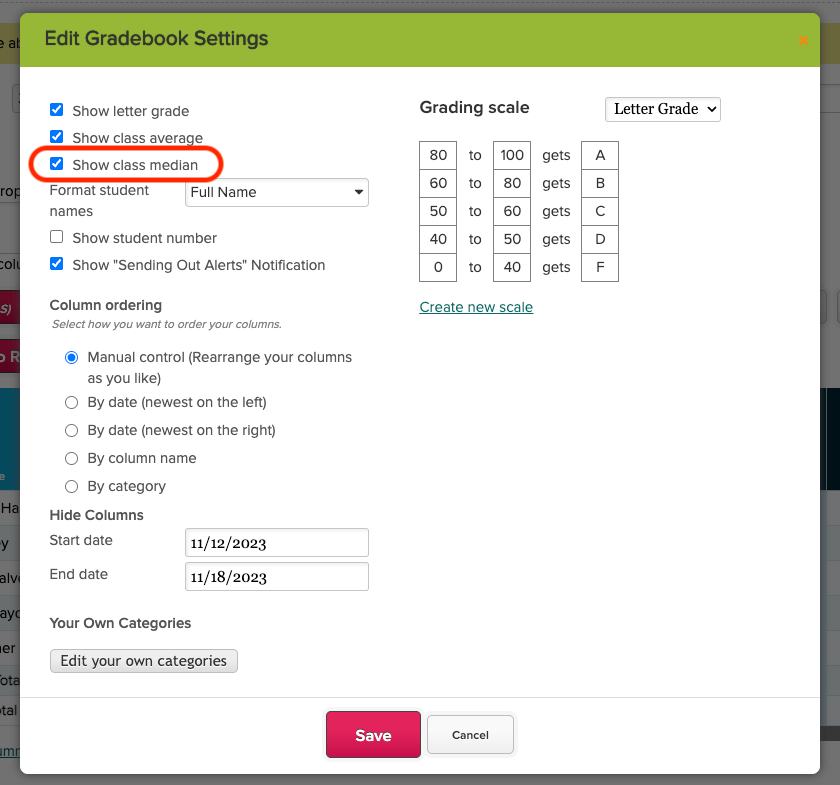
- New option to show Median for columns
- Improve how inactive students are displayed
- Bug FIx pop-up for “Send Email Result”
General Improvements
- Refine UI for Student Navigator (See Above)
- Refine UI for “By Parent” screen for Students
- Improve how Grade Levels are managed (Disallow duplicate MetaID)
- Bug Fix WYSIWYG editor when saving links
- Bug Fix first time invite for teachers
Beta Features / Beta Apps
- Mass Messaging option to filter Applicants by Status
- Improving Tutoring Plan App for Parent Portal (Search bar)
- Improve SFTP Importer from PowerSchool (Import School Name as Tag)
- Improve Payment Info indicator for Payment Plan
- Internal improvements to Report Creator (for Billing Reminders)
- Improve internal data maintenance (data purging)
- Bug Fix Internal Feedback Survey Framework
- Bug Fix translation for Homework
- Bug Fix Online Forms for new Trial Accounts
- API Improvements for Mobile App (Improve support for Teachers Lounge)
Gradebook Improvements
We have 3 new features to share for the Gradebook. First, you can now easily expand / collapse the first column containing the Students Name:
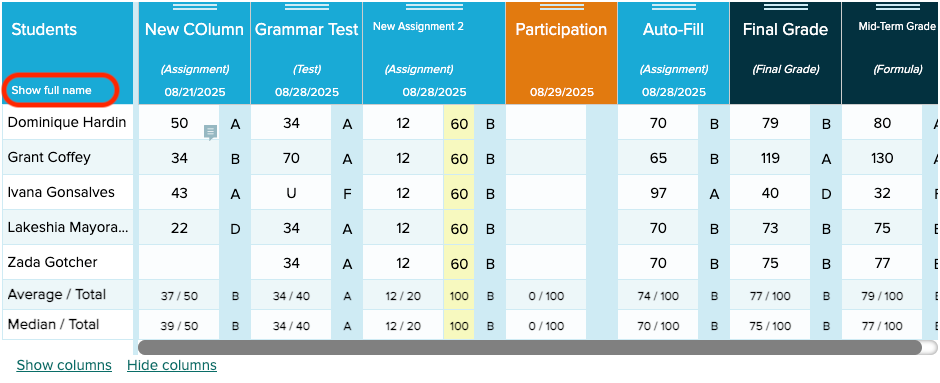
Here’s how it looks like when expanded:

Notice, there is also a new row for “Median”, which you can show/hide when configuring the Gradebook:
Finally, we’ve improved the way inactive students are displayed in the gradebook, depending on the settings for the school.
