New Release – Feb 9, 2026

This QuickSchools release contains general improvements and bug fixes to our Student Information System (SIS).

Full list of improvements are below:

General Improvements

  • Improve Multi-Row Selector for Students Listing
  • Student Navigator now supports Search List
  • New “Tab” view for Student Custom Fields
  • Improve Subject Enrollment Importer
  • Transcripts Support for Subject Custom Fields
  • Support Subject Teacher for Attendance in Report Creator
  • Bug Fix Report Cards Subject Criteria (Repeating Fields)

Beta Features / Beta Apps

  • Co-Teaching Support in Orchestra Master Scheduler (Phase 1)
  • Optimization Course Request Importer via SFTP from PowerSchool
  • New Importer for Health App
  • Miscellaneous Improvements to Tutoring Plan App (Private Beta)
  • New Hifz App (Early Alpha)
  • Replace “Unenroll All” with “Drop All” for Section Enrollments (Chrono)
  • Improve Data Archiving for Homework
New Release – Jan 13, 2026

The first QuickSchools release for the year contains general improvements and bug fixes to our Student Information System (SIS).

Full list of improvements are below:

Online Forms Improvements

  • Use School Date Format in “Notification for New Submission” Emails
  • Support for Submitted Name in “Notification for New Submission” Emails
  • Add “Submission Date” to Submissions Listing

Gradebook Improvements

  • Bug Fix “E” (Excused Absent) in Standards-Based Gradebook
  • Hide option to “Show Class Median” in Self-Paced Gradebook
  • Fix Console Error in Self-Paced Gradebook

General Improvements

  • Bug Fix “Bulk Email Latest Receipt” in Fee Tracking
  • Bug Fix Mark-Up logic for Lunch Ordering

Beta Features / Beta Apps

  • Improve Canvas Integration
  • Support “Override Room” in Student Profile
  • API Improvements for Mobile (Payments, Standard-Based Gradebook)

New Release – Nov 24, 2025

This QuickSchools release contains general improvements and bug fixes to our Student Information System (SIS).

Full list of improvements is below:

General Improvements

  • Improve UI for configuring Custom Fields
  • Improve Online Payment flow for Admissions
  • Improve Saved Settings from view Gradebook Median
  • Improve notification for School Admin when School Admin is added/removed
  • Improve Support for Permanently Deleting Students
  • Parents / Students can remove default payment method
  • Retain Semester Order in Transcripts when Reset Semester Data
  • Report Creator support for Student Document Custom Fields
  • Bug Fix Mass Messaging Parents to Teachers of their enrolled children

Beta Features / Beta Apps

  • Improve support for the Discipline Label in Email Alerts
  • Improve PowerSchool Importer when missing Birth Date
  • New / Improved “Attendance Snapshot” App
  • Bug Fix Online Forms Public URL for Group School
  • Option to view Hidden Filters in Report Creator (Internal Only)
  • Improve Data Maintenance (Purge old/deleted data)

New Release – Oct 29, 2025

This QuickSchools release contains improvements to the Gradebook, the Orchestra Master Scheduler, plus other miscellaneous improvements to our Student Information System (SIS). We are also making general improvements to the user interface: 

Updated Student Navigator to browse Student Profiles

Full list of improvements are below:

Master Scheduler Improvements

  • Option to exclude certain courses from Teacher Caseload
  • Improve Importer for Course Catalog
  • Importer support for Hidden Course Requests

Gradebook Improvements (See Below)

  • New option to Expand/Collapse Student Name
  • New option to show Median for columns
  • Improve how inactive students are displayed
  • Bug FIx pop-up for “Send Email Result”

General Improvements

  • Refine UI for Student Navigator (See Above)
  • Refine UI for “By Parent” screen for Students
  • Improve how Grade Levels are managed (Disallow duplicate MetaID)
  • Bug Fix WYSIWYG editor when saving links
  • Bug Fix first time invite for teachers

Beta Features / Beta Apps

  • Mass Messaging option to filter Applicants by Status
  • Improving Tutoring Plan App for Parent Portal (Search bar)
  • Improve SFTP Importer from PowerSchool (Import School Name as Tag)
  • Improve Payment Info indicator for Payment Plan
  • Internal improvements to Report Creator (for Billing Reminders)
  • Improve internal data maintenance (data purging)
  • Bug Fix Internal Feedback Survey Framework
  • Bug Fix translation for Homework
  • Bug Fix Online Forms for new Trial Accounts
  • API Improvements for Mobile App (Improve support for Teachers Lounge)

Gradebook Improvements

We have 3 new features to share for the Gradebook. First, you can now easily expand / collapse the first column containing the Students Name:

Read More »

New Release – Sept 10, 2025

This QuickSchools release contains the foundational framework for our upcoming Tutoring Plan app, but also includes some general improvements to our SIS. 

Full list of improvements are below:

General Improvements

  • Bug Fix Student Tags in Gradebook
  • Bug Fix Saved Gradebook Preferences
  • Bug Fix Upload File in Online Forms App
  • Bug Fix Failed ACH Payment for Payment Plan
  • Bug Fix Credit Card Fee Payment Allocation for Failed Online Payments (Family Billing)
  • Minor Improvements to Payment Plan Importer

Beta Features / Beta Apps

  • Disallow Cancel Lunch Order after Cut-Off Date
  • Confirmation Dialog when Bulk Delete Documents
  • Improve SFTP Importer from PowerSchool
  • Internal Feedback Survey Framework
  • Internal Improvements for managing PDF Templates

Tutoring Plan (Coming Soon)

We have a new app in the works that will allow schools to sell Tutoring Lessons via the QuickSchools Portal for Students and Parents. 

The school admin can define hourly rates as well as discounted packages for students/parents to purchase online. Once purchased, the school admin can then assign the student to a specific tutor, who will then perform the lesson. The tutor can then record completed lessons (and hours) online for students/parents to review.

More info coming soon.

Security Update – Mar 12, 2025

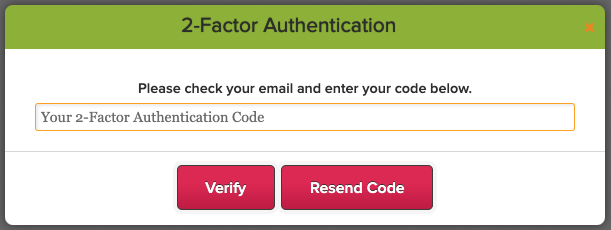
We’ve just released an update to our two-factor authentication (2FA) framework, standardizing the 2FA expiry to 10 days for ALL users, including School Administrators. The 2FA expiration is device-specific, meaning once you log in on a device, you won’t need to enter a new 2FA code for the next 10 days—unless you clear your cache or switch to a different device.

Thank you for your patience and support as we continue to improve our platform.

Upcoming Improvements

We have some additional security improvements that we’re excited to roll out in our next QuickSchools release. You can look forward to:

  • Users can view Active Sessions and terminate them
  • Admin Users can view Login History for Teachers, Students, and Parents.

Also coming soon:

  • Verification Code when purchasing Utility Credits
  • 2FA for Super User
  • Captcha on Login

We’re committed to improving the user experience while maintaining the highest security standards. Please continue to share your experience on QuickSchools with our Support Team, via Chat or Email.

Protecting Your QuickSchools Account: What You Need to Know About Two-Factor Authentication (2FA)

Update (New Date: February 24, 2025)
The rollout date for mandatory Two-Factor Authentication (2FA) has been rescheduled from February 17 to February 24. This blog post has been updated to reflect the change.
Please review the details below to ensure a smooth transition.

At QuickSchools, your security is our top priority. That’s why we’re rolling out Two-Factor Authentication (2FA)—an extra layer of protection to ensure that only you can access your account.

We understand that changes like this may bring up questions, so we’ve put together a helpful guide to walk you through the upcoming 2FA rollout:

Stay protected and up to date–learn more about 2FA today!

Read More »