Update (New Date: February 24, 2025) The rollout date for mandatory Two-Factor Authentication (2FA) has been rescheduled from February 17 to February 24. This blog post has been updated to reflect the change.Please review the details below to ensure a smooth transition.
At QuickSchools, your security is our top priority. That’s why we’re rolling out Two-Factor Authentication (2FA)—an extra layer of protection to ensure that only you can access your account.
We understand that changes like this may bring up questions, so we’ve put together a helpful guide to walk you through the upcoming 2FA rollout:
At QuickSchools, the safety and security of your school’s data is our top priority. In light of growing concerns about cybersecurity, we want to reassure you that we’ve implemented robust measures to keep your information safe and secure.
Here’s What We’re Doing Right Now:
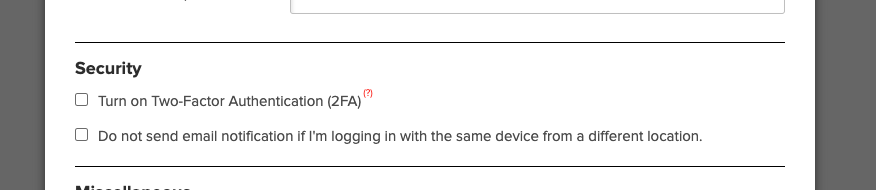
• Two-Factor Authentication (2FA): You can enable 2FA for your school by going to Settings > Turn Features On/Off > Edit Overall Settings, and selecting the Security section (as seen below). For more details on 2FA, visit our July 2022 release blog.
• Login Activity Monitoring: Users can view their login history, including IP addresses, browser, and device details, to stay vigilant.
• Email Notifications: We notify you immediately when:
A School Admin is added or removed.
Your password is changed or reset.
Planned Data Security Enhancements Coming Soon:
• Mandatory 2FA for Admins: Within the next 3-8 weeks, 2FA will become mandatory for all School Admin accounts. This ensures unauthorized access is even harder to achieve.
• Function-Level Security with 2FA: Sensitive actions, such as purchasing Text Messaging Credits with a saved credit card, will require additional 2FA verification.
• Dynamic Security Controls: We’re exploring ways to lock sensitive functions based on suspicious activity.
For more information about our security measures and approach to keeping student data safe, we invite you to read our blog post: “Is Student Data Safe?”.
We understand that unauthorized logins are one of the biggest threats to security, and we are committed to helping your school prevent them. If you have any concerns or need assistance enabling security features, please feel free to reach out to us.
Thank you for trusting QuickSchools to support your school’s needs