For school administrators who are new to QuickSchools, there is an area under “Settings” that gives you access to features regardless of the subscription plan you’re on. This area can be accessed by clicking on “Edit Overall Settings”:
“Edit Overal Settings” from the “Features” page for Administrators
Our Webinar Series continues next month on the topic of Google Classroom Integration. QuickSchools will be hosting 2 webinars, one for Administrators and one for Teachers. The webinar for Administrators will be held first, and is already available for sign up. Link is available when you’re logged into QuickSchools:
QuickSchools Webinar for Administrators on how to Integrate with Google Classroom
We will write up separate articles on what each webinar will cover. If you’re interested, please do sign up. We look forward to seeing you there!
Reporting on Min, Target and Max Size for Sections
Hide “Debug” function by default.
Fix course search function in Step 4: Schedule for large data sets
Fix installation errors related to missing column
Bug fix for Course Constraints
Bug fix when deleting students (orphaned course requests)
Bug fix for the “Student With Incomplete Schedule” Report
Live Stream
Remove and Auto-Generate Password when creating a Zoom conference
Rename “Conference” to “Live Stream”
Join URL is clickable when viewing a Live Stream
Improve Time Selection widget
General UI improvements
Online Forms
Support dynamic Send Email for Auto-Emails from Status Change in Online Forms
Option to disable “Download Forms” in Online Forms
Support option to copy previous submission (See below)
Improve Payment Options (See below)
Fix Installation / Upgrade Error
Fix “Download Forms” function affected by bad Form Packet name
Other General Improvements
Zapier Integration
Improve Time Selection widget for Assignments
Support Online Payments for Admissions (See below)
Report Creator Support for Interventions
Support Sorting and Renaming of student Documents (See below)
Bug fix for Attendance PDF
Bug fix when submitting Admissions Form when Residential Section is disabled
Copying Previous Online Forms Submission
Once an applicant submits an online form, there will be a button to “Start New Application”:
Start a new Application after completing a Submission
This option allows the system to reference the previously submitted data, so that when the applicant is filling in a particular form for the new application, there will be an option to “Copy from Previous Submission”:
If you’re using the Master Scheduler in QuickSchools, the Alternate Bell Schedule can be used to reformat the main Bell Schedule into a weekly schedule. This includes displaying classes that meet at different times throughout the week. Here’s an example:
In this example, Math, Science and English meet 3 times a week, while the remaining classes meet only twice a week. In order to produce a weekly schedule like this, you’ll need to configure a main Bell Schedule that contains all distinct periods, in this case 7 classes that meet twice a week (designated as “A” periods), and 3 classes that meet 3 times a week (designated as “B” periods):
Bulk Create Block Sections (based on Lecture-Lab combinations)
Bulk Remove Block Sections
Ability to adjust target limit for Step 5 Load
Bug fixes related to running Step 4 with orphaned sections
Google Classroom Synchronization
Improved support for teachers to synchronize individual courses
Bug fixes related to Timezone and Scale Score Formulas.
Other General Improvements
Automated emails for Online Form Submissions when status is changed
Automated emails for Online Payments
Improve Notification features for Assignments and Submissions
Improve support for shared addresses in Admissions module
Improve support when taking attendance from the Attendance Calendar on the Student record
New Importer for Subjects/Sections-Based Attendance
Extend timeout for large Stock Take in Library App
Bug fix when a school within a group is suspended and archived
Bug fix for Temperature App
Miscellaneous improvements to Summary Reports related to Attendance
Internal monitoring framework improvements
Automated Emails for Online Forms
If you’ve installed the Online Forms App, there is a new feature to allow you to automatically send out an email when the status of a submission changes. Check out the new Mail icon on the Submissions page (similar to the Mail icon for Gradebook):
When you click on it, you’ll be able to customize an email that gets sent whenever a submission is changed to that status:
In case you haven’t noticed, QuickSchools will be offering it’s first Webinar for Teachers in just a couple of weeks, as part of our new Webinar Series
This webinar will focus on tools/modules related to Online Learning, which include:
With the release of the new Assignments module (which is an improvement over the previous Homework module), we’ve expanded the flow for handling assignments over the portals in QuickSchools. Here’s a rough summary:
Posting Assignments
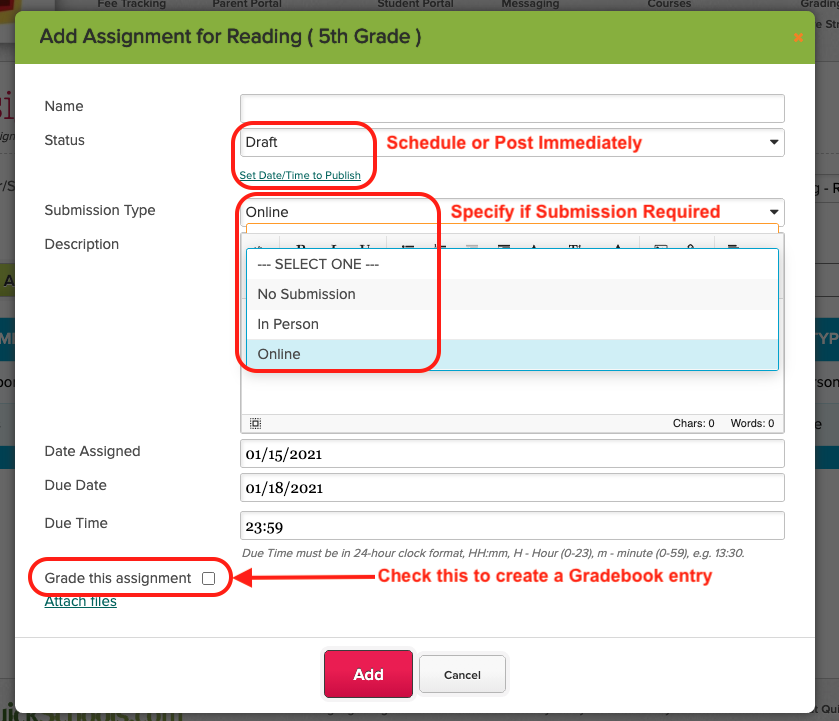
Teachers can now post assignments in real-time, or schedule an assignment to be published at a specific date / time in the future. This means that teachers can plan out and configure assignments for the entire academic term, and the system will publish them automatically:
Create Assignments in QuickSchools
When creating an assignment, teachers can specify if the assignment requires a submission, and whether the assignment will be graded. For graded assignments, a column in the Gradebook can be created and linked automatically.
Submitting Assignments
Students can very easily view all upcoming assignments. You can filter Assignments by subject and sorted by the column headers:
With 2021 now in full swing, it’s important to understand how teachers can utilize QuickSchools to communicate and engage with students effectively. Here we highlight a few sample scenarios, how teachers can communicate with students.
Group Discussion
Discussing Assignments
Private Messaging
Announcements
Group Discussion
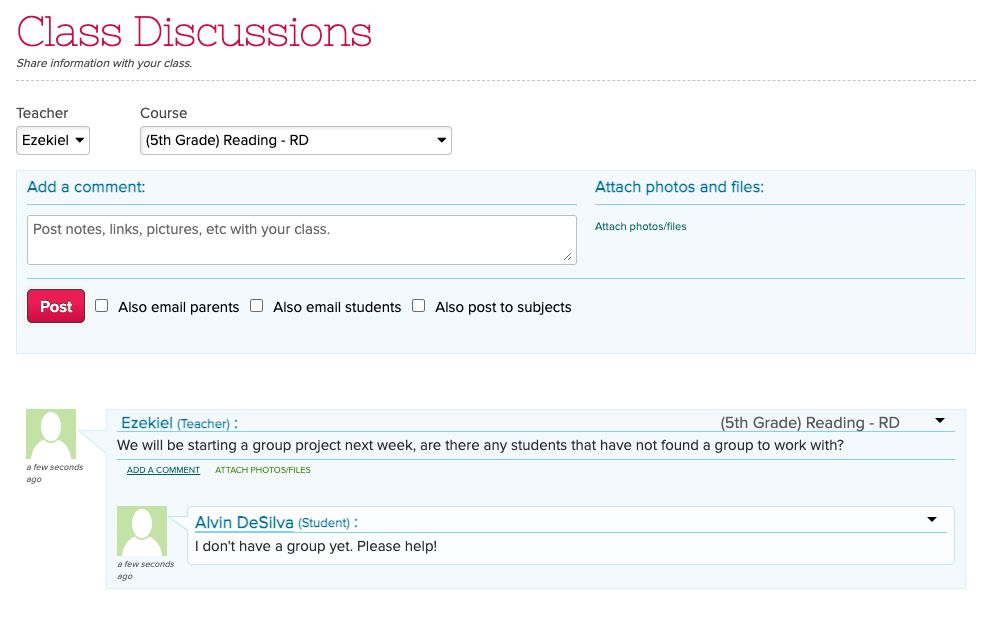
The “Class Discussion” feature (part of the “Homework” and “Assignments” modules) is a great way to discuss topics online. Only students enrolled into the class are able to post messages for any given subject:
Post Messages to Students via Class Discussions
As a teacher, you can also post a new discussion thread to multiple subjects at the same time using the “Also post to subjects” box. Simply select one or more subjects from the dropdown: