Limited Live Chat Service during the 2021 Holiday Season

We wish to announce that our customer support hours will be reduced during the holiday period. 

Starting Saturday Dec 18, our Live Chat service will only be available from 8 am to 8 pm US Eastern Standard Time (EST). We’ll be fully offline starting at 4 pm EST on Friday Dec 24 in observance of Christmas. We’ll resume with limited service on Sunday Dec 26 at 8 am EST.

Likewise, our Live Chat service will be offline again starting at 4 pm EST on Friday Dec 31 in observance of New Year. Our regular support hours (24-hr Monday-Friday and 8 am to midnight EST Saturday-Sunday) will resume on Sunday Jan 2. 

If you need assistance while we’re offline, please leave us a message and we’ll get back to you as soon as possible.

The entire QuickSchools staff would like to take this opportunity to wish you a joyous holiday season – and extend our thanks for an amazing 2021.
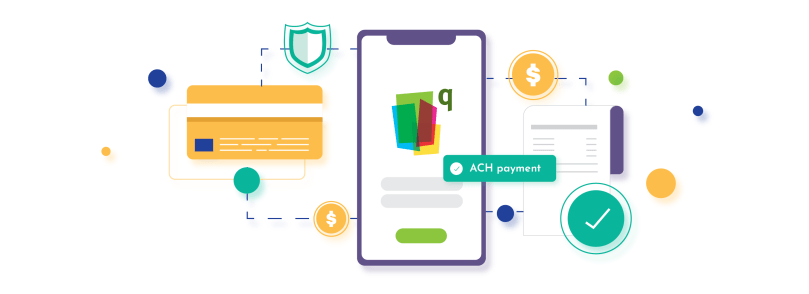
ACH Payment – Easy Online Payment for Schools

easy online payment for schools

QuickSchools is always looking for ways to make our student information system easy, robust, and effective not only for school administrators and faculty but also for students and parents alike. We understand that for a school, keeping the accounting books constantly updated and in top shape is extremely important.

Learn how QuickSchools can create easy templates that schools can use for regular invoicing to parents

Whilst tracking fees seems to be a straightforward task to people outside of a school, we know that it’s definitely not. Trying to keep track of various fee structures for different grades, discounted fees for siblings, payment plans, and scholarships, all of these permutations can truly be overwhelming.

Read More »

Thank You & A Roundup of Posts on QuickSchools’ Transcripts Module

Thanks to everyone who attended the webinar on Creating Professional Transcripts with QuickSchools. It was a joy for us to host this event. We hope that you found it helpful.

Thanks to all participants for making our Transcripts webinar a lively event!

We sent out a follow-up email to all registrants requesting for feedback. We’d appreciate it if you could provide us with comments or suggestions so that we can improve our webinar series. Also, in case you missed joining the session or would simply like a copy of the recording, please let us know by checking off the relevant box in your reply form. Our team will send you a link to the recording.

We’d like to take this opportunity to highlight that our blog is a treasure trove of information. Here, we offer you a roundup of blog posts related to the Transcripts module:

Read More »

New Release – Nov 22, 2021

This release primarily focuses on framework improvements for our Alpha and Beta features. This includes our Learning Management System (LMS), our Dashboard capability, and Audit Trail. We will be making more framework and system improvements towards the end of the calendar year.

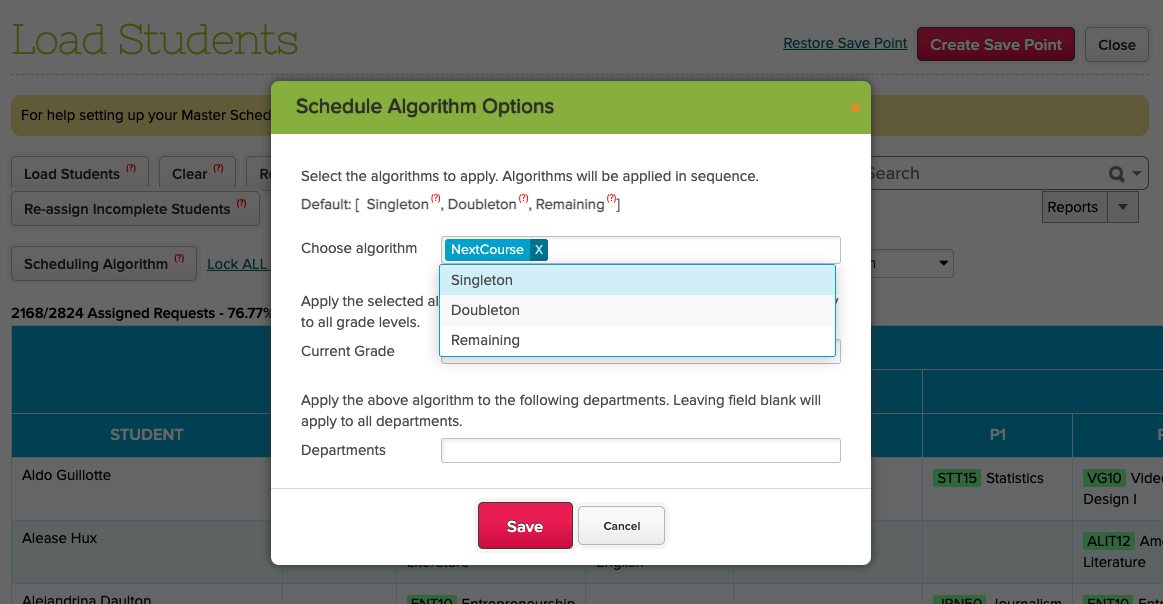
New “Next Course” Scheduling Algorithm which will schedule students into sections based on the previous enrollment period / semester

We’ve also taken this opportunity to improve the Orchestra Master Scheduler, and include a few miscellaneous bug fixes and improvements. Here is a list of the latest QuickSchools upgrades:

Master Scheduler Improvements

  • Support remove Caseload during Import
  • Fix Teacher Caseload when copying to a new Enrollment Period in Step 1
  • Improve Save Point functionality for large schools
  • Refresh screen after Restore Save Point
  • Fix table misalignment in Step 4
  • New “Next Course” algorithm in Step 5
  • Fix loading sections in Step 5 for large schools

LMS Framework Improvements (Alpha)

  • My Workspace Chat
  • Online Testing

School Dashboard (Beta)

  • New KPI Widget
  • Auto-load Dashboard Screen
  • Miscellaneous Dashboard improvements

General (Functional) Improvements

  • Support Synchronize to Canvas based on start/end dates for active term
  • Improve performance for Google Classroom Integration
  • Improve Support Pre-Enrollment in API Resource for Zapier
  • Rename “Reference Number” to “Access Code” in Online Forms
  • New reportable fields for Health App in Report Creator
  • General Improvements to the Students screen
  • Improve client-side logging

Other Private Beta Improvements

  • Audit Trail Improvements
  • Filter Transcripts by Grade Level

School Dashboard

We started developing the School Dashboard a couple of years ago. This dashboard is based on the Report Creator framework. However, this initiative never really got off the ground due to competing priorities. We’re currently restarting this initiative by introducing a few minor improvements. 

You can now specify ONE of your Dashboards as the primary dashboard, so that when user access the “Dashboard Home” menu, the primary dashboard will load up automatically:

Read More »

Top 14 Classroom Ideas for Thanksgiving 2023

classroom tips for thanksgiving

Thanksgiving is fast approaching. That one time of the year when teachers all across America can think of fun Thanksgiving activities for their students. It that will definitely put them into the holiday mood! 

Many different Thanksgiving activities can be done during class time. We wanted to share our top classroom activities you can do with your students. From elementary to high school, bringing some fall excitement into your school.

Read More »

The Best Online Report Card System Every School Needs  

A report card is one of the most important documents that students will receive every year. Yet every report card season, though exciting, can be a very time-consuming and difficult period, especially for teachers. Manually entering all the results from different assignments, quizzes, and tests for every single student doesn’t just take time due to having to remember information or trying to recall forgotten scores, or having to go through the endless amount of paper, but is also prone to errors being made even though a calculator is being used. This then leads to rushing to get report cards done by the due date, and most likely a lot of overtime done.   

No wonder report card season is so stressful and teachers are under a lot of pressure! Whilst the end of report card season is rewarding, especially for the students, school administrators need to find ways to help the teachers during this taxing time.  

Not to worry, as QuickSchools is here to help! We have 9 reasons why signing up with QuickSchools will provide you with the best report card system you have ever had!  

Read More »

FREE WEBINAR: Creating Professional Transcripts with QuickSchools

We’re almost at the end of the year. This is the time when a majority of schools within the QuickSchools community will need to produce transcripts for recent graduates or for college admissions purposes. Keeping this in mind, QuickSchools’ November webinar will center on the Transcripts module. We’ll demonstrate how you can leverage the full capabilities of this module to create professional-looking transcripts. Join us for this FREE webinar and learn how to create transcripts that you can be proud of!

QuickSchools’ Creating Professional Transcripts webinar is geared towards school administrators, and suitable for all levels of users. We’ll first provide an overview of the basic features in the Transcripts module, before covering more intermediate and advanced concepts. Key discussion points include:

  • Transcripts overview: general behavior of the Transcripts module
  • Transcripts configurations and customizations
  • Administrative capabilities: advanced search, bulk print/download and reporting data
  • Live demo showcasing different styles of transcripts available in the QuickSchools library

We hope that you’ll take advantage of our interactive webinar. Post questions and answer polls during the 30-minute presentation session, and discuss further details during the follow-up, 30-minute Q&A session.

This webinar is scheduled for Thursday, November 18th at 11 AM (PST) / 2 PM (EST). School administrators can sign up by logging in to their QuickSchools account. The announcement and registration link are available on the Teachers’ Lounge page.

Teachers who are interested in attending this webinar can register by sending an email to support@quickschools.com.

New Release – Nov 1, 2021

In this release, we made some improvements to the overall usability of the QuickSchools application (see “UI (User Flow) Improvements” below). We’ll be making more of these improvements in upcoming Sprints, in addition to our usual feature improvements, security updates and bug fixes.

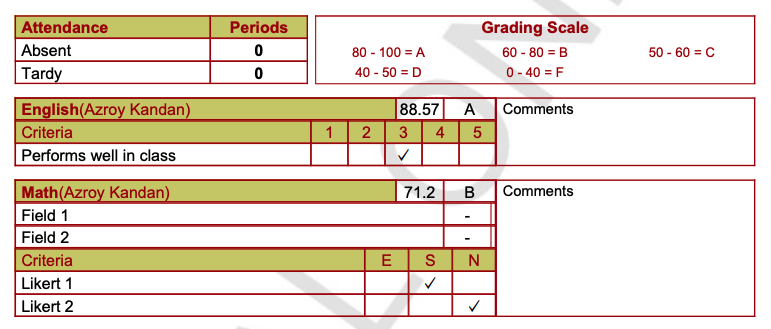
Report Card Likert now supports check marks

Here is a list of the latest QuickSchools improvements:

Master Scheduler Improvements

  • Support Copying Frequency when importing settings from previous enrollment period
  • Hide the “Activate” button for non-SIS configuration
  • Optimize Step 4 “Clean-Up” function
  • Improve Summary Report support for Bell Schedule for multiple Enrollment Periods

UI (User Flow) Improvements

  • New icon to minimize the top menu
  • New Bulk Action icons for tables
  • Sortable indicator when mousing over table header
  • Ability to crop images when uploading student profile images

General (Functional) Improvements

  • Add support for Categories to Fee Tracking Invoices – (See below)
  • Support check marks when using Likert in Report Cards (Image above)
  • Re-label Attendance Sub-menus
  • Improve payment flow from Student/Parent Portal
  • Improve performance when bulk sync transactions with Stripe
  • Zoom Security Enhancements
  • Miscellaneous security improvements to internal log files
  • Mobile API Support for Student Message Board and Parent Message Board

Minor Bug Fixes

  • Fix homeroom name when taking attendance by alternate homeroom teacher
  • Fix Billing Address on Account page
  • Bug Fix delete student with duplicate course requests
  • Bug Fix Add/Edit Sections
  • Bug Fix login via active session
  • Bug Fix sorting of grade levels in Attendance Settings
  • Bug Fix exclude students dropped by sections in Mass Messaging
  • Bug Fix graphing for Report Creator

Private Beta Improvements

  • Expanded access for students and parents to access Student Documents
  • Override Start/End Dates for Attendance by Grade Level
  • Bug Fix display correct Unallocated Amount in new Unallocated Amount screen

Some highlights below:

UI (User Flow) Improvements

We’ve made a few general improvements to our UI framework, which will hopefully improve the general experience for all our users.

There’s a new icon where you can minimize the top menu:

Read More »