Your School or College Schedule and How to Maintain It Easily

learn how to maintain your school or college schedule with simple clicks of a button

Have you had a hard time maintaining your school schedule? Well, you’ve landed on the right page!

When it comes to scheduling, it really is a tedious task. So much work and effort that sometimes even all that hard work is not enough. The hours spent trying to perfect your schedule but at the end of the day, you still have to deal with clashes. This would cause a delay for your other tasks and (worst case scenario) you might even have to start from scratch. Maybe you just have not found the right scheduler to fit your scheduling needs and we’re here to put your worries to rest.

Whether your classes are held online, in-person, or you’re even conducting hybrid classes, we’ve got the simple solution to your scheduling troubles. With QuickSchools, we offer you the complete tools to get your day going with no more setbacks! Choose from either a straightforward scheduling system usually used for elementary to middle schools, to a more complex scheduling software also known as a master schedule commonly found in high schools of public school districts and colleges. 

Read More »

Patch Release – Feb 21, 2022

QuickSchools released a mini patch to address various improvements. 

Here are the latest Improvements in this patch:

Our next scheduled release is targeted for the week of March 7, and should include more improvements to the Master Scheduler and Section Attendance. If you have any further questions or suggestions for improvement, please chat with us online. We look forward to hearing from you

Is student data safe online?

keeping student data safe online

The topic regarding student data and how secure it is online has been growing, especially since remote learning has intensified. As an initiative by the National Cyber Security Alliance (NCSA), an online safety, security, and privacy campaign called ‘Stop. Think. Connect.” was held in accordance with the National Data Privacy Week last month. This serves as a reminder to those in the education industry to evaluate how we are doing when it comes to keeping our students and their data safe in the classrooms and beyond.

In this era of technological advancements, students, especially those who are minors, now have more access to technology and the internet. This, without a doubt, is a game-changer especially with the ongoing endemic, making learning easier and more accessible from home. However, the age of digital media and the increase/expansion of edtech further emphasize the importance of data privacy in schools. With increased accessibility, there must also be an increase in data protection. 

Read More »

Roundup: What You Need to Know About QuickSchools’ Fee Tracking Module

fee tracking blog roundup with quickschools

The Fee Tracking module is one of our most popular modules, and we’ve written extensively about its many features. Over the years, there has been a substantial accumulation of knowledge on this module. This build-up, along with the upcoming Collecting and Managing Student Fees webinar, necessitated a Fee Tracking blog roundup.

In this post, we share the most relevant Fee Tracking articles that will add value to the QuickSchools community. The content presented below provides a basic overview of the module, and covers the most used and useful features. So without further ado, let’s take a look…  

Overview of Fee Tracking Features

Charging Fees

Collecting Payments

Communicating with Students and Parents (Email Templates)

And we simply can’t resist a stroll down memory lane with this very first blog post announcing the Fee Tracking module about a decade ago! 🎉🎊

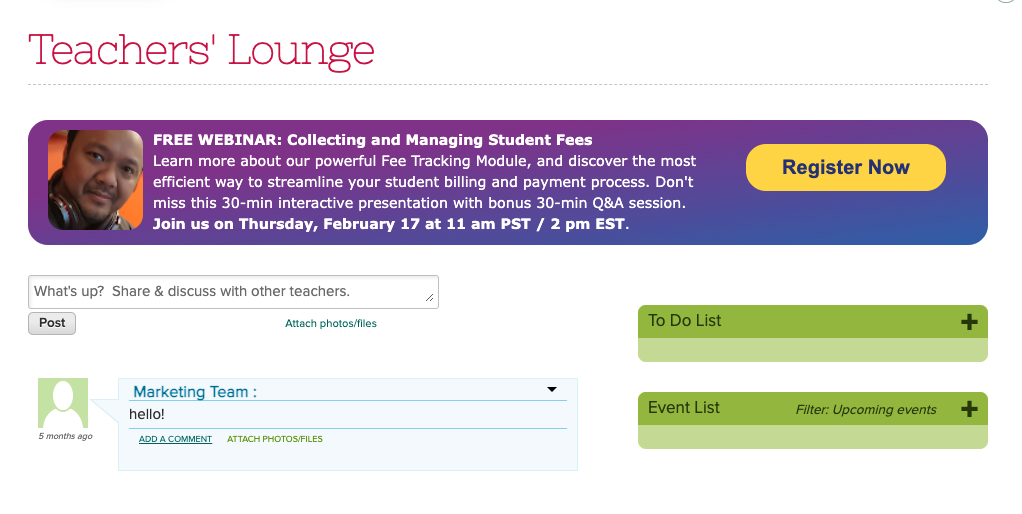
We’d like to remind the QuickSchools community that our upcoming webinar – Collecting and Managing Student Fees – focuses on the Fee Tracking module. This webinar is scheduled for February 17, 2022 at 11 am PST / 2 pm EST.

quickschools webinar with collecting and managing student fees

This webinar is the perfect time for you to see a live demo and/or ask questions. Book a slot for yourself by logging on to your QuickSchools account and signing up from the Teachers’ Lounge page.

We look forward to seeing you!

New Release – Feb 14, 2022

Today’s release focuses primarily on the Orchestra Master Scheduler, plus minor improvements to our new Online Testing module (Alpha) and Student Information System.

New option to Bulk Lock/Unlock Section Assignments in Step 5 of the Orchestra Master Scheduler

Here is a list of the latest QuickSchools improvements:

Master Scheduler Improvements

  • Option to Search/Sort Courses by Department ni Step 1
  • Option to Search Teachers by Department in Step 1
  • Option to Resync configured Teacher Names in Step 1
  • Option to color code the days in Step 4
  • Expanded Options to Bulk Lock/Unlock Section Assignments in Step 5 (see above)
  • Option to Clear Section Assignments by Department in Step 5
  • Option to Ignore Teacher Assignment when Loading Step 5
  • Highlight successful Load in Step 5
  • Support Weekly Schedule when finalizing Sections in Step 6 with SIS
  • Bug Fix Copy Target Students
  • Bug Fix Step 5 Student Count for large schools
  • Bug Fix Step 5 When Loading course requests linked to courses that are no longer offered
  • Bug Fix Schedule PDF with SIS enabled

LMS Improvements

  • Online Testing Framework Improvement (Beta)

General Bug Fixes and System Improvements

  • Remove support for deprecated payment gateway
  • Miscellaneous API improvements for Mobile App
  • Fix minor typo during Bank Account Verification for Student/Parent Portal

QuickSchools Webinar Series for 2022

We’re pleased to announce the schedule for our Monthly Webinar Series for 2022. We’ll be continuing with our webinar series by building on our past success. This means that we’re updating the discussion points for our most in-demand topics from previous years, as well as offering 4 brand new topics. Here’s the current list of topics and dates:

Schedule updated on August 30, 2022

*************** Winter break in November & December ***************

Please note that the topics above are subjected to change based on demand and feedback. 

Our webinars are typically held at 11am PT / 2pm ET, on the third Thursday of the month. In addition, we’ll be maintaining the well-received format introduced last year – 30-minute interactive presentation, followed by 30-minute Q&A session. 

We’re excited to bring these webinars to the QuickSchools community for FREE. We hope that you’ll take advantage of this opportunity. Registration is usually opened 3 weeks before the scheduled webinar date. Don’t forget to mark your calendar!

February 2022 Webinar: Collecting and Managing Student Fees

Thank you to everyone who attended our January webinar on Google Classroom Integration for Admins. We’re excited to see a healthy mix of new and returning attendees. We love to see the growth – it keeps us motivated to continuously improve our webinars!

As we resume our 2022 Webinar Series, we’ll be bringing you our webinar on Collecting and Managing Student Fees. This webinar will focus on our Fee Tracking module, which is one of our most popular modules. The Fee Tracking module provides an easy way for schools to charge tuition and fees, track payments, as well as manage invoices and receipts. In addition, schools are also able to streamline charges and payments for families.

QuickSchools’ Collecting and Managing Student Fees webinar was developed for school administrators. It is suitable for all levels of users. A few of the key discussion points include:

As per usual, this webinar is interactive. Post questions and answer polls during the 30-minute presentation session. Engage in more detailed discussion during the follow-up, 30-minute Q&A session.

The Collecting and Managing Student Fees webinar is scheduled for Thursday, February 17 at 11 AM (PST) / 2 PM (EST). Register by logging on to your QuickSchools account. The registration link is available on the Teachers’ Lounge page.

Note: Business vector of a webinar participant created by pikisuperstar – www.freepik.com

How a Master Schedule can help improve your College productivity

Academic productivity is important for institutions. It shows that contributions made by universities are for the betterment of student learning and it increases over time. There are many practices to help improve academic productivity. The biggest aspect that helps is technology. We will be sharing how an Online Master Scheduler, (OMS), connected to your student information system, can improve productivity in your university. 

As an institution, especially tertiary education, universities offer a long list of courses to students. Students can have a combination of a major or minor in different degrees. The issue with having a lot of course options for students is ensuring there’s flexibility and ability to accommodate students. Scheduling can be a daunting task when dealing with conflicts for every student. Especially when your method is outdated. 

Read More »