New Release – May 9, 2022

Today’s release focuses primarily on the Orchestra Master Scheduler, with some general improvements to several modules and beta apps:
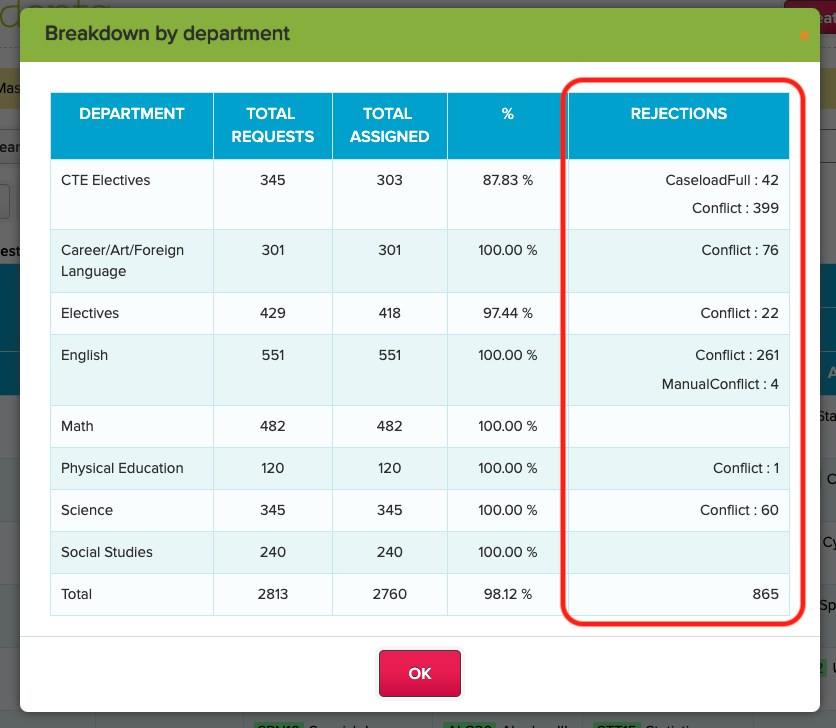
Step 5 “Breakdown by department” includes Rejection info

Here is a list of the latest QuickSchools improvements:

Master Scheduler Improvements

  • Properly handle Current Grade vs. Next Grade
  • Improve support for Next Course when settings are imported from another Enrollment Period
  • New “Scheduling Algorithm” in Step 4 supports (1) Singleton vs. Remaining and (2) Distribute vs. Randomize
  • Include Rejection Info when showing the Completion Status “Breakdown by Department” in Step 5
  • Clear Rejections after restoring a Save Point
  • Add support for Rejection Reasons to Report Creator and Summary Reports
  • Bug fix – Record only ONE rejection per section and course requests
  • Bug fix – Disable “Distribute Students” in Step 5 for Weekly Schedule

General (Functional) Improvements

  • New Sign-In/Sign-Out Summary for Student Portal
  • Add support for Online Payments in Report Creator
  • Handle special characters properly in Subject Names
  • Trim Student Name when student profile is saved.

General Bug Fixes

  • Bug fix when adding Book Title with Special Characters into Library App
  • Bug fix when viewing the Student record after switching schools (for Group Schools)
  • Disable link from Standard-Based Gradebook to Report Cards when Standard-Based Gradebook is uninstalled
  • Bug fix Report Creator for Student Grade Level

Beta Improvements / Fixes

  • Support Self-Enrollment from Parent Portal
  • Add support for Private Messaging to Applicant Portal
  • Add support for Online Forms to Applicant Portal
  • Fix how HTML is rendered in Online Tests App

Sign-In / Sign-Out for Student Portal

We’ve create a new screen for students to view the Sign-In / Sign-Out records from the Student Portal:

Read More »

May Webinar: QuickSchools’ Product Roadmap

May is bringing us another exciting webinar. Sign up and you’ll get an exclusive look at new features that QuickSchools will be rolling out for the rest of 2022!

A few of the major improvements we’ll be showcasing:

  • Expanded capabilities for QuickSchools’ Learn LMS, including online testing, subject-centric interface for teachers, online assignments, live stream, and calendar.
  • Expanded capabilities for the Online Payments module, including payment plan and shopping cart.
  • Introducing QuickSchools’ Engage – a standalone system to cater to your school’s student application and admission process. We hope to impress you with our Applicant Portal!

This webinar is suitable for both school administrators and teachers. We also welcome all levels of users, from beginners to advanced.

As per usual, our webinar is interactive. The 30-minute presentation session includes a live demo. You’ll also get to post questions and answer polls. We’ll follow-up with a 30-minute Q&A session. Here’s your chance to engage in more detailed discussion. We’d love to hear what you have to say about the features that we’ll be releasing and what changes you’d like to see in our software.

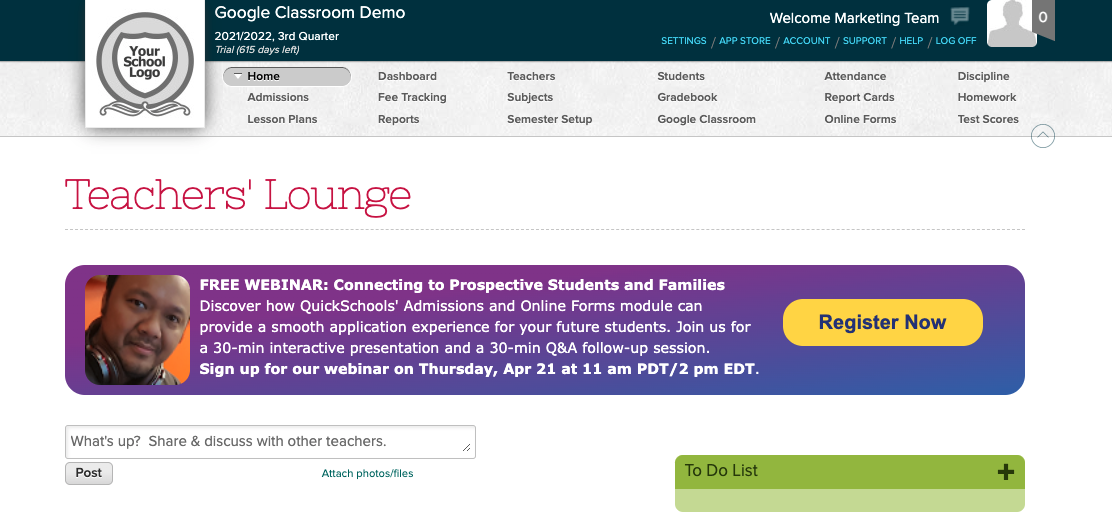
QuickSchools’ Product Roadmap is scheduled for Thursday, May 19 at 11 AM (PDT) / 2 PM (EDT). Register by logging on to your QuickSchools account. The registration link is available on the Teachers’ Lounge page.

Tech Fatigue: Why you feel tired and how to overcome it

tips on how to overcome tech fatigue

What is tech fatigue?

Technology or digital fatigue is defined as the state of exhaustion and disengagement that occurs among people who are required to use numerous digital tools and applications concurrently. Everybody across the globe has been heavily relying on technology these past few years, especially since the pandemic hit. Many, if not all of us, have experienced digital fatigue. Even though technology has been around for decades, we sometimes don’t have a choice to not be online.

Read More »

Roundup: Discover How to Leverage Admissions and Online Forms for Growth

quickschools admissions and online forms

QuickSchools is equipped to help you simplify your school’s admission process. You have the option of using our Admissions module for easy setup, or our Online Forms App/module for more customization. In this blog post, we’ll be presenting you with a collection of the most relevant support articles and blog posts for the two modules. We hope that this post will give you an insight into how we can help you increase your student enrollment.

Learn more about QuickSchools’ Admissions and Online Forms module from the articles below:

Admissions

Online Forms App

For an overall comparison between our Admissions module and our Online Forms App/module, please visit: Admissions vs. Online Forms

New Release – Apr 18, 2022

Today’s release focuses primarily on the Orchestra Master Scheduler, with some general improvements to several modules and beta apps:

quickschools april 18th 2022 updates

Here is a list of the latest QuickSchools improvements:

Master Scheduler Improvements

  • Refactor support for Pathways
  • Improve how Next Grade is handled with and without SIS
  • Improve grouping and sorting of courses in Step 1 Course Request Templates
  • New Tool tip in Step 2 for Student Portal Access
  • Support Weekly Schedule for Bulk Create Teams in Step 4
  • General improvements to Distribute function in Step 4
  • General improvements to Rejection Analysis in Step 4
  • General improvements to Allow Conflicts in Step 5
  • Move option to “Distribute vs. Randomize” to the “Scheduling Algorithm” in Step 5
  • Show Teacher Caseload in Step 5
  • Fix support for Low/High Grade when running Step 5
  • Add support Step 5 Optimize in Debug function
  • System Configurable Seeds for Step 5 Optimize (Beta)
  • Improve finalizing sections in Step 6 when academic term has not yet been activated
  • Improve tracking History of changes in the Enrollment Period
  • Add Course Conflict Levels to Report Creator

General (Functional) Improvements

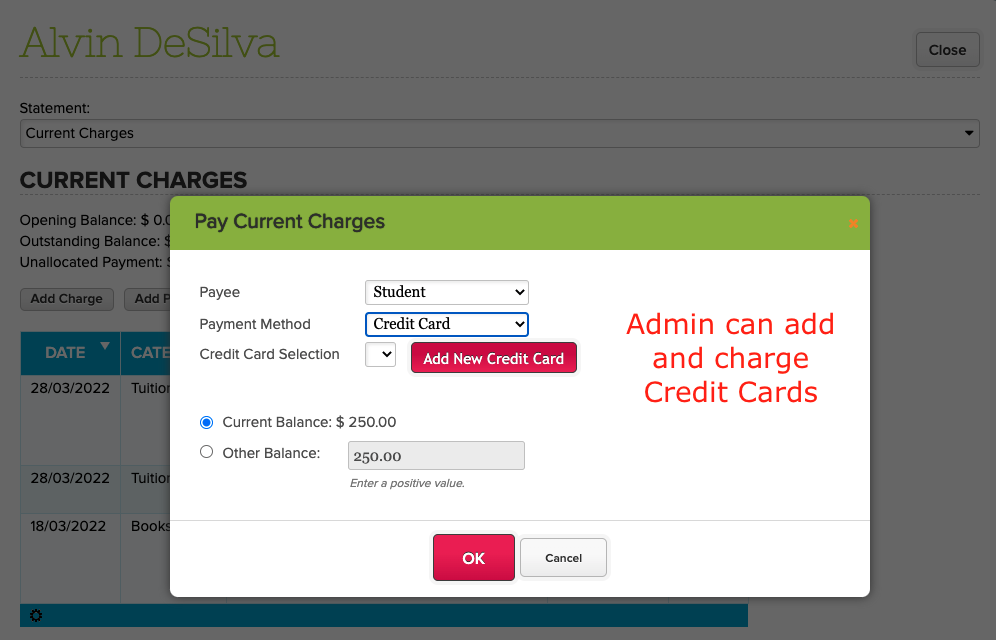
  • Allow Administrators to Add Credit Cards for Online Payments
  • Simplified Schedule supports searching by Course Code
  • Display Refund Amount in Student Billing for Stripe Payment is refunded

General Bug Fixes

  • General improvements to the Fee Tracking “Unallocated Payments” screen
  • Bug fix for Simplified Scheduling to maintain search results after table is refreshed
  • Bug fix for handling Gradebook Formulas in Report Cards
  • Bug fix for handling Gradebook Categories when integrating with Canvas

Beta Improvements / Fixes

  • Add support for 8th Grade in new Transcripts and Graduation Requirements
  • Bulk Send Text Message from Self-Enrollment App
  • General improvements to Online Test app
  • General improvements to Audit Trail framework

Improvements to Online Payments

As you can see from the screenshot above, we’ve added the ability for administrators of the Fee Tracking module to add credit cards on behalf of students and parents. Credit Cards can then be charged individually and processed through Stripe.

In the near future, we’re looking to expand the Online Payments capabilities within QuickSchools. This includes the following:

  • Ability to Bulk Charge Credit Cards
  • Ability to schedule charging of Credit Cards
  • Expand support for ACH (Bank Transfer)
  • Payment Plan functionality
  • Shopping Cart functionality

If any of these features interest you, please let us know via Chat or Email. We’d love to hear your thoughts as we build these features further.

How important is digital literacy for your students in today’s online world?

digital literacy and how important it is for your students

With the online world growing, it is important that your students understand digital literacy. Preparing them for the skills they need to know in order to use technology safely and responsibly is a must. 

The rise of edtech and the internet has opened up a new world that brings a lot of benefits. Especially to those that may not have had such opportunities before. It can empower and educate students, leading them to a path that is forever changing. Thus they will constantly be learning to stay on top. 

In recent years, technology has become so advanced that we need it in every aspect of our lives. Helping to teach your students to be digitally literate will not only help them through their studies but will carry on into their work life. 

Let’s start at the very beginning with the question, what is digital literacy?

Read More »

April Webinar: Connecting with Prospective Students and Families

April is bringing us another exciting webinar – Connecting with Prospective Students and Families.

This webinar will focus on two modules – Admissions and Online Forms – with features to support your school’s recruitment process. Discover how you can collect, process, and maintain applicant data. Our software equips you with the capabilities to track applicant status, as well as run promotions and outreach campaigns in the future.

This webinar is suitable for all levels of users. We will cover the following topics:

As per usual, our webinar is interactive. Post questions and answer polls during the 30-minute presentation session. Engage in more detailed discussion during the follow-up, 30-minute Q&A session.

Connecting with Prospective Students and Families is scheduled for Thursday, April 21 at 11 AM (PDT) / 2 PM (EDT). Register by logging on to your QuickSchools account. The registration link is available on the Teachers’ Lounge page.

New Release – Mar 30, 2022

Today’s release focuses primarily on the Orchestra Master Scheduler, and fixes to our new Online Testing module, now moving to Private Beta:

orchestra k12 master scheduler

Here is a list of the latest QuickSchools improvements:

Master Scheduler Improvements

  • New option to sort courses by name or code in Step 4
  • Ability to Color Code courses by Department in Step 4
  • Ability to Color Code days in Step 5
  • Ability to Allow Conflicts during “Load” in Step 5
  • Ability to distribute students in Step 4 when a teacher is added / removed
  • Hide “Activate” button in Enrollment Period for non-SIS
  • Fix Grade Filter in Scheduling Algorithm in Step 5

LMS Improvements

  • My WorkSpace Chat Console (Beta)

General (Functional) Improvements

  • Ability to schedule “Recalculate Fields” for Transcripts
  • Ability to preview attachments in Admissions
  • Show Submitter Name in Online Forms when Submission is not linked to a student
  • Schedule Standard Charge moved out of Beta
  • Add Course Department to Report Creator

General Bug Fixes

  • Remove Resigned Teachers from Dropdown for Attendance Rosters
  • Fix bug related to Add/Drop History
  • Fix Documents Tag in Admissions module

Beta Improvements / Fixes

  • Ability to relabel Interventions
  • Improve Framework for Audit Trail