New Release – November 22, 2022

Today’s release lays the groundwork for our new Payment Plan module. We expect an early beta version to be released in the next month. The remaining improvements focus on our Orchestra Master Scheduler, Lunch Ordering app, and our SFTP Importer (Beta), plus other general improvements and bug fixes.

New “Conflicts” by Department in Step 5 of the Orchestra Master Scheduler

Here is a list of the latest QuickSchools improvements:

Master Scheduler Improvements

  • Set default Next Course for Year-Long Courses in Course Catalog
  • Preview / Download student Schedule PDF from Step 5
  • Show Conflicts in “% Complete” Breakdown by Department in Step 5
  • Bug Fix when Link / Remove Section with custom Day labels in Step 4

Lunch Ordering App

  • Customers can view/print paid orders

General Bug Fixes

  • New option to Skip Invoices in QuickBooks Integration App (see below)
  • Show negative amounts properly in “Billing History”
  • Bug fix unenrolling students in Group Schools
  • Bug fix schedules tasks that “Repeat every weekday”
  • Bug fix when submitting grades from Gradebook to Report cards
  • Bug fix when displaying total score in Online Tests 
  • General Security Updates

Beta Improvements / Fixes

  • Payment Plan Framework (Early Alpha)
  • SFTP Importer (Beta) support to deactivate old students
  • SFTP Importer (Beta) support to delete old course requests
  • API Improvements to support Engage CRM
  • Bug Fix on new Sections tab for Teacher Portal
  • Add support for Notes to Parent Portal

Option to Hide Invoices for QuickBooks Integration

This is a new feature to help hide transactions that may already have been exported to QuickBooks outside of QuickSchools:

Read More »
Free Lunches via Lunch Ordering

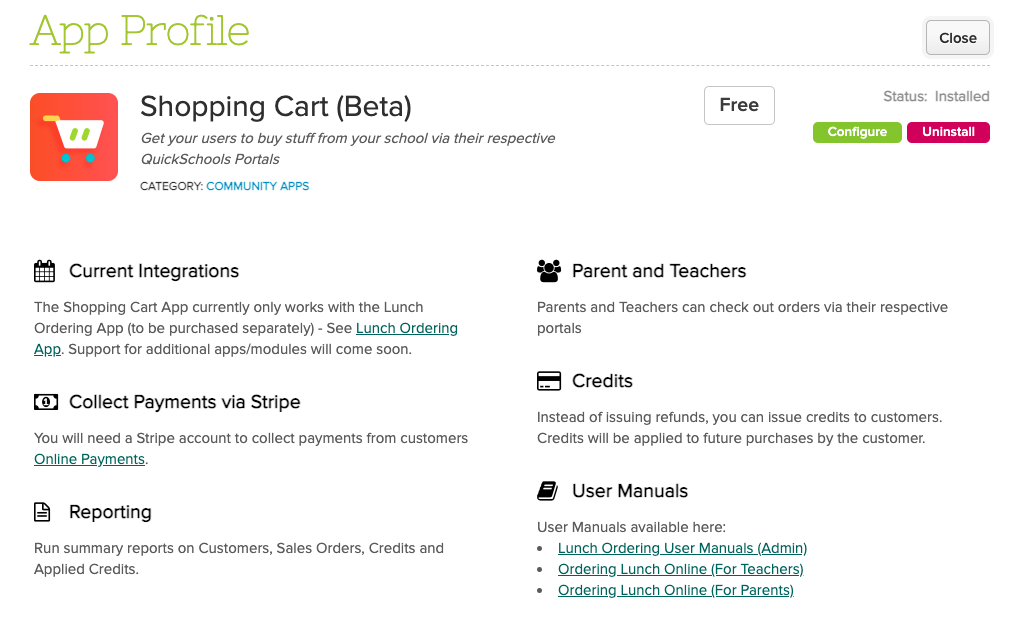
This article describes how schools can setup Free Lunch Orders through our new Lunch Ordering App (with Shopping Cart). This may come in handy when certain cases require this, such as when prospective students visit the school and want to try out the Cafeteria.

A summary of the steps are as follows:

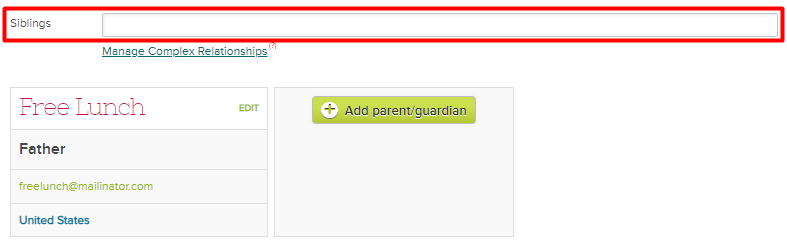
  • Create a Dummy Student and Parent Account
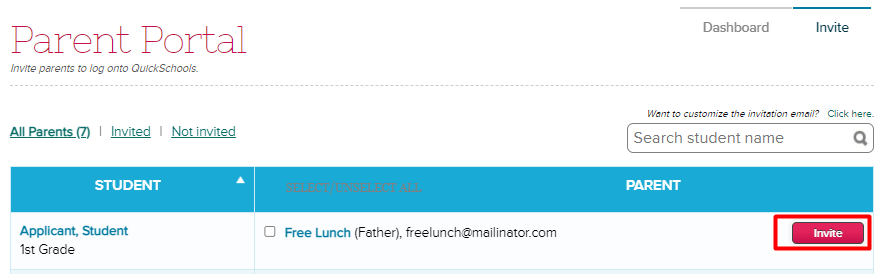
  • Invite Parent via Parent portal
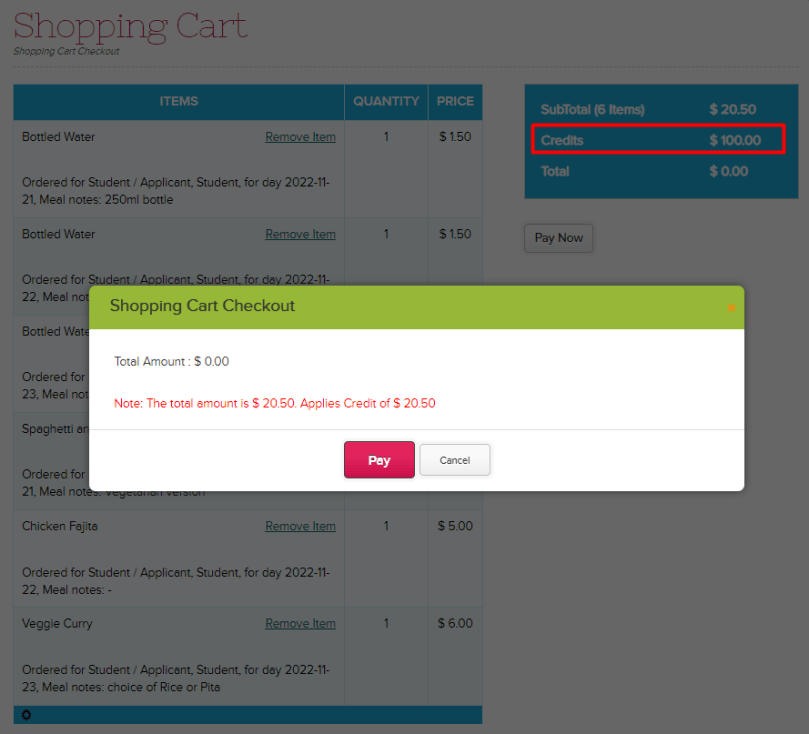
  • Add Credits for the Parent’s Lunch Ordering
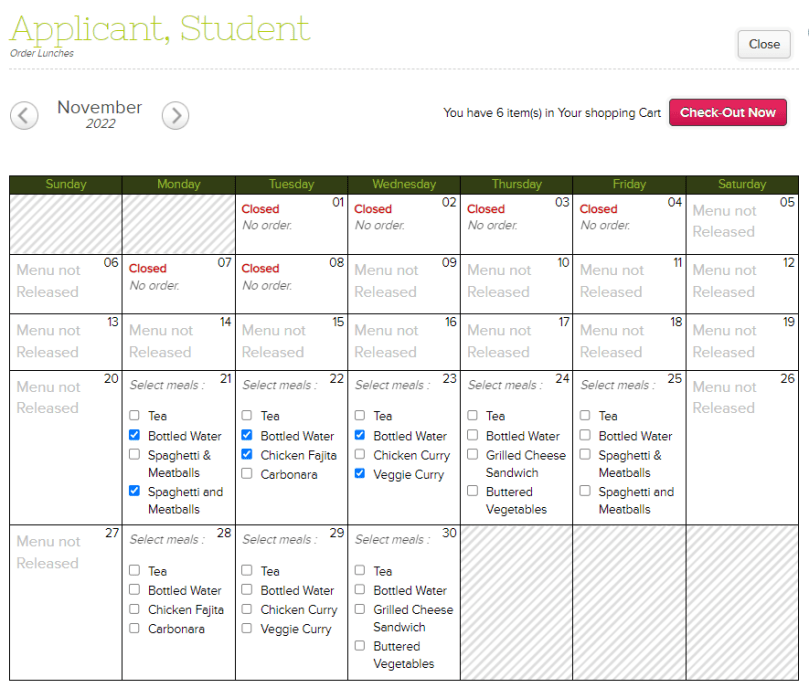
  • Order lunches through the Parent Portal

Setup Dummy Student and Parent Accounts

You will need to setup a dummy account for a student and parent. If you want to have separate lunch orders per Grade Level/Homeroom, a dummy student account would need to be created for each grade level. However, all students can still be linked to a single Parent Account.

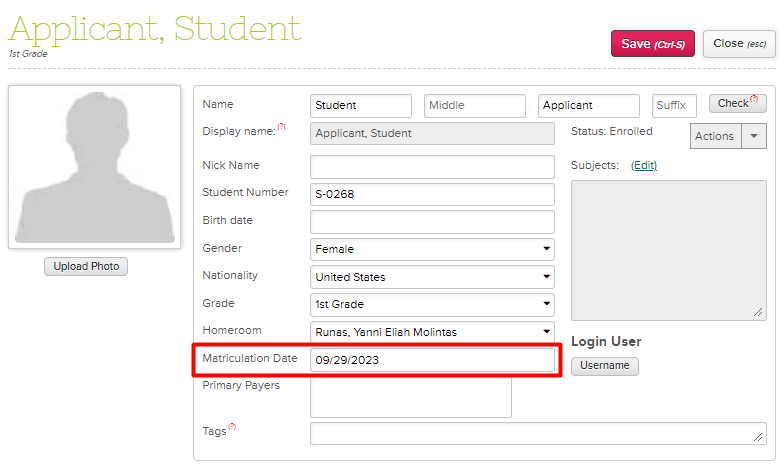
In order for the student to be excluded from the Attendance Roster (if Homeroom Attendance), set the Enrollment Date to a future date.

If you would be having more than one dummy student (one per grade), link the students as Siblings in order to access them all in a single Parent Portal.

Invite the Parent to the Parent Portal

Invite the dummy parent account by going to the Parent Portal > Invite tab > Click on the Invite button for the dummy parent.

Add Credits

Without a valid credit card, parents can only submit orders using Credits. You will need to add sufficient credits to the parent account, so as to complete lunch orders as necessary.

COMING SOON
At this time, credits can only be added by QuickSchools Support Staff. The ability for the School Admin to add credits to users will be available soon.

Order Lunch for Students

Once credits have been added for the Parent, you can order lunch via the Parent Portal and checkout using the credits.

The lunch orders can then be viewed through either the Lunch Ordering > Order Fulfillment tab, or our Lunch Ordering Reports.

To know more about ordering lunches in the Parent Portal, please feel free to check our Ordering Lunch Online (For Parents) Guide.

If you have any questions or concerns regarding setting up Free Lunches, feel free to chat in, or send us an email at support@quickschools.com. Feel free to provide any suggestions or feedback as well.

For This Back to School Season 2023, Let’s Not Forget Our Student’s Mental Health

The new school year recently started. Students all over the world are physically heading back to school.  Many have been looking forward to starting classes in person since many schools were still conducting lessons remotely previously. They must have missed their friends, for instance having lunch together and getting to play outside during PE. 

Those in boarding school might be moving into dorms while others wait for the school bus on the first day of class. Due to this sense of (pre-covid) normalcy, some kids might be suffering from anxiety about having to physically attend classes and interact with other people daily. They may be worried about catching covid, not knowing how to interact with friends, and extroverts suddenly becoming introverts after a long period of isolation.

Read More »

New Release – October 31, 2022

Today’s release focuses on continued improvements to our Orchestra Master Scheduler and  Lunch Ordering app, plus general improvements and bug fixes to our Student Information System (SIS).

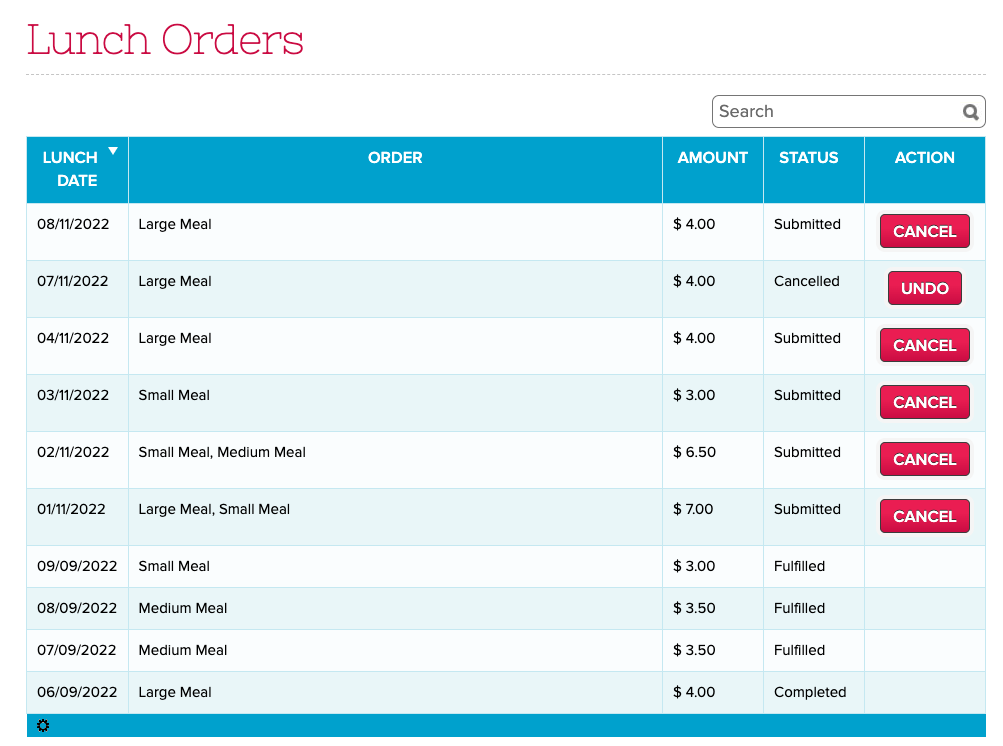
Updated “Lunch Orders” listing for Parents and Teachers

Here is a list of the latest QuickSchools improvements:

Master Scheduler Improvements

  • Search Students in Step 5 by Student Number
  • Option to display Student Number in Step 5
  • Option to show internal Section ID in Step 4 and 5
  • Option to show roster directly  to Teachers via their portal
  • Bug Fix Course Requests when Course is excluded from Enrollment Period

Lunch Ordering App

  • Improve Lunch History screen to support sort, search and additional functions (See Above)
  • History for Bulk Cancel Lunch
  • Ability to Undo Bulk Cancel Lunch
  • Support for Lunch Day Labels
  • Bug Fix Deleted Lunch Orders when all individual meals are removed

General Bug Fixes

  • New “Schedule” tab for Student & Parent Portals for Simplified Schedule (See below)
  • Links in Notes for Simplified Schedule are now clickable (See below)
  • Links in Notes for Generated PDF from Simplified Schedule are also clickable (See below)
  • Update Note for cost of paid Text Messaging
  • Bug Fix Customer Dropdown for QuickBooks Integration App.

Beta Improvements / Fixes

  • Option to force full online payments in students / parents (i.e. remove option to pay any amount)
  • Improve support for Weekly Schedule in “Courses & Sections”
  • Bug fix Gradebook when missing Add Date in “Courses & Sections”
  • Miscellaneous Improvements to the SFTP Importer (Beta)
  • Support Custom Emails for Scheduled Emails
  • Bug fix revoking access to Teachers for Group Schools
  • Remove “View Enrollment History” for Group Schools
  • Expand data dictionary for Summary Reports
  • General Security Updates

Schedule for Student and Parent Portals

If your school is using the Simplified Schedule, both the Student and Parent Portals now have a dedicated “Schedule” tab that quickly shows you the class schedule:

Read More »

Teacher Tips: Fun Fall Activities in the Classroom

fun fall activities teachers can do in the classroom

It’s pumpkin spice season! Everybody loves the coziness, the orange hues, and the falling leaves. Let’s look at some fun activities for your students that can be done in the classroom this autumn. 

Read More »

Lunch Ordering App (Comparison)

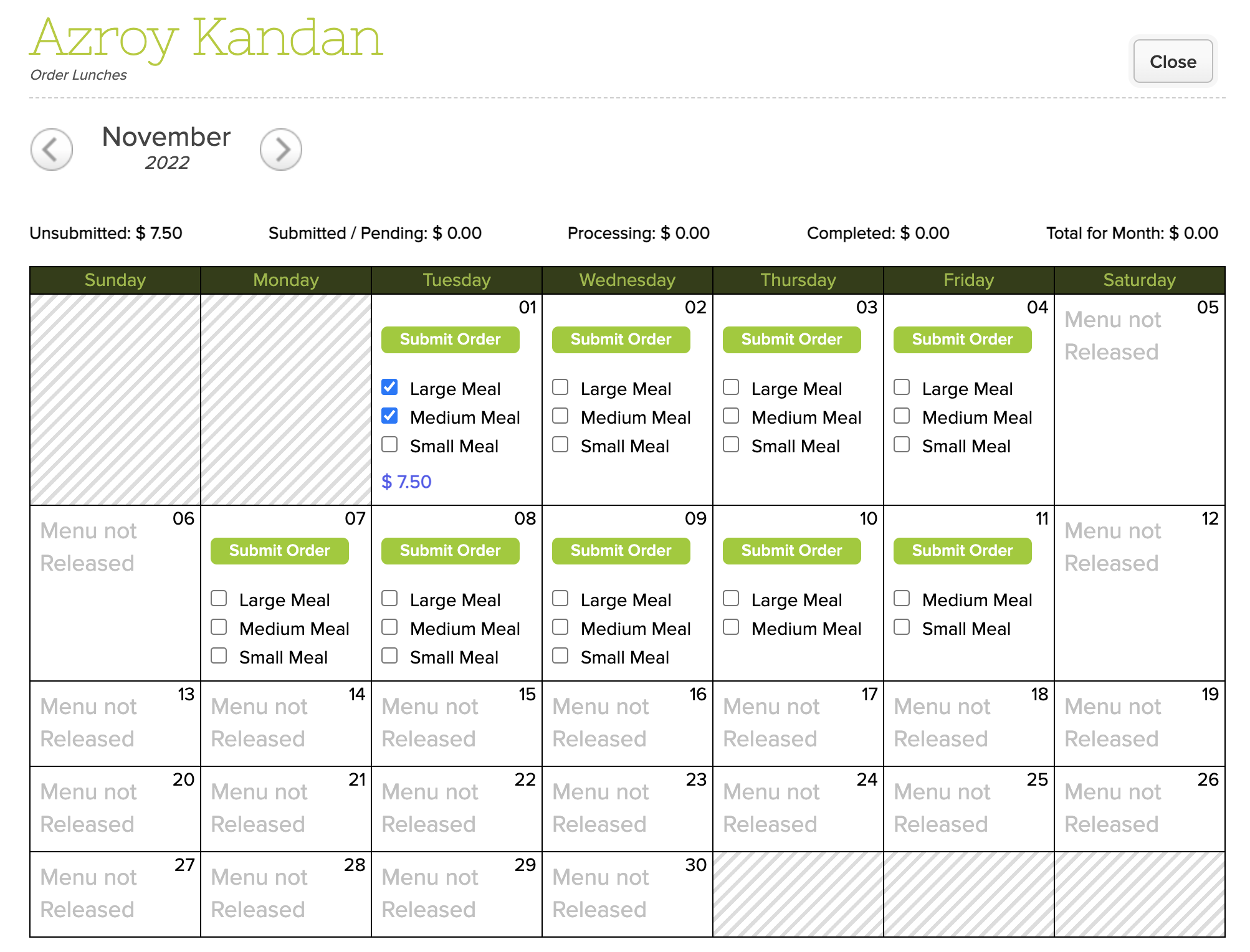
As you may have noticed, we’ve released a new version of the Lunch Ordering App which supports Online Payments. However, the original version in QuickSchools still works for schools that want to collect lunch payments via traditional means. But what are the differences between the new and old versions of the Lunch Ordering App? Here, we discuss the differences, as well as pros and cons.

Original Lunch Ordering AppLunch Ordering with Online Payments
Fulfill then ChargeCharge then Fulfill
Integrates to Fee TrackingIntegrates to Online Payments
Tried and TrueNew (Still in Beta)

Fee Tracking vs. Online Payments

Original Lunch Ordering App with Fee Tracking

The original Lunch Ordering App was designed to allow parents to submit orders freely (before the cut-off date). Parents would only be charged AFTER orders were fulfilled. Once fulfilled, the school would bill the parents via the Fee Tracking module. Parents can then make payments to the school per the usual means. If changes are required after the cut-off date, administrators can edit the orders, up until the orders are fulfilled.

Read More »

Thank you for Attending our Transcripts Webinar!

We’d like to thank everyone who attended our Transcripts webinar. We hope you enjoyed the presentation, and gained some useful information.

A follow-up email has been sent to all registrants. Please take the time to complete the attached survey, and submit it back to us. We welcome all feedback. We look forward to finding ways to improve future webinars.

For those who’d like to know more about our Transcripts module, feel free to reach out to us via our Live Chat Support or email us directly at support@quickschools.com.

We also curated the most relevant information on our Transcripts module from our Help Center and Blog. Follow this link to go to the Roundup: All About Transcripts post.

Our October webinar will be our last webinar for 2022. It has been a pleasure hosting the webinar series for the QuickSchools community. We love sharing our best practices to make sure that our community can fully leverage what QuickSchools has to offer.

Our webinar series will resume again in January 2023. In the meantime, let us know if you have suggestions for future topics by contacting our support team. Thank you again, and have a great rest of the year!