Custom Attendance Codes

The Custom Attendance Codes app has been in the QuickSchools App Store for several years now. The app itself has not changed much, but there are a couple new features to mention. So we thought we’d revisit this app and it’s functionality.

The Custom Attendance Codes app essentially allows you to

  • Create additional attendance codes specific to your school
  • Allow teachers to use custom attendance codes while taking attendance
  • Note/record attendance codes to be applied in the future
  • Inform teaches of applied attendance codes when taking attendance

Configuring Access

The Attendance Codes app essentially has 2 components that in combination can address the scenarios above, and these are (1) the Attendance Codes themselves, and (2) a Daily Status which is essentially the application of the Attendance Code on a date range. When configuring the app, you can keep these components purely for administrators, or you can allow teachers to view them on their Attendance roster:

Configure Access to the Attendance Codes App

Custom Attendance Codes

Users with administrative access to the Attendance Codes app will have the ability to view/edit Attendance Codes under the “Codes” submenu (under the main “Attendance” menu):

Manage Custom Attendance Codes for your School

When adding/editing an Attendance Code, the following fields are available to you:

Read More »
Emergency Contacts Report

We have a new Student Emergency Contacts report available in Quickschools. This report will assist in reviewing the emergency contacts available in your account and in gathering their information.

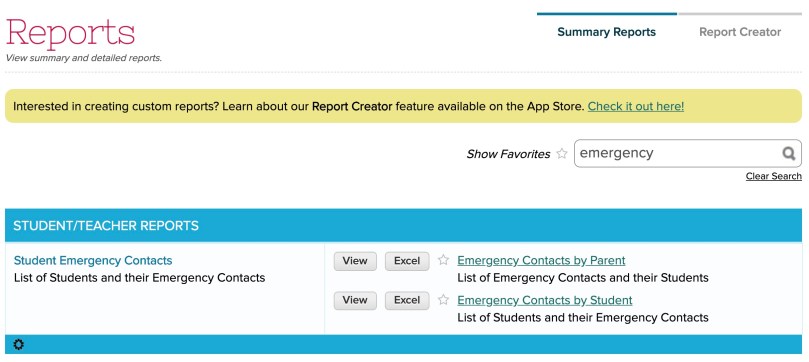
There are two variations to this report: “Emergency Contacts by Parent” and the “Emergency Contacts by Student”.


To access the report, just search for “emergency”

Both of these reports include the following lists:

  • Only Show Students with ONE Emergency Contact
  • Only Show Students with MORE THAN ONE Emergency Contact
  • Only Show Students WITHOUT an Emergency Contact

Here’s what the reports look like:

Read More »

Report for Subject Catalog

We’ve just enabled a new report in QuickSchools that allows you to see all current subjects for the active semester:

“Subject Catalog / Course Offering” Summary Report

Existing Summary Reports take into account whether a student is enrolled into the subject. In this report, all subjects will be displayed regardless of whether students are enrolled.

Sample “Subject Catalog / Course Offering” Summary Report

Subjects will be sorted by their Grade Level. NOTE: If you find that the grade levels are not sorted the way you want then, be sure to Configure your Grade Levels from the Students Listing:

Read More »

Report for Orphaned Subjects (linked to Resigned Teachers)

As with any organization, employees (including teachers) come and go. When a teacher resigns (and is deactivated from your QuickSchools account), the teacher record is retained and remains linked to all subjects that the teacher taught. This is obviously helpful for historical records. So just because a teacher resigns, we still keep track of the courses and grades linked to that teacher.

But what happens if a teacher resigns during an active term?

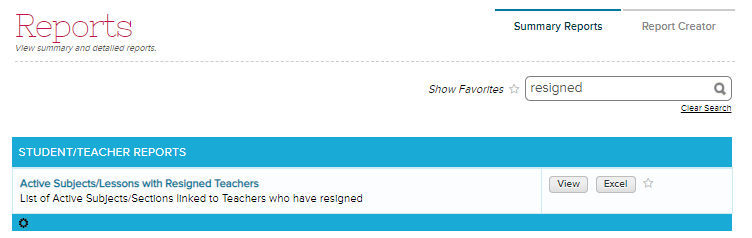
Typically, subjects assigned to resigned teachers would be re-assigned to an active teacher. But depending on circumstances, school administrators may not update the subjects in QuickSchools in real time. So here we’ve built a new report that identifies active subjects linked to resigned teachers. This new report called the “Active Subjects/Lessons with Resigned Teachers” is available under “Summary Reports”:

Active Subjects/Lessons with Resigned Teachers Report

This report ONLY lists active courses linked to resigned teachers. However, there is a filter to determine whether the course is “Active” or “Orphaned”. An “Active” course is essentially a course that has been successfully re-linked to an active teacher. While an “Orphaned” course is only linked to a resigned teacher, and needs to be re-linked to an active teacher.

Read More »

Report for Absences with Tardies

Although Summary Reports are pre-configured to contain preset columns and filters, the reporting tool itself can be quite powerful. So if you’re looking for a report that you’re unable to create on your own via the Report Creator, you can always commission QuickSchools to build a custom report that appears in the Summary Reports. 

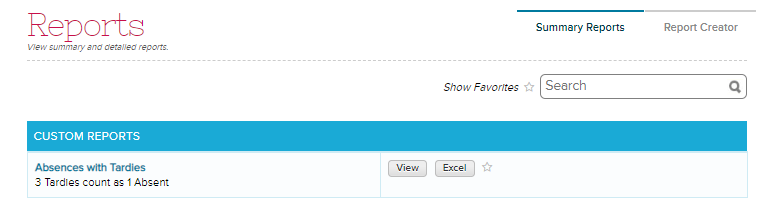
Here’s an example taken from language schools that need to convert 3 tardies to 1 absent. The “Absences with Tardies” Summary Report that we built consolidates all absences and tardies using the conversion described above: 

The report contains columns for Number of Absent, Number of Tardy and Total Absent which includes the converted Tardies.

Read More »

Reports Tell a Story

We recently published an article describing the difference between Summary Reports and the Report Creator. And it’s worth noting that with Summary Reports, the goal is to address a specific scenario. Or use case within your daily use of QuickSchools. So we thought we’d start highlighting some of these scenarios in a new category within our blog. This new “Summary Reports” category is linked below:

https://www.quickschools.com/blog/category/summary-reports/

So with this new category, we’ll be highlighting specific reports (some of which will be new) that address a specific use case within your daily use of QuickSchools. For example, below is a previous article on how to access the Reference Numbers when inviting parents to fill in an Online Form submission:

https://www.quickschools.com/blog/2019/05/30/report-for-reference-numbers/

Sample Application Reports with Reference Numbers
Sample Application Report with Reference Numbers

We’ll have some new highlights coming up soon. Please feel free to suggest any particular scenario that you’re looking to have a report on.

Summary Reports vs Report Creator

When accessing the “Reports” menu in QuickSchools, there are actually 2 options available, depending on your subscription and your access. Here we’d like to compare and discuss the differences between these 2 options, the Summary Reports and the Report Creator:

Summary Report

Report Creator

Reports are pre-configured for each module.All reports have to created from scratch. But you can save and share reports once created.
Fixed Format – Columns are fixed, Available Filters are fixed, but you can select how you want to filter.Customizable Format – You can freely add columns and filters.
Designed for Speed – You get quick and easy access to data you used oftenDesigned for Data Exploration – You have to know / understand the data you want to extract, and build the report. Once built, you can share and re-use the report as needed.
Optimized for Large Data Sets – You can pull data quickly, since the query has been optimized. Optimized for Exception Reporting – You can create reports on specific scenarios that are important to you, and then produce charts and graphs with click-through functionality
Aggregate (Pivot Table) Reporting – Data can be aggregated and combined in pivot-table style report.Tabular Reporting – Report is basically always tabular. For aggregate reporting, you typically have to export to Excel and manipulate offline
Limited Features – The Primary Purpose of Summary Report is simply reporting and exporting to external systems.Full Featured – Supports Email Templates, Scheduled Emails, Graphing, Filtering on regular modules, Group School Reporting, and Dashboarding. Check out this article for more info.
Included in ALL subscription plans. Access to specific reports is based on installed modules.Included in the Athena Plan. For all other plans, needs to be installed from the App Store.

Common Features

Both Summary Reports and Report Creator support the following features:

Read More »