New Module-Based Custom Fields

QuickSchools is proud to announce our new framework, which has just been rolled out to the Teacher module. The new module boasts several improvements over the previous “Custom Fields” tab:

  • We now support Drop-Downs (in addition to regular Text Fields)
  • You can sort fields
  • You can add headers and regular text to organize
  • You can allow specific users to view and/or edit specific fields
  • You can very easily delete and restore fields as well

For right now, the new Custom Fields section is only available in the Teachers module, but we’ll be adding the same Custom Fields section to other modules, like Admissions, Students, and Discipline. Here’s a quick rundown of how it works:

The section should initially look like this:

Empty Custom Fields Area

Simply click on the “Add Custom Field” button to add a new field:

Read More »
Updated QuickSchools Parent Portal

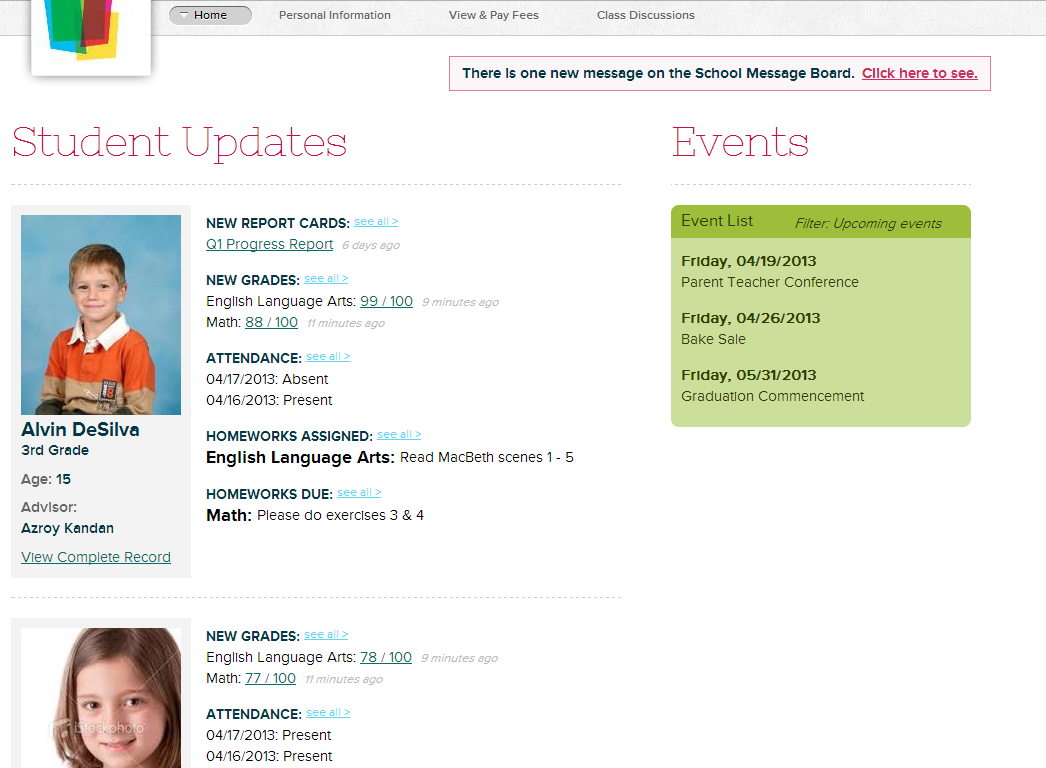
Check out the new QuickSchools Parent Portal Interface:

New QuickSchools Parent Portal Interface

You can now check the status of the student right after logging in. Just click on the appropriate links to view a particular aspect of the student’s status (like Report Cards, Grades, Attendance, or Homework). Or click on “View Complete Record” to get the original tab-based view like before.

We hope you like this new improvement 🙂

Updated May 24, 2013:

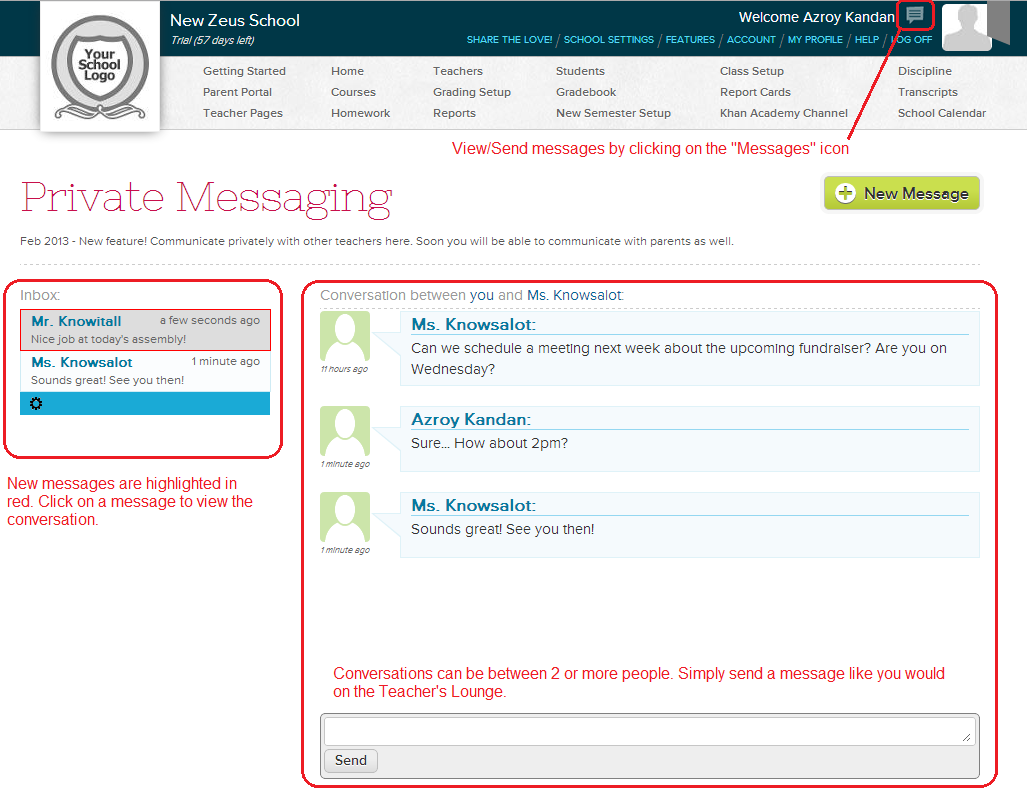
We’ve just released Private Messaging for Parents. You can check it out here:

https://www.quickschools.com/blog/2013/05/24/private-messaging-for-parents/

Activating a Semester

In QuickSchools, academic terms are self-contained, meaning that when you edit/create subjects and enrollments in one semester, it does not effect other semesters within your account. We previously discussed how to create new gradebooks for the new semester in a separate article. To make this function more seamless, you can now activate empty semesters directly from the main “View All Semesters” menu, and the system will ask whether you’d like to copy subjects from the previous semester.

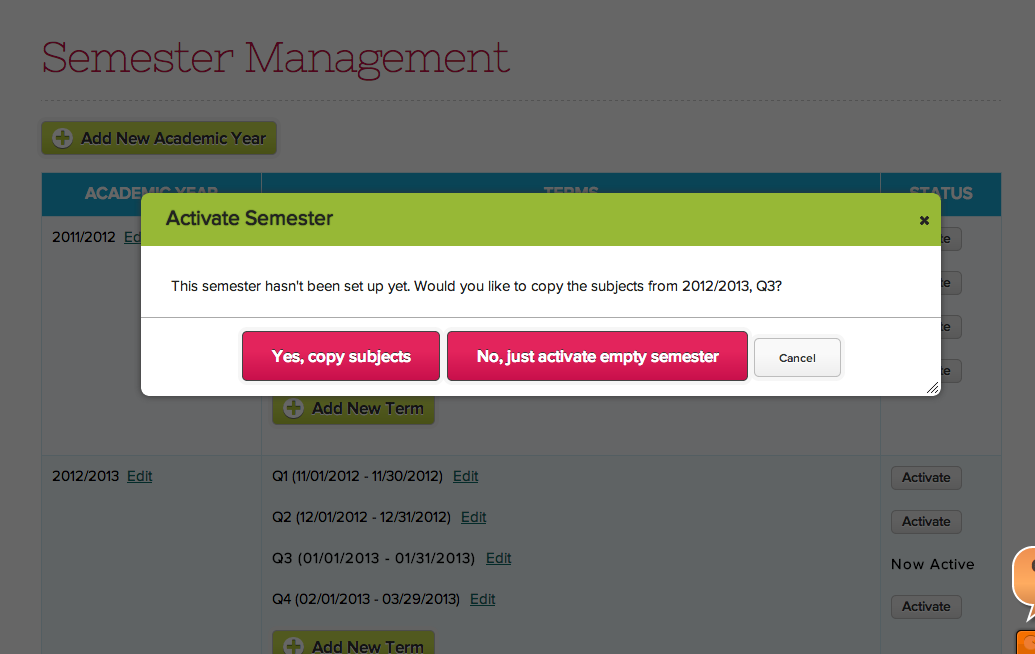
Here’s what the screen will look like if you try to activate an empty semester that currently does not contain any subjects:

Activating an Empty Semester

Just click on “Yes, copy subjects”, and the system will automatically re-create subjects that you had setup in the previous semester. If you’d like to manually recreate the subjects for the new semester, then you can simply select “No, just activate empty semester”.

Here’s what the screen will look like if you attempt to activate an empty semester in a future academic year:Read More »

Upcoming feature: Teacher Pages

Our next feature that’s coming up real soon is Teacher Pages. Through Teacher Pages, teachers can connect with their classes for each subject that they teach. Teachers will be able to create and share rich content e.g. post a message and introduce a topic to the class, share links to material available on the Internet like a TED Talk video, a wikipedia article or a video from the Khan Academy, etc.

Students (and maybe parents too) of the class will then be able to connect through their respective portals and share their thoughts as well. Hopefully, the Teacher Pages feature will encourage discussions and exchange of ideas that ultimately enhances the classroom learning experience.

We are very excited about this new feature and we’ll share more details once the feature’s released.

UPDATED May 3, 2013:

The Teacher Pages module had been released, but it has been renamed to “Class Discussions”. We will be posting it on our blog in the next few days. You can turn it on via the “Features” page. Let us know what you think about it.

UPDATED May 6, 2013:

Online Class Discussions now LIVE!

https://www.quickschools.com/blog/2013/05/06/online-class-discussions/

We’re now officially on HTML5

Just a quick announcement. It’s been several months now since we first announced the availability of the new HTML5 interface. We’ve had many new improvements that came along with it. Just to name a few:

Under development and soon to be released:

  • Subject-based Discussions (like the Teacher Lounge and Parent Message Board, but for subjects)
  • Portal Messaging (ability to send messages to other users via the portal)

With that said, Read More »