New Release – Oct 29, 2025

This QuickSchools release contains improvements to the Gradebook, the Orchestra Master Scheduler, plus other miscellaneous improvements to our Student Information System (SIS). We are also making general improvements to the user interface: 

Updated Student Navigator to browse Student Profiles

Full list of improvements are below:

Master Scheduler Improvements

  • Option to exclude certain courses from Teacher Caseload
  • Improve Importer for Course Catalog
  • Importer support for Hidden Course Requests

Gradebook Improvements (See Below)

  • New option to Expand/Collapse Student Name
  • New option to show Median for columns
  • Improve how inactive students are displayed
  • Bug FIx pop-up for “Send Email Result”

General Improvements

  • Refine UI for Student Navigator (See Above)
  • Refine UI for “By Parent” screen for Students
  • Improve how Grade Levels are managed (Disallow duplicate MetaID)
  • Bug Fix WYSIWYG editor when saving links
  • Bug Fix first time invite for teachers

Beta Features / Beta Apps

  • Mass Messaging option to filter Applicants by Status
  • Improving Tutoring Plan App for Parent Portal (Search bar)
  • Improve SFTP Importer from PowerSchool (Import School Name as Tag)
  • Improve Payment Info indicator for Payment Plan
  • Internal improvements to Report Creator (for Billing Reminders)
  • Improve internal data maintenance (data purging)
  • Bug Fix Internal Feedback Survey Framework
  • Bug Fix translation for Homework
  • Bug Fix Online Forms for new Trial Accounts
  • API Improvements for Mobile App (Improve support for Teachers Lounge)

Gradebook Improvements

We have 3 new features to share for the Gradebook. First, you can now easily expand / collapse the first column containing the Students Name:

Read More »
Schoology Integration App – Important Update

Schoology recently strengthened their API security standards. In response, we’ve updated the QuickSchools–Schoology Integration App (available in our App Store) so everything continues running smoothly. During this update, we also took the opportunity to enhance several features to improve your integration experience with QuickSchools.

Below is a quick walkthrough of what’s new:

Install the QuickSchools App in Schoology

With the latest upgrade, an extra step is now required to fully connect QuickSchools and Schoology.

  1. Log in to your Schoology account
  2. Go to the App Center
  3. Select QuickSchools–Schoology Integration
Read More »

New Release – Oct 8, 2025

This QuickSchools release continues to build on the foundational framework for our upcoming Tutoring Plan app, but also includes some general improvements to our SIS as well as the Library App. 

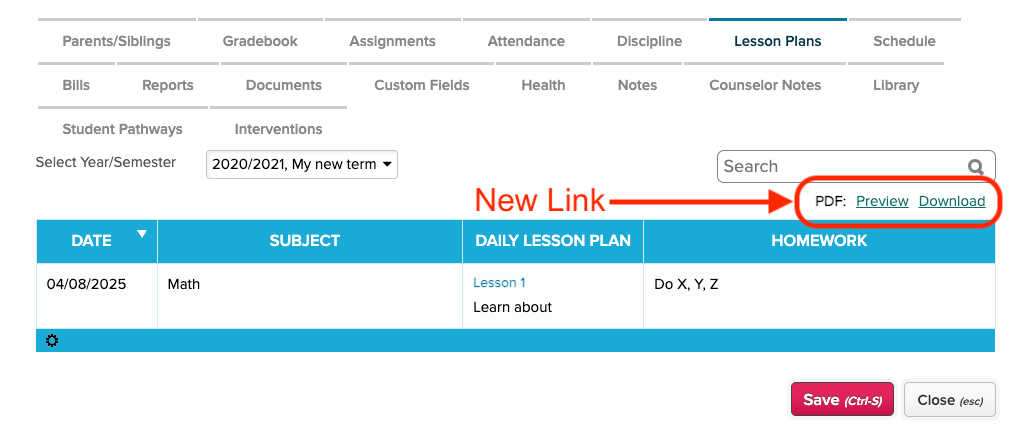
New option to “Preview” or “Download” a PDF of the Lesson Plans

Full list of improvements are below:

Library App Improvements

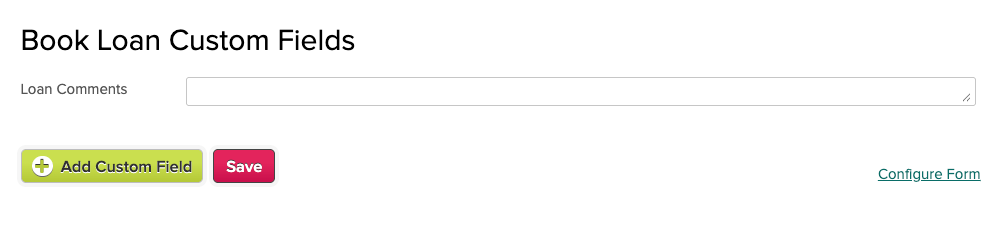
  • New Custom Fields for Book Loans (See below)
  • Option to exclude teachers from list of Members
  • Bug Fix exclude Applications from list of Members

General Improvements

  • Print Lesson Plans from Student record (See above)
  • Improve Support for Student Name Format
  • Bug Fix Scheduled Tasks for Cancelled / Suspended Accounts

Beta Features / Beta Apps

  • Ability to rename “Demerits” in Discipline module
  • Bug Fix Internal Feedback Survey Framework
  • Tutoring Plan Framework Improvements

Custom Fields for Library Book Loans

You can now configure Custom Field for your Book Loans:

Configure Custom Fields for Book Loans

When checking out books, you will be prompted to fill in the Custom Fields:

Read More »

New Release – Sept 10, 2025

This QuickSchools release contains the foundational framework for our upcoming Tutoring Plan app, but also includes some general improvements to our SIS. 

Full list of improvements are below:

General Improvements

  • Bug Fix Student Tags in Gradebook
  • Bug Fix Saved Gradebook Preferences
  • Bug Fix Upload File in Online Forms App
  • Bug Fix Failed ACH Payment for Payment Plan
  • Bug Fix Credit Card Fee Payment Allocation for Failed Online Payments (Family Billing)
  • Minor Improvements to Payment Plan Importer

Beta Features / Beta Apps

  • Disallow Cancel Lunch Order after Cut-Off Date
  • Confirmation Dialog when Bulk Delete Documents
  • Improve SFTP Importer from PowerSchool
  • Internal Feedback Survey Framework
  • Internal Improvements for managing PDF Templates

Tutoring Plan (Coming Soon)

We have a new app in the works that will allow schools to sell Tutoring Lessons via the QuickSchools Portal for Students and Parents. 

The school admin can define hourly rates as well as discounted packages for students/parents to purchase online. Once purchased, the school admin can then assign the student to a specific tutor, who will then perform the lesson. The tutor can then record completed lessons (and hours) online for students/parents to review.

More info coming soon.

Lunch Roster PDF (Mini-Release)

We just released a few minor improvements to the Lunch Ordering app in order to support a new and improved PDF Template for the Lunch Roster PDF. If you have installed the “PDF Templates” App (currently in Beta), you can now select the “New Lunch Roster Report” PDF template. This template allows you to include additional pages for (1) Teacher Orders and (2) Summary of Orders, as well as show/hide Homeroom details.

The Lunch Roster PDF now sorts pages by Grade Level, and sorts columns by Meal Sort Order too. Check out these apps on our QuickSchools App Store:

PDF Templates App

This app allows administrators to change, configure and customize PDF Templates for other modules like Fee Tracking, Lunch Order, Master Scheduler and others (depending on the apps/modules that you have installed): 

Read More »

New Release – July 29, 2025

This QuickSchools release focuses on improvements to the Online Forms App as well as the Student Importer, along with general improvements to our Student Information System (SIS) and new UI for the Orchestra Master Scheduler. 

Full list of improvements are below:

Online Forms App

  • Updated Screen for Configure Form Packet (See above)
  • Improve ability to select multiple forms for download
  • Bug fix Submission Counter on Form Packet Listing

Student Importer / Students API Resource

  • Improve support for Complex Names
  • Improve how siblings are automatically linked
  • Bug Fix Clear Leave Date when reactivating student

General Improvements / Bug Fixes

  • Improve View-Only version for Student “Custom Fields” tab
  • Improve how Custom Fields are displayed on main listing based on access
  • Auto-Purge Deleted Student Documents
  • New Payment Plan Importer
  • Ability to Configure Homerooms with Classes (See below)
  • Update list of available Nationalities
  • Improve support for GPA calculations that include lower grade levels
  • Improve support for deleted Attendance Codes
  • Improve Error Handling for Admissions when Capacity is reached
  • Improve support for Duplicate Course Requests with new OMS UI
  • Miscellaneous improvements to Orchestra Master Scheduler

Beta Features / Beta Apps

  • Bulk delete Student Documents
  • Bug Fix Login API for Mobile
  • Bug Fix Attendance Dashboard for Homeroom Attendance

Configure Homerooms with Grade Levels

When clicking on the “Configure” link on the “Students” listing, the Class Setup table have been expanded to support Homerooms:

Read More »