Thank you for Attending our Transcripts Webinar!

We’d like to thank everyone who attended our Transcripts webinar. We hope you enjoyed the presentation, and gained some useful information.
A follow-up email has been sent to all registrants. Please take the time to complete the attached survey, and submit it back to us. We welcome all feedback. We look forward to finding ways to improve future webinars.

For those who’d like to know more about our Transcripts module, feel free to reach out to us via our Live Chat Support or email us directly at support@quickschools.com.

We also curated the most relevant information on our Transcripts module from our Help Center and Blog. Follow this link to go to the Roundup: All About Transcripts post.

Our October webinar will be our last webinar for 2022. It has been a pleasure hosting the webinar series for the QuickSchools community. We love sharing our best practices to make sure that our community can fully leverage what QuickSchools has to offer.

Our webinar series will resume again in January 2023. In the meantime, let us know if you have suggestions for future topics by contacting our support team. Thank you again, and have a great rest of the year!

Roundup: All About Transcripts

QuickSchools provides school administrators with a flexible transcript module, allowing schools to produce professional-looking transcripts.

You can easily create transcripts by using one of the templates available from our comprehensive library. Or, you can choose to design your own transcript and fully customize it to fit your school branding.

We curated the following articles to help you learn more about our transcript module:

Read More »

New Release – August 1, 2022

In today’s release, we’re including framework improvements for our upcoming Lunch Order and Shopping Cart modules. The release also includes a mix of improvements to the Orchestra Master Scheduler, Admissions, Sign-In/Sign-Out, and security, just to name a few.

Step 4 Scheduler supports color-coding without "Organize by department"
Step 4 Scheduler supports color-coding without “Organize by department”

Here is a list of the latest QuickSchools improvements:

Master Scheduler Improvements

  • Color Code Step 4 when “Organize by department” is not enabled (See above

Security Improvements

  • General Security Improvements
  • Improve Privacy on Test Server

General (Functional) Improvements

  • Ability to hide Admissions Application Statuses (See below)
  • Show Custom Fields for Documents on Student record
  • Importer for Sign-In/Sign-Out App (See below)
  • Improve Report Creator support for Sign-In/Sign-Out App

General Bug Fixes

  • Improve Support for Disputed Charges in Fee Tracking with Online Payments
  • Improve Support for OneRoster (v1.1) Integration
  • Upgrade Text Messaging Framework
  • Bug Fix Alerts Framework for deleted parents
  • Bug Fix when adding new Online Test
  • Other Server Updates

Beta Improvements / Fixes

  • Lunch Ordering Support for Online Payment
  • New Shopping Cart Framework
  • Ability to Share Dashboard
  • Improvements to Bulk Charge Credit Cards via Standard Charges
  • Add support to disable Auto-Enrollment for Canvas Integration
  • Add support to automatically Un-enroll students for Canvas Integration
  • Fix District-Wide Students for Group School

Hide Application Status

In the Admissions module, when configuring the Application Statuses, you now have the option to hide certain status:

Read More »

New Release – July 12, 2022

In today’s release, we continue to make security improvements, PLUS a mix of improvements to the Orchestra Master Scheduler, Online Forms, Fee Tracking, and the Report Creator, just to name a few.

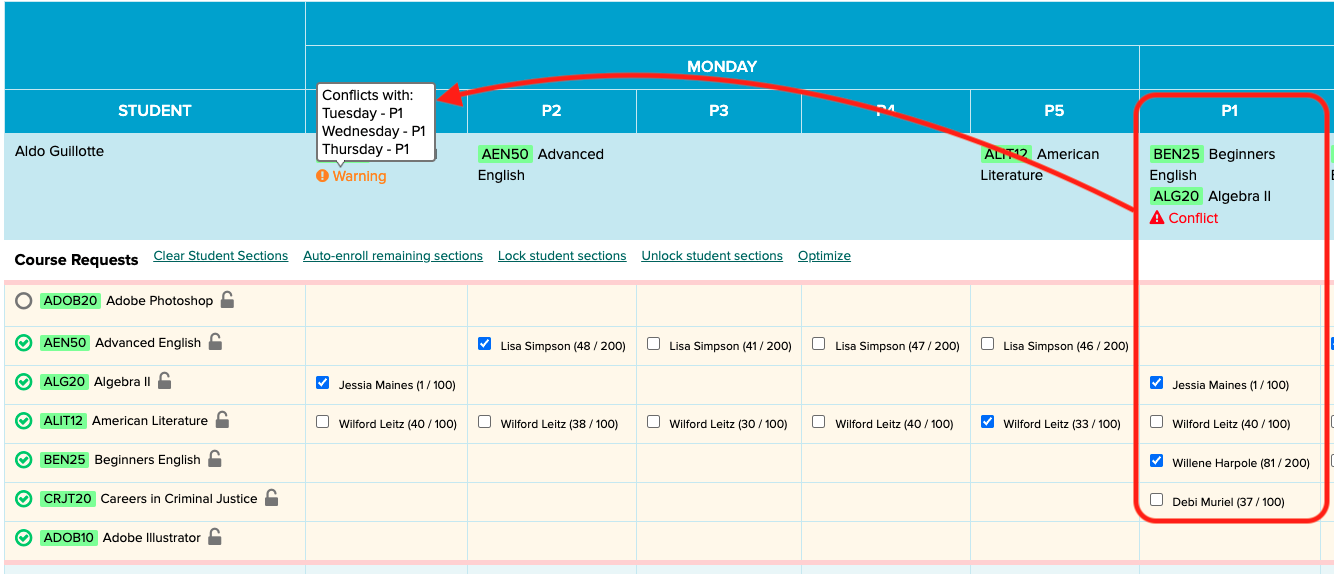
Master Scheduler now shows multi-period conflicts in Step 5

Here is a list of the latest QuickSchools improvements:

Master Scheduler Improvements

  • Improve visibility for Conflicts in Step 5 (for Weekly Schedule)
  • Option to Hide/Remove Course Requests in Step 5
  • Fix Conflicts tab in Step 4

Security Improvements

  • 2-Factor Authentication (2FA) via Email (See below)
  • Option to reduce Login Email Alerts based in IP Address
  • Other Security Improvements

General (Functional) Improvements

  • Online Forms Option to charge fees by Grade Level (See above)
  • Option to require files for upload when inviting applicant in Admissions module
  • Improve support for ACH only in Student/Parent Portal
  • View Assignments from Student Portal when clicking “Show All”
  • Improve notifications for scheduled tasks

General Bug Fixes

  • Bug fix for missing features based on roles
  • Bug fix when scheduling Live Stream with repetition
  • Bug fix School Message Board on Student Portal

Beta Improvements / Fixes

  • Option to automatically hide Transcript grades from future semesters

2-Factor Authentication

In our effort to improve security, we are building support for 2-Factor Authentication (2FA), starting with email. This feature can be turned on for the school under “Edit Overall Settings” (under “Settings” > “Turn Features On/Off”):

Read More »

Security Improvements

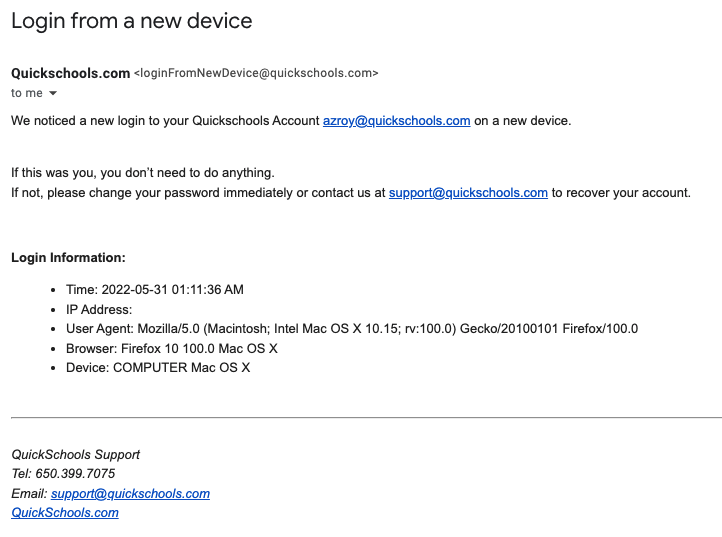
You may have received an email notification recently from QuickSchools letting you know about a new login to your account. This is a new security-related feature that was released recently. Basically, any time someone logs into your account either via a new IP address, or a new device, QuickSchools will send you an email notification.

Notification on "Login from New Device"
Notification on “Login from New Device”

Recent Security Improvements

There are several other security-related features included in our recent release. In addition to new login, QuickSchools will also send out an email notification if you (1) change/reset your password, or (2) add/remove users to the School Admin role. Finally, with this new release, if you do change your password, anybody currently logged into your account will automatically be logged out.

If you notice any strange activity in your account, please change your password immediately. You should also contact your school’s administrative team, or contact QuickSchools support for assistance. We can help track down what might have happened to your account.

Security-Related Summary Reports

As a school administrator, you have access to Summary Reports that show user and login history. In particular, the “Portal Login History” Summary Report shows the history of all logins for any user in your school:

Read More »

New Release – May 31, 2022

Today’s release contains several security-related improvements PLUS a mix of improvements to a variety of modules that include Orchestra Master Scheduler, Admissions, Standard-Based Gradebook, Fee Tracking, and the Report Creator, just to name a few.

may 31st 2022 quickschools updates
Improved Security with New Email Notifications

Here is a list of the latest QuickSchools improvements:

Master Scheduler Improvements

  • Improve new “Scheduling Algorithm” in Step 4
  • Refresh list of Subject Areas when new subject area is added
  • Report Creator support for Day and Time in Bell Schedule

Security Improvements

  • Notification Email when logging in from New Device
  • Notification Email when School Admin user is added/removed
  • Notification Email when password is changed
  • Clear active sessions when password is changed

General (Functional) Improvements

  • Ability to relabel period names for Subject-Based and Period-Based Attendance (See below)
  • Ability to unselect radio button when taking attendance
  • Ability to schedule tasks for every other week (i.e. Bi-Weekly)
  • Reformat Student Name when converting Inquiry to Application (in the Admissions module), based on configured Student Name format
  • Report Creator support for (1) subject Custom Fields and (2) Online Payments
  • API Support for OAuth2

General Bug Fixes

  • Fix Subject line when using Email Template from the Admissions module
  • Fix Family Name tag when using Email Template from the Admissions module

Beta Improvements / Fixes

  • Bulk Charge Credit Card using Standard Charges (See Below)
  • Improve Search Student specifically by Student Name, Grade Level or Tag
  • Ability to hide “View Complete Record” from Student Portal
  • Ability to restrict deletion of Fee Tracking transactions to specific users/roles
  • Ability to disable “Add Standard” for teachers in the Standards-Based Gradebook
  • Ability to disable “Override Gradebook Settings” for teachers in the Standards-Based Gradebook
  • Ability to hide “Call Number” when creating new books in the Library App
  • Show Subject Abbreviation is Student Self-Enrollment History screen
  • REST API support for OneRoster v1.1
  • Improve framework for Integration via File Transfer (SFTP)

Relabel Attendance Periods

You can now relabel the period names for Period-based and Subject-based Attendance. Just click on the new “Customize Period Names” button under “Attendance” > “Settings”:

Read More »

ACH Payment – Easy Online Payment for Schools

easy online payment for schools

QuickSchools is always looking for ways to make our student information system easy, robust, and effective not only for school administrators and faculty but also for students and parents alike. We understand that for a school, keeping the accounting books constantly updated and in top shape is extremely important.

Learn how QuickSchools can create easy templates that schools can use for regular invoicing to parents

Whilst tracking fees seems to be a straightforward task to people outside of a school, we know that it’s definitely not. Trying to keep track of various fee structures for different grades, discounted fees for siblings, payment plans, and scholarships, all of these permutations can truly be overwhelming.

Read More »