Integration to Learning Management Systems (LMS)

Learning Management Systems (LMS) are a very different beast compared to Student Information Systems (SIS), which is what QuickSchools provides as an online service. Student Information Systems (also known as School Management Systems or School Administration Systems) focus on record keeping, and the administrative aspects of running a school (track student demographics, attendance, grades, fees, transcripts, etc). Learning Management Systems on the other hand focus on the delivery of content (or lessons) to students, and is primarily used by teachers.

There is a big overlap between the 2 systems though. School Management Systems are known to provide some level of LMS functionality, such as portals for students and parents to download homework assignments. Learning Management Systems too have been known to produce report cards, which has mainly been in the realm of SISs. But it’s really hard for any vendor or company to provide focus in both areas, as they are primarily different markets with different needs.

The large overlap between the two types of systems suggests that integration would allow schools to tap into the best of both worlds – so teachers can use an LMS to share lessons and record grades, while administrators can use an SIS to produce report cards and transcripts.

We announced last year that we now support integration with Schoology, which is an awesome Learning Management System in the market today. But Schoology is not the only LMS out there, and it does focus only on K-12 schools. And so, we’ve decided to introduce more apps in this area.

In the coming months, we’ll be providing integration to the following LMSs:Read More »

Tag Students

We have a new feature under development, currently available upon request in Private Beta. On the student record in QuickSchools, you can now tag students, and those tags will appear on the main Students listing. You can also search for students based on those tags:

Student Listing with searchable studdent tags
Student Listing with Searchable Tags

This is particularly useful to inform users about important information regarding the student, like Peanut Allergies, Suspensions, and so on. Once the Tagging feature is enabled, you can set tags for the student under the Student record.

Read More »

Hide Subject Gradebooks

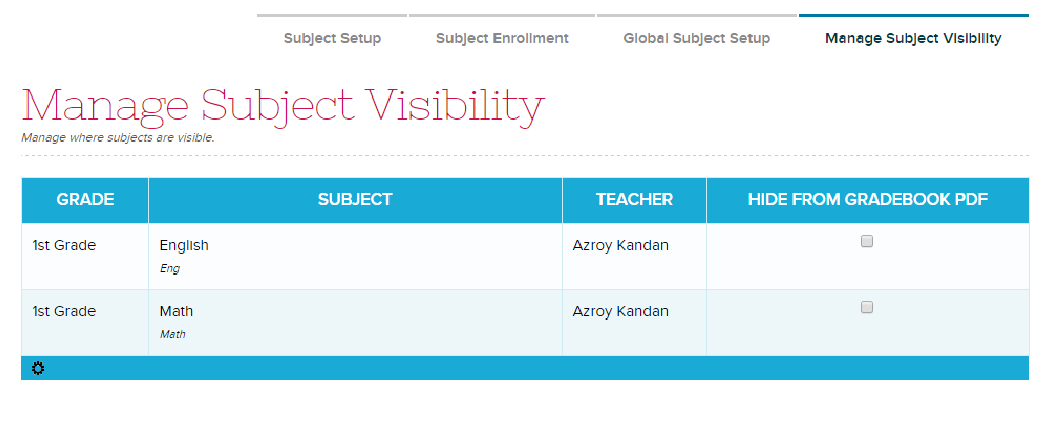
We have a new QuickSchools feature that allows administrators to hide specific subject gradebooks from the student record and PDF (and hence from the Parent/Student Portal). This is a great way for keeping entire gradebooks confidential, or if you have subjects that simply do not have any grades (like Homeroom).

This feature is only enabled on demand, so please contact our technical support personnel for access to this feature. Once enabled, you will have access to the “Subject” > “Manage Subject Visibility” menu where you can indicate which subjects to hide from the student record:

Manage Subject Visibility

Clicking on a check box automatically saves your configuration. You can test it out by opening the student record, and seeing if the subject appears on the Gradebook tab, or on the Gradebook PDF.

Let us know what you think. Thanks!

Importing / Exporting Gradebook Data

We’re happy to announce that we now have the ability to directly import data to your QuickSchools Gradebook via Excel. This feature is still in beta, so please feel free to request for it via email, and we can turn it on for you.

Once the import functionality is enabled, an “Import” button will appear directly on your Gradebook:

Importing Gradebook Data from Excel

When you click on “Import” you will be prompted to select an Excel file from your machine, after which you will be asked to map columns from the Excel file with fields in the QuickSchools Database. The process works very similar to importing students and teachers from Excel:Read More »

Alerts / Notifications (Private Beta)

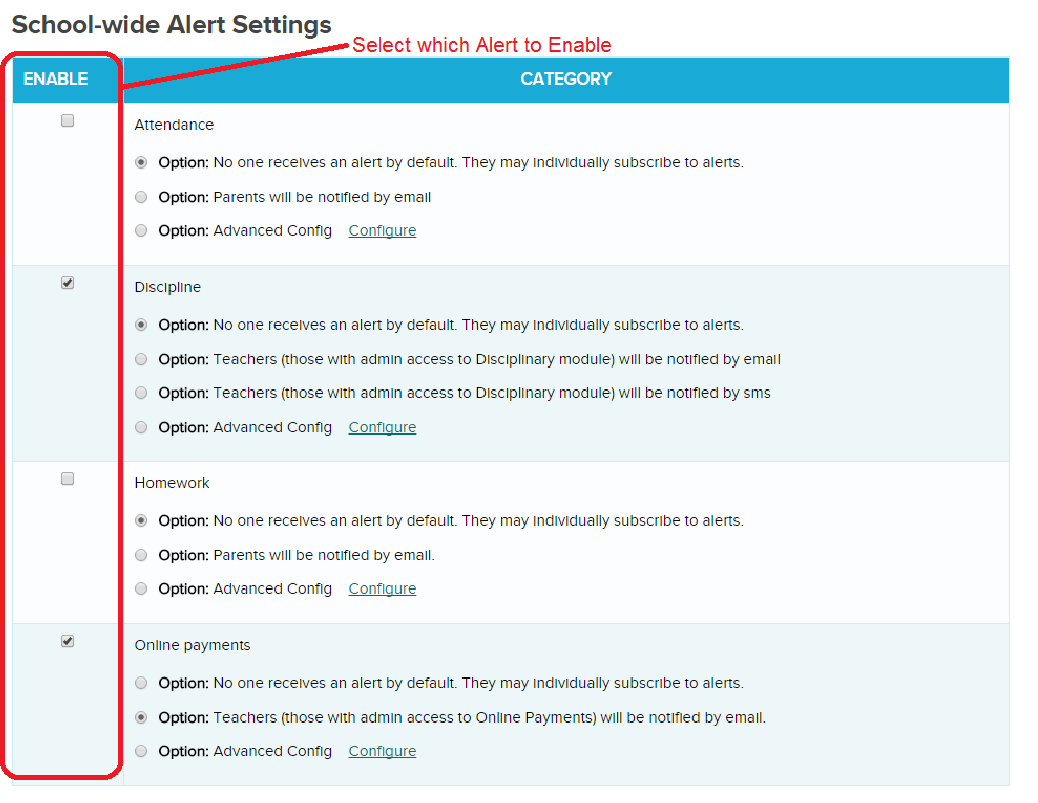
Some good news! QuickSchools has released an early beta version of our Alert Notifications module. We currently support only the following events, but once an alert is enabled, users can decide how to receive alerts. Current list of events:

  • Attendance: Parents can receive notifications when attendance is taken for their students.
  • Discipline: Administrators can receive notification when a new disciplinary incident is created.
  • Homework: Parents can be notified when homework is assigned.
  • Online Payments: Administrators can be notified when an Online Payment is received.

The following section appears at the bottom of the “Settings” > “School Profile” page if you have Alerts enabled on your account:

Enable Alerts for your users in QuickSchools (Private Beta)

Once an Alert is enabled, users can override any school-wide default preferences, and set their own personal preferences on how to receive notifications. The Preferences are located at the bottom of the “Settings” > “My Profile / Change Password” screen as follows:Read More »