The QuickSchools Online Forms app (available on our App Store) contains Email Templates that you can set up for multiple scenarios. The templates themselves support auto-filled fields based on what the user has filled into your Online Form. You can even configure an auto-respond notification email when a form is submitted. Here’s an example:
Just look for the Email Templates section for a particular Online Form Packet:

You can use the “Email Templates” button to manage the different types of templates. Be sure to check off the “Send notification email” box for the auto-respond emails. Then click on “Configure notification email” to set up the email that will be sent out. Here’s the Email Template that will pop-up:
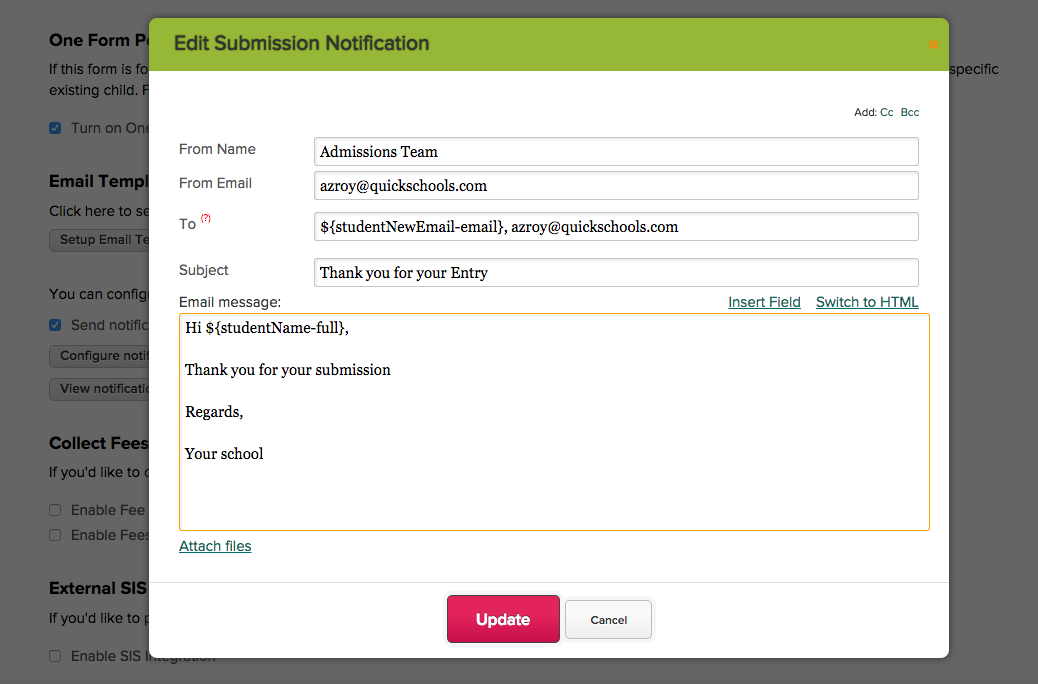
Fill in the email details, including the “To” and “From” fields (“CC” and “BCC” fields are optional). You can select multiple recipients. And you can use the “Insert Field” link to add auto-filled fields as well:Read More »