Once configured, the screens work virtually the same as the Parent sign-in version. Students will need a PIN number to sign themselves in and out:Read More »
We’ve posted several articles (tutorials really), about the Standards-Based Gradebook (or SBG for short) that we released in QuickSchools recently. The whole concept of grading students based on standards is relatively new. The goal of this new methodology is to gain more insight into areas that require more attention. We thought we’d put together a brief video tutorial just to put everything together:
Please check out the original blog posts regarding SBG here:
Over the years, we’ve worked with many schools who need to build transcripts to be sent to colleges and other institutions. The QuickSchools Transcripts module is very similar to our Report Cards module, in that you can very easily configure existing templates to suit your needs. And if our existing templates don’t quite fit your needs, we can certainly build new templates as well.
Here we discuss some considerations when building / configuring your transcripts on QuickSchools. Let’s start with a few questions:
How do you award credit (by quarter, or semester, or year)?
Credit is often times awarded independently of the grades that appear in your report cards. For example, you may have report cards with 4 quarters, but if credits are awarded yearly, the transcripts will only show a single end-of-year grade. And if credit is awarded for every semester, then the transcripts will only show grades for each semester (and not for each quarter). Colleges typically are not interested in how semester or yearly grades are calculated from quarterly grades.
Sample QuickSchools Transcript
In the example above, credits are awarded every semester. The report cards on the other hand may have 2 semester or 4 quarters per year.
How do you calculate grades for each subject (average quarterly final grades)?
In general, semester grades are simply the average of quarter grades, and yearly grades are simply averages of all the academic terms. But if your final grades require the inclusion of specific final exams, then that will need to be factored in. Or if your grade is a running total for the entire year (i.e. a single gradebook for the entire year with no averages), that would need to be factored in as well. Please come chat with us with specific on how to set up your transcripts, if it’s not a simple average.
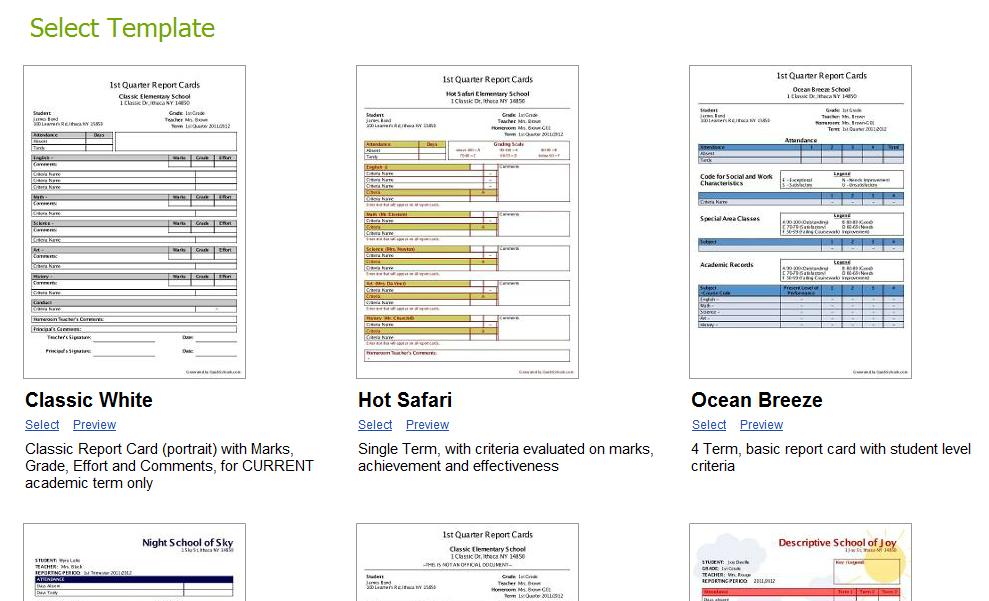
Based on these first 2 characteristics, you should be able to select a template, before configuring it further:
Available Templates for Transcripts
How do you calculate Grade Point Average (GPA)?
Out of the box, QuickSchools follows the standard calculation of Grade Point Averages. Each letter grade is assigned Points (A is 4 points, B is 3 points, and so on), and each subject is assigned a number of credits. Courses are weighted by credits, and then renormalized by total number of credits.
You can change the mapping of Letter Grade to Points via the “Transcripts” > “Transcript Configuration” screen.Read More »
Happy New Year! During the winter break, QuickSchools released several new improvements that we’d like to share with you. And we have many more new improvements coming out really soon. But just to wet your palate, here are some interesting ones to mention:
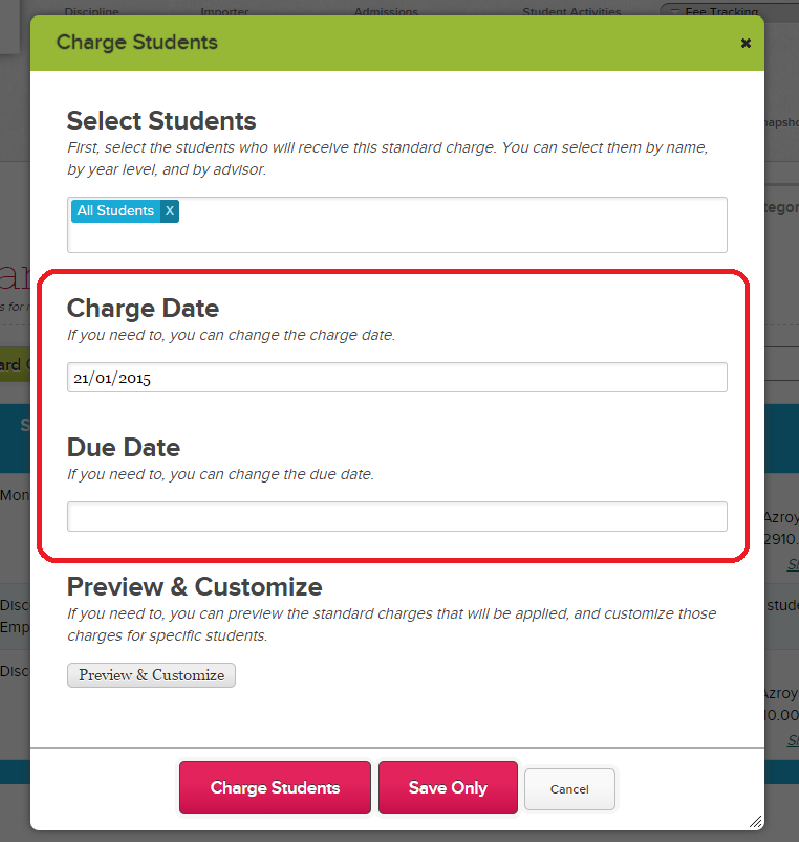
Set Due Date and Charge Date when applying Standard Charge
Bulk Set Fields in “Subject-Based” screen for Report Cards
Activating a new Academic Term also migrates your activated Schedule
Receipts are now available from Parent / Student Portal
Delivery Status of Mass Emails sent via Parent Messaging can now be monitored / confirmed
Hide specific Gradebooks from the Student record
Set Due Date and Charge Date when applying Standard Charge
Bulk Set Fields in the “Subjects-Based” screen for Report Cards
If you want to apply the same grade or comment to multiple students in the report cards (for a particular subject), you can now do so in the “Subject-Based” screen of the report card, by clicking on the icon underneath the column field you want to update:Read More »
For those who would like to subscribe to QuickSchools via direct payments from your bank account (ACH), this option is now available. You may need to contact a Live Chat agent to turn this on for you.
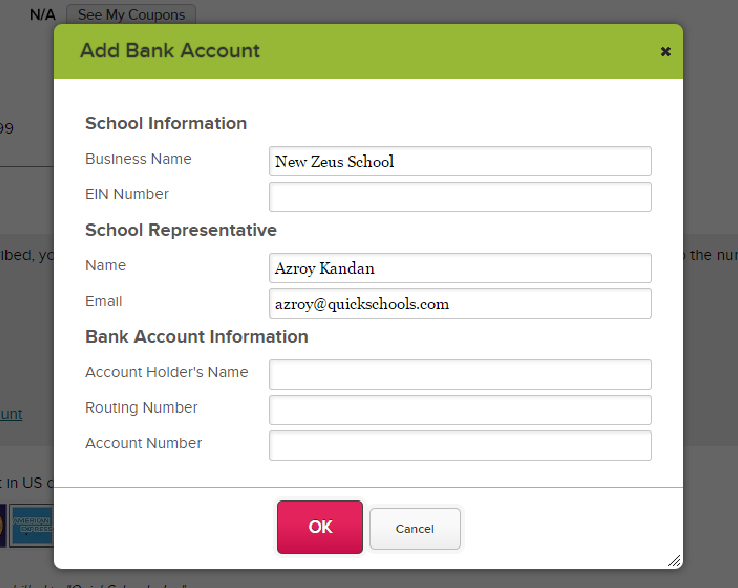
From the “Account” page (as a School Administrator), once you click on the “Pay with Bank Account” or “Add Bank Account” link, you should see this screen:
Add Bank Account (ACH)
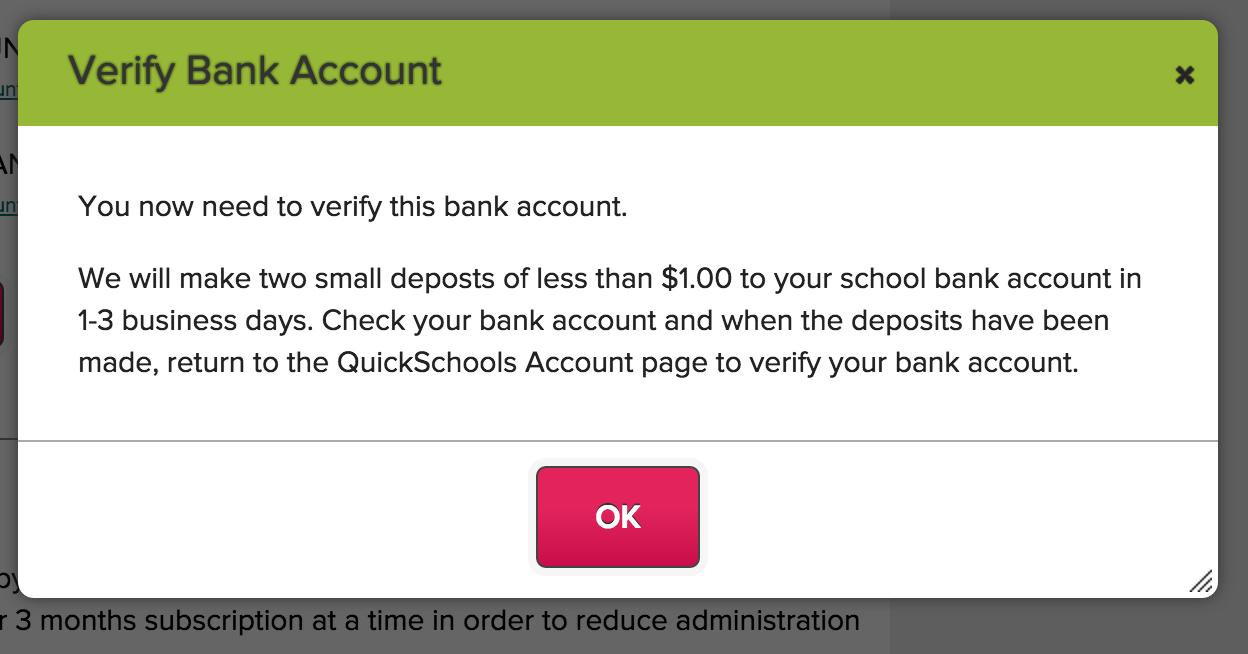
Once you’ve added your bank details, you will be prompted with the following message:
Verify Bank Account (ACH)
Basically, verification of Bank Accounts works similar to PayPal and other ACH merchant providers. Two small payments will be deposited into your bank account, and you will be asked to verify these amounts before we can deduct payments from your bank account. Read More »
At QuickSchools, we try really hard to be a one-stop shop when it comes to school management, with no hidden fees. Many of our schools are able to sign up for a trial, subscribe, and then use the software month-over-month completely on their own, sometimes even without using our awesome Live Chat support. Our software is pretty easy-to-use for many small schools.
But there are always schools that want to go the extra mile, and go beyond the existing off-the-shelf functionality and self-service customizations that are built into the software. And for those types of schools, we do offer several options for additional customizations and value-added services like online training and rollout support, as well as data migration services. We can even build custom apps for you.
Here are some examples of items / functions that work off-the-shelf, but can also be customized for an additional fee:
Report Cards
We have dozens of templates that are completely customizable. You can rename fields, hide sections, and even change the colors. But if you absolutely need to build a report card template completely from scratch, we can do that too. Learn more here:
Our Transcripts module works just like our Report Cards, with many readily available templates that can be configured by an administrator. But if needed, we can build brand new custom templates for your transcripts as well.
System-Generated PDF Files
QuickSchools is able to generate printable PDF files of a wide variety of documents, including the Student Profile, Student Gradebook, and Financial Documents (like Statements, Invoices and Receipts). These documents can be customized for individual schools.
Printed PDF Gradebook with Comments
Admissions Embedded Online Form
Our built-in embedded online forms for Admissions Inquiries and Applications are designed to pick up the Cascading Style Sheet (CSS) from your website. But if you wanted to style the form with additional CSS or even Java Script, and you don’t have the expertise to do it yourself, we can do this for you for an additional fee as well.
We’re happy to announce that we now have the ability to directly import data to your QuickSchools Gradebook via Excel. This feature is still in beta, so please feel free to request for it via email, and we can turn it on for you.
Once the import functionality is enabled, an “Import” button will appear directly on your Gradebook:
Importing Gradebook Data from Excel
When you click on “Import” you will be prompted to select an Excel file from your machine, after which you will be asked to map columns from the Excel file with fields in the QuickSchools Database. The process works very similar to importing students and teachers from Excel:Read More »
I own a Barbering school in Los Angeles California and was searching in vain for a reasonable program to track my students. As a Federally Funded school, I have many requirements and Quickschools has it all for me. 23 days into the free trial and I am hooked. The live chat support is absolutely phenomenal and so efficient. A real blessing for any vocational school like myself. Fully customized to your school !
Judy Caspe
ZMS The Academy www.zmsacademy.com
“Our barbers cut through hairy situations”
Please feel free to share your comments below, or come chat with us online. We’d love to get you started with a free QuickSchools trial.