In our last webinar, we went over how to customize beautiful Report Cards in QuickSchools. The Transcripts module is an extension of that framework, and can also be used to create professional-looking transcripts that convey your school’s brand and image.
Here are some highlights of the Transcripts module in QuickSchools:
- Visually Intuitive (Add Semesters, and Grades)
- Selection of Templates
- Configurable (Relabel Fields and Enable Sections)
- Customizable (Custom Sections and Calculations)
- Powerful Administrative Features
Visually Intuitive Interface
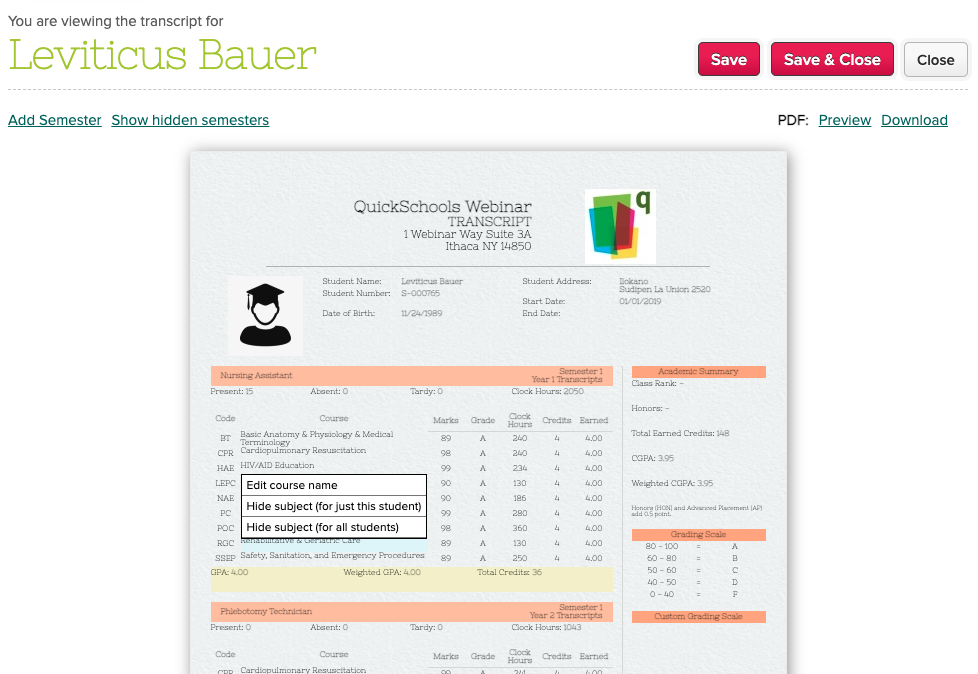
Use the Transcripts menu to see how the transcripts look like BEFORE printing anything. You can make changes directly to the transcripts, by clicking on fields, and updating them. You can even hide subjects that you don’t need.
Selection of Templates
We have a library of templates to choose from depending on the type of school you run:
Read More »