Interested in an Online Demo?

We designed QuickSchools to be as simple and easy to use as possible. With on-screen video tutorials, online manuals, and live chat, schools can easily jump in and try things out all on their own. We even offer a free trial with complete access to all of our features to get started. However, if you prefer to see QuickSchools live in action, or if you have more complicated questions to ask, you can schedule an online demo with us. Demos typically last between 20-40 minutes. Here’s what our standard agenda includes:

  • School Details
    • Share basic information about your school. We’ll then tailor the live online demo to fit your requirements.
  • Why Quickschools?
    • We’ll discuss what makes Quickschools different compared to other Student Information Systems.
  • Live Demo
    • We’ll demo some of our features! The features highlighted will be specific to your needs.
  • Pricing Information
    • Our pricing information is available here, which we will briefly review.
  • Q&A
    • Here’s where we’ll take on any questions you may have.

If you are interested, you can request an online demo via chat, emailing us at support@quickschools.com, or by scheduling via the link below:

Schedule a Demo!

Online Forms Importer

We have a new importer available in Quickschools, this time for the Online Forms app. The importer allows you to create new submissions within a form packet. You can then manage each submission as you normally would. The importer is currently in private beta, so you’ll have to request it via chat or email. Here’s how it works:

A new “Import” button is made available for all form packets:

The mapping process is the same across all of our importers. Just map the fields from your excel file to those in your form. To make things easier, the drop down will show the form name first just in case you have similarly named fields in other forms.

Read More »

Attendance Calendar for Holidays

In case you missed it with the release of Sprint E20, there is a new Calendar feature in Quickschools that is readily available to all schools.

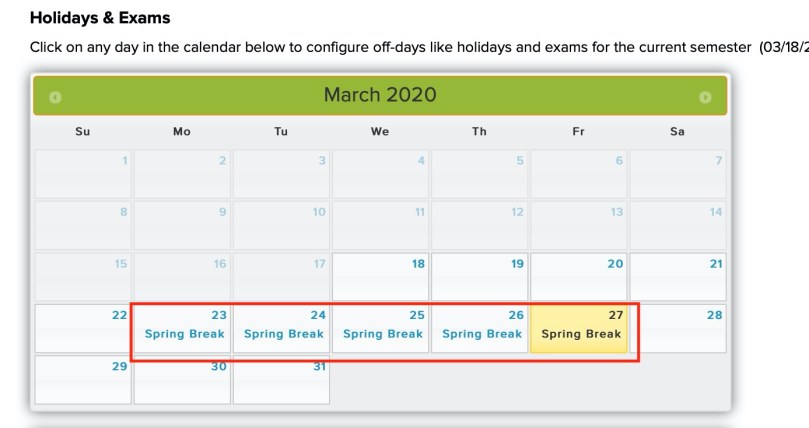
As an administrator, you can now define the holiday calendar for each academic term that you set up. In addition, the feature can also restrict data entry for attendance. This will prevent teachers from inadvertently adding attendance data on days students are not expected to attend.

Here’s a quick guide on viewing and configuring the calendar:

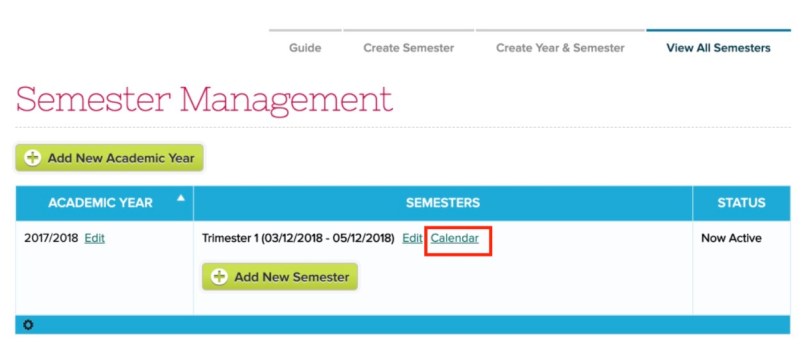
  1. Under the “New Semester Setup” > “View All Semesters” menu, you should see a new “Calendar” link for each term:
New “Calendar” link when configuring an Academic Term
  1. Clicking on it will bring up a calendar for the specified start/end dates defined for the term:
Set up holidays and other non-school days on the Calendar
Read More »

Use Case: Term Grades

With the release of Sprint E21 in late November, the option to access previous term final grades in the gradebook was made available in QuickSchools. In case you are wondering the benefits of this new feature, here are a few use cases you can reference as an example:

Compare Current Grade with Previous Term

The previous final grade can simply be added in to compare with the student’s current final grade.

In the example above, we see that the current Q2 grade has fallen compared to Q1.
Term Grades Averages

With the previous final grade added to the gradebook, custom formulas can now be created to calculate the student’s current semester average (previously only accessible via report card calculations).

Read More »

New Admin & Principal Meetings

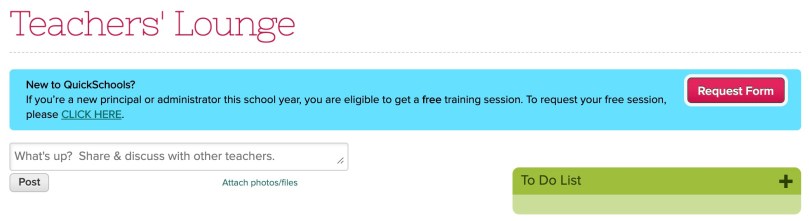
If you are a new principal or administrator using Quickschools for the first time, we’d like to invite you to schedule a free training session. In your account, you may have noticed the following announcement that was posted today:

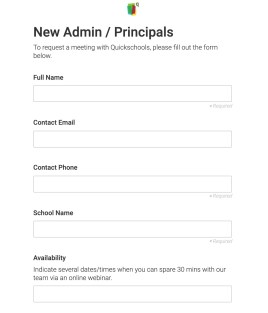
This announcement will be available over the next 2 weeks. In order to schedule a meeting, click either the red “Request Form” button, or the “CLICK HERE” link, to complete the form:

We hope to get you up to speed with all of the available features in your account. We’d also like to take this opportunity to learn about the features you are interested in, as well as gather any feedback you may have about your current experiences with Quickschools.

Do note that a typical meeting can range between 20-40 minutes. If you are unavailable to meet, please click here for a helpful guide.

Emergency Contacts Report

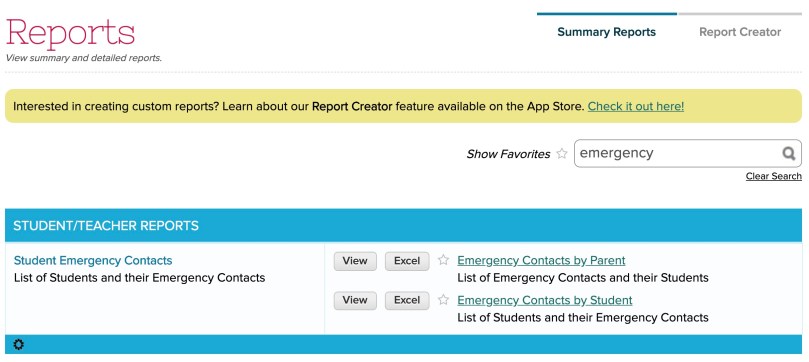
We have a new Student Emergency Contacts report available in Quickschools. This report will assist in reviewing the emergency contacts available in your account and in gathering their information.

There are two variations to this report: “Emergency Contacts by Parent” and the “Emergency Contacts by Student”.


To access the report, just search for “emergency”

Both of these reports include the following lists:

  • Only Show Students with ONE Emergency Contact
  • Only Show Students with MORE THAN ONE Emergency Contact
  • Only Show Students WITHOUT an Emergency Contact

Here’s what the reports look like:

Read More »

Starting the New Year

School is starting and while some schools are already in session, others are gearing up to begin the new year soon. If you used Quickschools last year, you’ll want to make sure your account has transitioned over to a new academic year and term. This will allow changes to the data without affecting the previous school year. Here are some helpful articles that will assist you in getting everything set up starting the new year:

With the above steps completed, teachers can begin entering data into the account. All users will be able to see the currently active term in the top navigation bar:

Starting the new year - currently active term
*Users should see the correct term active before entering in data

Other features, such as the scheduler, can also be updated as needed. If you have any questions, please be sure to reach out to us via chat. We hope you have a succesful school year!

Importing Your Data

Many of our modules offer the ability to import data from an Excel file. If you are tasked with adding a lot of data into your Quickschools account, doing so in bulk via our importers will be the most efficient method of completing this task. Below, we have consolidated a list of sample files, along with their original support article, for quick access.

Please note that you do not need to use our sample files to import data. You can use your existing Excel files as-is, and simply map the columns from your file to fields in our database. By using our sample files you have the added benefit of:

  • Knowing what fields are available for import
  • Skipping the mapping process (if column names are left the same)

Students & Parents

Add student and parent information from a single excel file. Supports Custom Fields if added as additional columns. This importer also supports updating existing student data in bulk.

Teachers & Staff

Import all of your teacher and staff information. This importer can also be used to update existing data.

Attendance

One of our newest importers. Quickly and easily add attendance data. Particularly useful for historical attendance records.

Read More »