
Whether it’s keeping parents informed, ensuring students stay on track, or facilitating collaboration among teachers, clear and timely communication is essential. In today’s digital age, Student Information Systems have become the hub of school communication, offering a range of messaging features that bridge the gap between schools, parents, and students. If you’re looking for ways to enhance your school’s communication strategy, the messaging features within an SIS can provide the solution. From parent message boards to private teacher messaging, these tools make staying connected easier. Let’s take a closer look at the benefits of Student Information System messaging features like QuickSchools‘.
Parent Portal Messaging Features: Keeping Families in the Loop

Parents are essential partners in a student’s educational journey. The parent portal on an SIS is designed to strengthen this partnership by providing a seamless communication channel between the school and families. This further helps increase parental involvement in schools.
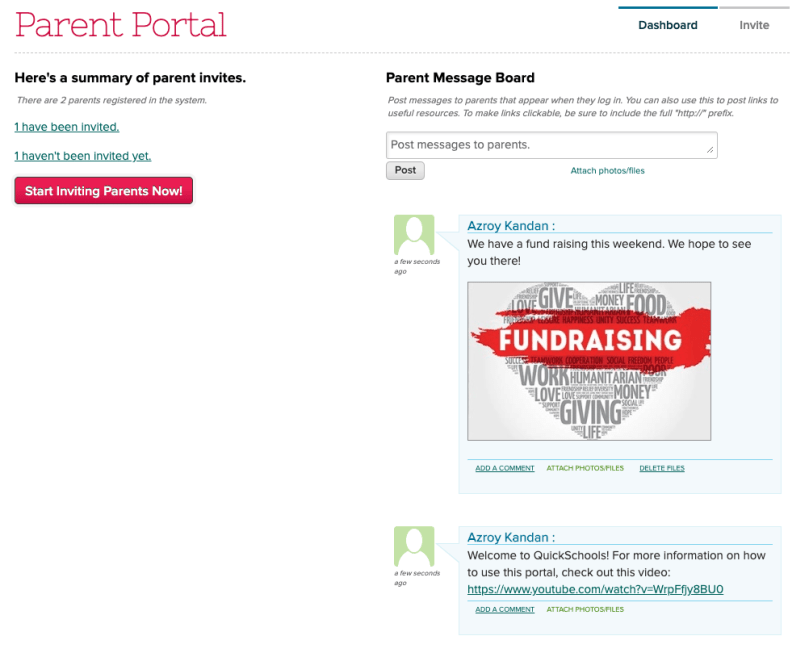
1. Parent Message Board
The parent message board serves as a central hub for all important school announcements. Whether it’s updates on upcoming events, reminders about deadlines, or changes in school policies, the message board ensures that parents always have the latest information at their fingertips. Unlike traditional paper notices that can easily get lost, this digital platform is accessible anytime, anywhere, making it easier for parents to stay informed.
2. Direct Messaging Between Parents and Teachers/Administrators
Parents often have specific questions or concerns regarding their child’s progress, behavior, or classroom activities. With the direct messaging feature, parents can communicate privately with teachers or administrators, eliminating the need for phone calls or in-person meetings that may be difficult to schedule. This immediate, secure, and private communication helps resolve issues quickly and efficiently. Teachers can also use this feature to send messages to the parents of a single student or the whole class, making the communication process even more efficient.

3. Email and Text Notifications
Parents can opt to receive notifications via email or text for time-sensitive information, such as weather-related closures or emergency alerts. This feature ensures that critical information is delivered promptly, reducing anxiety and keeping everyone in the loop.
The messaging features in the parent portal promote transparency and engagement. By making it easier for parents to access information and communicate with the school, the SIS helps foster a strong home-school connection, ultimately supporting student success.
Student Portal Messaging Features: Empowering Students

Students need to be proactive in their education, and the student portal’s messaging features enable them to do just that. These tools provide students with the resources they need to stay informed and ask questions.
1. Student Message Board
The student message board acts as a centralized location where students can find announcements, assignment updates, and important notices from their teachers or school administrators. This ensures that students are always aware of what’s happening in their classes and the school at large, helping them stay organized and on track.
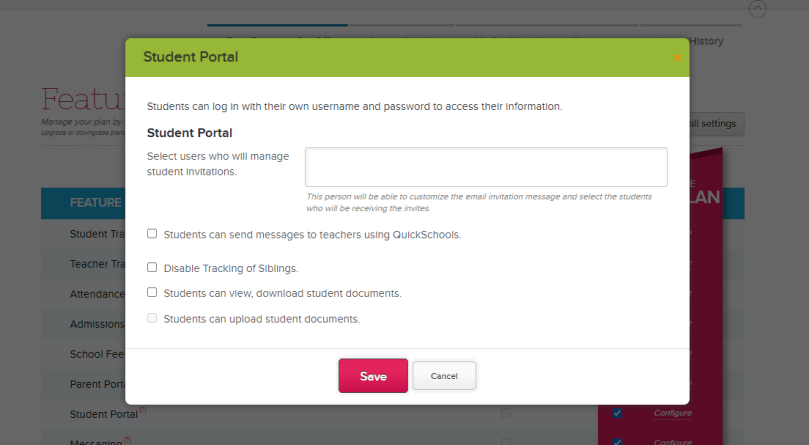
2. Direct Messaging with Teachers
Students often have questions outside of class hours, whether it’s about an assignment, a project, or an upcoming test. The direct messaging feature allows students to privately message their teachers, encouraging them to seek help when needed. This open line of communication helps remove barriers to learning and ensures that students can get the support they need to succeed.
By giving students direct access to information and communication tools, the SIS empowers them to take control of their education. This fosters a sense of responsibility and independence, which can lead to better academic outcomes and a more positive school experience.
School-Wide Messaging Features: Streamlining Communication
In addition to supporting parent and student communication, SIS platforms also offer robust messaging features for school-wide announcements and updates.
1. Mass Email, Text, and Voice Messaging
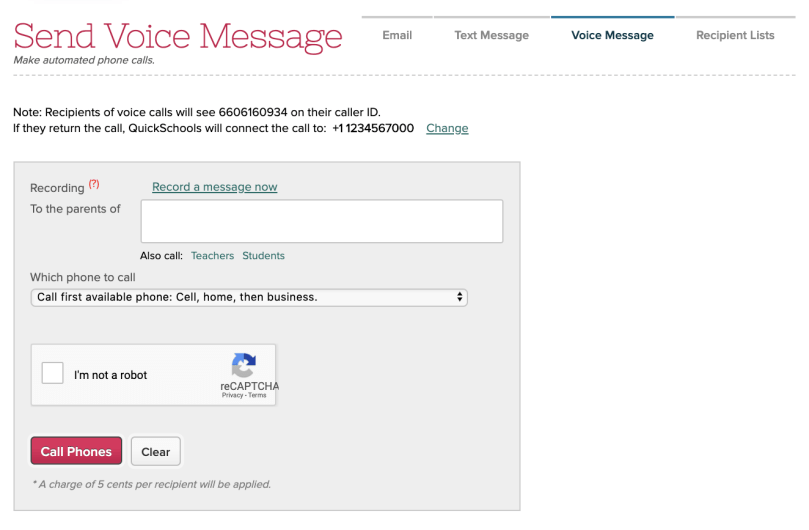
School administrators can easily send mass communications to all parents, students, or staff members using email, text, or voice messaging. Whether it’s a reminder about a school event, an update on school policies, or an emergency notification, these tools ensure that everyone receives the same information simultaneously.
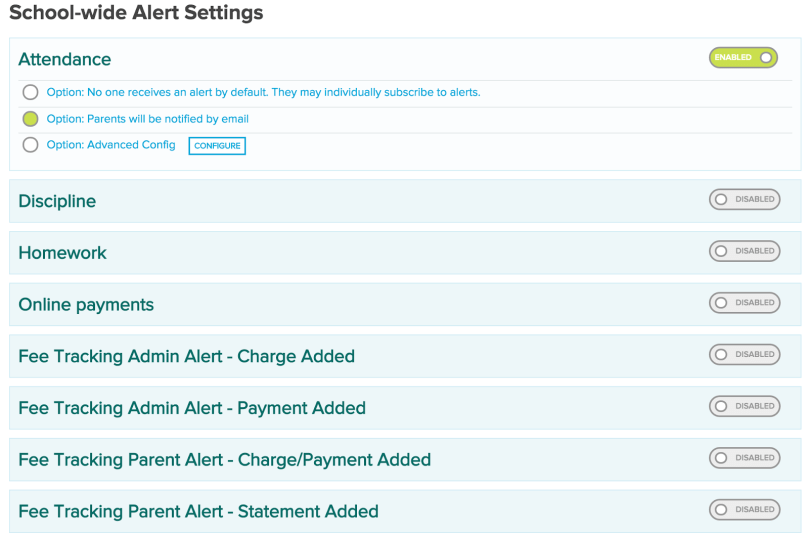
On top of that, the School Alert feature, allow schools to send out emails, texts, and even voice messages to the entire school or specific parent groups like the PTA. On top of that, administrators can also save templates of frequently used communications, so they don’t have to recreate messages each time. Unlike standalone systems, QuickSchools keeps contact information current and eliminates the need for complicated exporting and importing of contact lists.
Voice Messaging, although used sparingly due to additional costs, is a valuable feature in emergencies. QuickSchools makes it easy to record voice messages over the phone without needing a microphone, and previously recorded messages can be reused.
2. Customizable Recipient Lists
Not every message needs to go out to the entire school community. With customizable recipient lists, administrators can target specific groups, such as parents of seniors, members of the football team, or staff members in a particular department. This targeted communication ensures that messages are relevant and reduces the risk of information overload. This feature saves time and ensures accurate communication with the right audience.
3. Automated Notifications
Automated notifications can be set up for recurring events, such as report card releases, parent-teacher conferences, or attendance alerts. This automation reduces the workload for school staff while ensuring that important information is always delivered on time.
These school-wide messaging features streamline communication, making it easier for administrators to keep everyone informed. In times of emergency, they also provide a reliable way to disseminate information quickly and efficiently, ensuring the safety and well-being of the school community.
Private Messaging Between Teachers: Fostering Collaboration

Communication isn’t just important between schools, parents, and students. Teachers also need to collaborate effectively to ensure student success.
1. Teacher Collaboration
Private messaging between teachers allows them to share lesson plans, discuss student progress, and coordinate efforts on school-wide initiatives. By facilitating open communication, these features help teachers work together to create a cohesive and supportive learning environment. QuickSchools’ Teachers Lounge feature enhances this collaboration by providing a dedicated space for teachers to discuss school-related topics and share ideas.
When teachers can easily collaborate, they can provide more consistent and effective instruction. This not only benefits students but also fosters a sense of community among the staff, which can lead to a more positive and productive school culture.
The Power of Effective Communication
In today’s fast-paced world, effective communication is more important than ever. The messaging features within a Student Information System provide the tools needed to keep everyone connected—whether it’s through the parent and student portals, school-wide announcements, or private teacher collaboration.
By leveraging these messaging features, schools can enhance communication, streamline information sharing, and foster stronger relationships between all members of the school community. Ultimately, this leads to a more engaged and supportive environment where students can thrive.
Ready to see how these powerful messaging features can transform communication in your school? Sign up for a 30-day free trial and experience firsthand how easy it is to keep your school community connected.


[…] school information system makes communication between schools and families seamless by providing real-time updates and direct messaging. Instead of waiting for report cards […]