
Today’s QuickSchools release mostly contains bug fixes and refinements, except for one new feature – Export from Report Creator via SFTP.
Full list of improvements are below:
General Improvements
- Refine email notifications from no-reply@quickschools.com
- Discipline Incident PDF
- Miscellaneous Bug Fixes to Master Scheduler
Other Beta Improvements
- Export from Report Creator via SFTP (Beta)
- Improve Framework for scheduled SFTP Imports
- Hide Course Section Limits when Orchestra Master Schedule is not installed
- Bug Fix Search Unified Parent for Group School
- API Improvements for Engage CRM
Export from Report Creator via SFTP (Beta)
This feature is currently in private beta, and works with the Report Creator App. We will be making additional improvements to this app in the coming weeks. For right now, here’s what it does:
Create a SFTP Connection
There will be a new menu where you can create / edit SFTP connections:
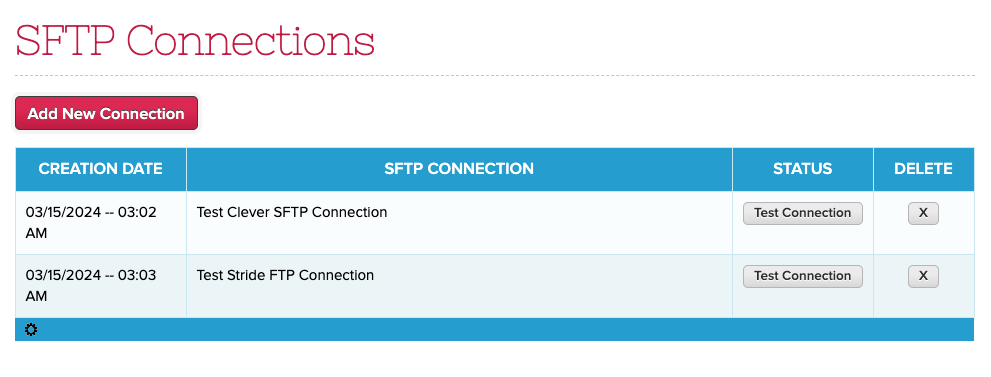
Click on “Add New Connection” to create a new SFTP Host:

Schedule Export via SFTP
On the Report Creator, there will be a new link to “View/Edit Scheduled SFTP Sync“:

This brings up pending and completed exports via SFTP:

After clicking on “Schedule SFTP Sync“, you can simply select a report and a target host, as well as the timing of the export:
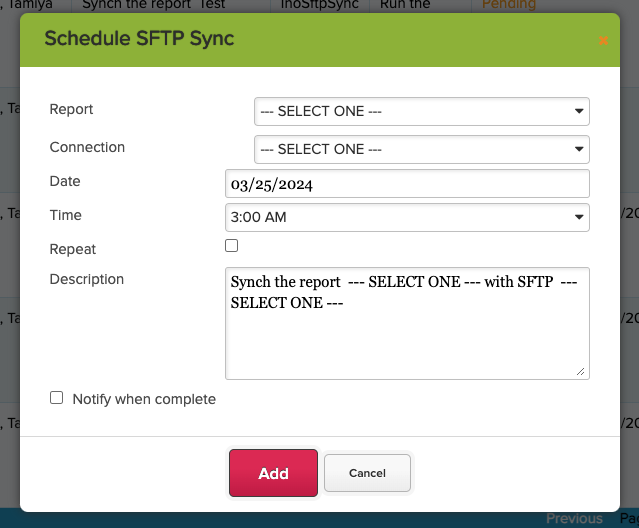
And that’s it! It’s a pretty simple app. With this app, you can schedule data to be exported to external vendors for a variety of scenarios. Upcoming improvements will improve our ability to conform to external vendor requirements. Let us know if you’re interested in trying this out.
